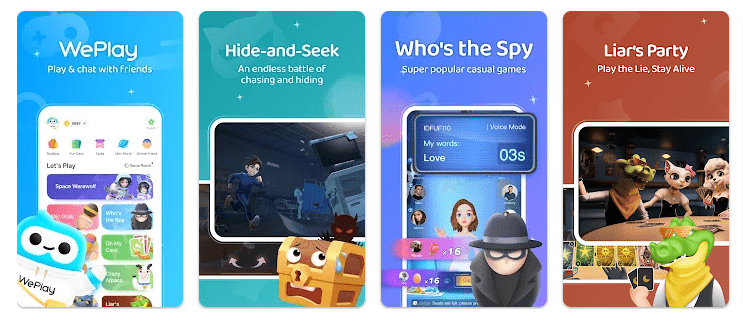
WePlay is an Android party game and chat app. It puts casual games and voice chat in one place, so users can play with friends or meet other players online. The Google Play listing shows more than 50 million downloads and a Teen rating.
The app is useful when you want something to do with other people instead of playing a game alone. Its current game list includes WeParty, Mic Grab, Who’s the Spy, and Draw & Guess. It also has 3D avatars and clothes that users can change.
Storage, Internet, and Battery
WePlay is a fairly large Android app. A recent APK bundle for version 6.7.0 was about 241.51 MB, while another recent build was about 227.68 MB, so the package size changes with updates and device versions.
The installed app can use more space than the download because game assets and cache files can take extra room. WePlay is mainly an online game and chat service, so an internet connection is needed for its online games and voice features. The app is free to install but has in-app purchases.
Battery use depends on how long you play, use voice chat, and keep the screen on. A long game session can use more battery than a simple reading app, but there is no reliable fixed battery number for every Android phone.
Hands-On Performance
I would not claim a personal Redmi test when I do not have verified hands-on measurements from that phone. Menu response, heating, battery loss, and glitches need to be checked on the actual device instead of being guessed.
The current Google Play listing says the developer has optimized the interactive experience and fixed known issues. Recent user reviews also show that some players have reported login, account, and game-related problems, so the experience may differ between users.
For a real Redmi test, I would check how quickly the home screen opens, how fast games load, and if voice chat stays connected. I would also watch for frame drops, frozen screens, phone heat, and battery loss during a longer session.
Main Tools Built Into the App
- WeParty: This is a social deduction game where players take different roles. It is made for groups and gives people a reason to talk while playing.
- Mic Grab: Mic Grab is a singing game with songs and voice interaction. It is a simple choice for users who like singing with other players.
- Who’s the Spy: This game asks players to work out who the spy is. It works best when several people join the same game and talk together.
- Draw & Guess: Players draw pictures and try to guess the answer. The game uses both drawing skills and teamwork.
- 3D Avatar: Users can create a 3D avatar and change its face and clothes. This gives players a way to make their profile look different.
Privacy Checks
WePlay’s Google Play Data Safety section says the developer does not share data with third parties. It says the app may collect location, personal information, and five other types of data, and that data is encrypted while being sent. Users can also request data deletion.
A recent Android package listing shows permissions and device features related to the microphone, camera, Bluetooth, location, Wi-Fi, notifications, advertising ID, and storage. Some access is used for voice, camera, or other app functions, so users should read Android’s permission prompts before allowing access.
Comparison with Competitors
WePlay is similar to Hago and Yalla Ludo because all three mix games with social chat. Hago offers party games, voice rooms, live streams, and 3D spaces, while Yalla Ludo focuses more on Ludo, Jackaroo, Domino, and voice chat.
WePlay has a good mix of social deduction, singing, drawing, voice chat, and avatars. Like its competitors, it is free to install but uses in-app purchases.
The Positives and Negatives
Pros
- Many party games in one app.
- Voice interaction is built into the experience.
- 3D avatars and clothes are available.
- More than 50 million Google Play downloads.
- Free to install.
Cons
- The app package is large.
- Internet access is needed for online play.
- In-app purchases are included.
- Some users report login or account problems.
Who Should Download This?
Ideal Users
- People who enjoy party games with friends.
- Users who like games with voice chat and social features.
Who Should Skip It
- People with very little phone storage.
- Users who want completely offline games.
Quick Questions Answered
Is WePlay free?
WePlay is free to install from Google Play. It also contains in-app purchases, including random items.
Does WePlay need the internet?
Yes, its online games and voice chat need an internet connection. The app is designed around playing and talking with other users online.
Is WePlay safe?
Google Play says no data is shared with third parties and that data is encrypted during transfer. The app may collect location, personal information, and other data, so checking the permission screen is still important.
Offzack Verdict
WePlay is a good choice for people who want party games and voice chat in one app. Its large size and online focus may not suit every phone, but the mix of games, social play, and avatars gives users plenty to try.
Download WePlay App from Google Playstore
Final Scorecard
- Ease of Use: ★★★★☆ — The games and main social features are easy to understand.
- Performance: ★★★★☆ — Recent updates include fixes and interactive improvements, but device results can vary.
- Features: ★★★★★ — Party games, singing, drawing, voice chat, and 3D avatars provide many choices.
- Privacy & Safety: ★★★★☆ — Google Play reports encryption in transit and no third-party data sharing.
- Value for Money: ★★★★☆ — The app is free to install, though in-app purchases are available.
- Overall Rating: ★★★★☆ — WePlay is a solid pick for users who enjoy social games and voice chat.