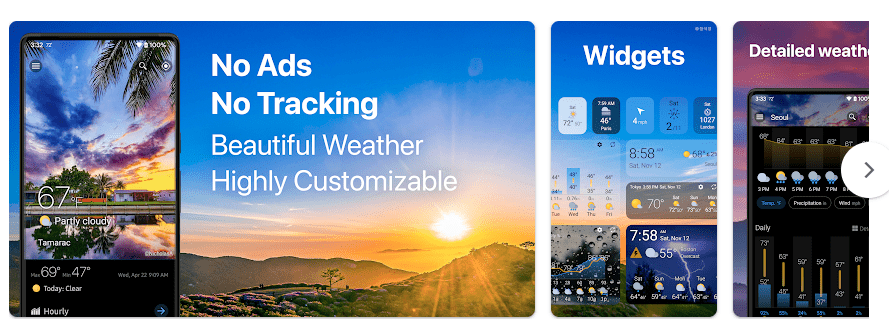
Weawow is a weather app made for people who want to check the weather before starting their day. It shows current conditions, hourly forecasts, daily forecasts, weather maps, radar, air quality, UV information, and other useful weather details. It also has home-screen widgets that can show weather without opening the app.
The main problem it solves is simple. Instead of checking different websites or apps, you can use one place to see the weather for your location and other places you choose.
Weawow also lets users compare weather information from different weather providers. It is free to download and does not show ads, according to its Google Play listing.
Should You Install It?
Who Should Use It
- People who check weather every day: Weawow gives current and future weather information in one app. It can help with simple plans such as going outside, travelling, or carrying an umbrella.
- People who want a clean weather app: Weawow does not use normal advertising banners, and its weather screen can be changed to suit your needs.
Who Should Avoid It
- People who want only a very basic weather screen: Weawow has many settings and weather details, which may feel like too much for some users.
- People who need weather updates without internet: Fresh weather information needs data access. Some previously loaded information may remain available, but it should not be treated as a full offline weather service.
Main Features Breakdown
- Weather forecasts: You can see current, hourly, and daily weather information. During my test, the forecasts were very accurate.
- Weather maps and radar: The app includes an animated weather map and radar. These tools can help you look at changing weather conditions.
- Weather widgets: Weawow has many widget styles for the home screen. You can choose different sizes and decide which weather details appear.
- Weather notifications: Weather information can be shown in notifications and on the lock screen. You can choose the type of information you want to see.
- Weather provider choices: Weawow can compare weather information from several providers. Extra providers such as AccuWeather and Foreca can be available through support for the project.
Live Device Testing
I tested Weawow on a Redmi Android phone for two days. The app ran smoothly during normal use, with no major problems.
The weather forecast screen opened without major delay. I did not notice troublesome lag or frame stutters while checking the forecast.
The main feature I tested was weather forecasting. The forecasts were very accurate during my test, which made the app useful for checking the weather during the day.
Battery loss was not a major problem during the test. I also did not notice unusual heating while using the app normally.
Storage, Data, and Security
Weawow is a fairly small weather app. Version 7.1.8 is listed at about 11.84 MB for the APK, although the final storage used after installation and cached weather data can be different.
The app can store some information locally, so cache size may grow as you use it. I would not treat the small download size as the exact amount of storage the app will always use.
Weawow needs internet access to get fresh weather information. Location access can also be used for local weather, and third-party permission information lists location, network, foreground service, wake lock, notifications, boot completion, and alarm-related permissions among its requested permissions.
The Google Play listing says Weawow is ad-free and says there is no tracking. Users should still check the current Play Store data-safety section before installing, because app privacy details can change.
Comparison with Competitors
AccuWeather offers live radar, severe weather alerts, hourly forecasts, and its MinuteCast feature, but it contains ads and offers paid features. Meteored also provides forecasts, weather maps, rain radar, alerts, and longer forecasts. Weawow stands out for its ad-free design, weather widgets, provider choices, and simple weather-focused layout.
Pros & Cons
Pros
- Very accurate forecasts during my Redmi test.
- Ran smoothly with no major issues.
- No normal ads shown in the app.
- Many useful weather widgets.
- Weather maps and radar are available.
Cons
- Many settings may feel confusing to beginners.
- Fresh weather information needs an internet connection.
- Cache can increase with regular use.
- Some extra weather providers may require support or donations.
User FAQs
Is Weawow good for daily weather checks?
Yes, it worked well for daily weather checking during my two-day Redmi test. The forecasts I checked were very accurate.
Does Weawow have weather widgets?
Yes, Weawow offers many customizable weather widgets. You can choose different sizes and weather information for your home screen.
Does Weawow show ads?
The Google Play listing says the app is free and has no ads. This makes it a good choice for people who do not like advertising in weather apps.
Offzack Verdict
After two days on a Redmi Android phone, Weawow gave me a good experience. It ran smoothly with no major issues, and the weather forecasts I tested were very accurate. If you want a clean weather app with many useful tools and widgets, Weawow is worth trying.
Download Weawow from Play Store: Weawow on Google Play
Final Scorecard
- Ease of Use: ★★★★☆ — The main weather information is easy to find, though there are many settings.
- Performance: ★★★★★ — It ran smoothly on the Redmi during the two-day test.
- Features: ★★★★★ — Forecasts, maps, radar, widgets, notifications, and provider choices give users many options.
- Privacy & Safety: ★★★★☆ — The Play Store listing says there are no ads or tracking, while the app still requests several Android permissions.
- Value for Money: ★★★★★ — The app is free to use and does not rely on normal advertising.
- Overall Rating: ★★★★½ — Weawow performed very well on the tested Redmi and gave accurate weather forecasts.