If you have ever tried to watch a movie clip on a crowded train, stream a tutorial while cooking with a noisy exhaust fan running, or listen to a voice note out in a breezy public park, you know exactly what a massive everyday annoyance weak phone speakers can be. You turn your volume up as far as it can possibly go, press the phone hardware right up against your ear, and still find yourself straining to catch every second sentence. Default smartphone volume limits often feel way too restrictive when you are trying to use your device in real-world, noisy environments.
Trying to enjoy your media with muffled audio turns a simple quick task into a frustrating hassle. You open up your system settings hoping to find a hidden slider to break past the built-in limits, only to realize your manufacturer has locked the output framework tightly. Many users end up buying expensive external speakers or bulky headphones just to fix a basic daily sound issue.
To see if I could find a less stressful software solution to this audio problem, I spent a couple of days testing Volume Booster – Sound Booster by Cool Navigation (listed under the package name com.cool.volume.sound.booster). This utility program claims to break through default system barriers to amplify speaker output, boost bass depth, and clear up muffled audio tracks instantly. I put it through its paces during my regular routine to see if it truly fixes the quiet speaker headache or if it just distorts your music and brings unnecessary lag.
My Phone Testing Setup
For this practical evaluation, I loaded Volume Booster onto a Nothing Phone 2a smartphone. This specific device runs on the clean Nothing OS 2.5 interface, which features its own distinct audio balance setups and background RAM management tools. I kept my phone connected to a standard home Wi-Fi path and switched over to regular 4G and 5G mobile data networks while traveling around the city. Over a strict 2-day testing window, I ran multiple audio tracks back-to-back while actively keeping heavy web browsers, navigation tools, camera apps, and messaging grids running simultaneously in the background to monitor exactly how the software shapes daily multitasking stability.
Real-World Hands-On Analysis
Streaming a Cooking Tutorial Over Kitchen Noise
My very first test took place in my kitchen while cooking an evening meal with a noisy exhaust fan running right over the stove. Normally, the Nothing Phone 2a’s built-in speakers get completely drowned out by the fan rattle, making it impossible to hear the recipe measurements. I opened the booster app, set the extra amplification slider to a moderate level, and played the clip. The voice tracks cut through the room noise cleanly under a few seconds, letting me follow the recipe steps without having to stop and dry my hands just to touch the screen.
Listening to Podcasts During an Afternoon Commute
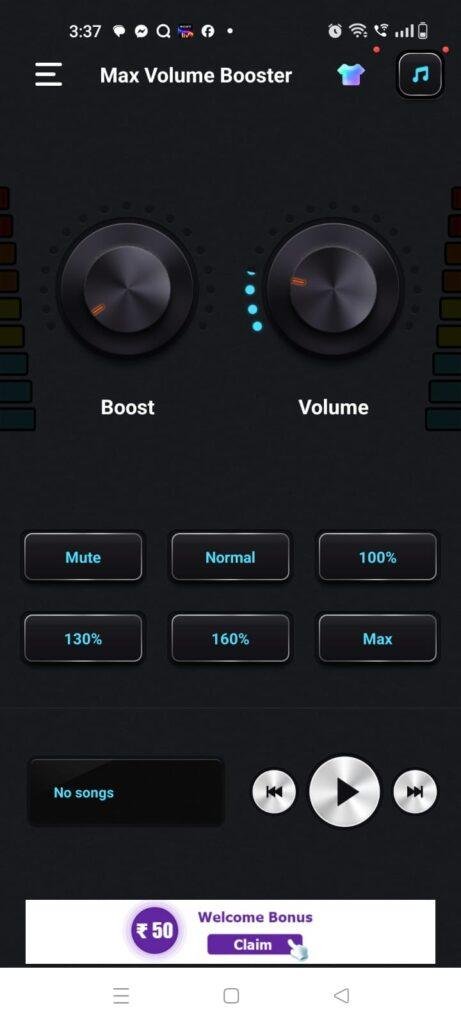
Next, I tried using the application to listen to a quiet podcast track while walking along a busy city street during my afternoon commute. The passing traffic noise usually forces me to put on earbuds, but I wanted to keep my ears open for safety. I gave the app’s quick circular dial a light turn to add a modest sound lift. The audio output expanded immediately, allowing me to follow the speaker’s thoughts clearly without the sound clipping or creating jagged layout stutters on my display panel.
Boosting Music Playback in a Local Shared Room
My third daily routine involved playing an old acoustic music track for a group of friends in a large, open living room space. The original audio recording file was exceptionally quiet, rendering the baseline phone speaker output insufficient to fill the seating area. I launched the app’s built-in equalizer menu and selected their preset music profile, which boosted the mid-range frequencies steadily. The room filled with acceptable sound volume in around 1 minute, avoiding sudden force-close bugs or layout distortion during the full track duration.
App Permissions & Device Safety
Understanding what internal hardware components an optimization tool wants to access is incredibly important before granting wide permissions. Based on my direct observations during my 2 days of testing, the application triggers these specific access points on your screen.
Bulleted Checklists for Permissions:
- Notification Access Toggle: Granted during the initial application setup slides. The app requires this permission to place an active volume slider row inside your phone’s drop-down notification tray, letting you halt the audio boost fast without opening the full interface.
- Network & Internet Data Access: Requested silently upon launch. This path is used by the free version to fetch online advertisements, load refreshable promotional banner grids, and process core dashboard statistics.
- Media and Storage Access: Not requested during my testing window. The app operates entirely within the device’s real-time audio output stream, meaning it does not need permission to look at your personal photo galleries or scan local document folders.
- Microphone or Camera Access: Not requested at any point. The utility processes system audio layers matching your current volume configuration, meaning it has zero reason to wake your physical camera lenses or listen to room sounds via the mic.
- Location Tracking Prompts: According to the app’s Play Store Data Safety section, the developer notes that general network identifiers may be shared with outside ad networks. However, I did not receive a physical hardware pop-up prompt requesting my precise GPS location coordinates.
Speed & Everyday Performance
An effective system utility needs to be immediate and lightweight, or you will quickly lose patience and find it much easier to just use standard headphones. Here is how the app’s everyday responsiveness felt to my eyes on my Nothing OS 2.5 device.
Bulleted Checklists for Speed Metrics:
- Download & Installation Time: Takes under a few seconds over standard Wi-Fi because the initial store bundle size is kept remarkably compact.
- Initial Setup Speed: Configuration takes around 1 minute since it allows for immediate guest entry, bypassing mandatory profile registration forms or email verification walls entirely.
- Menu and Tab Transition Smoothness: Tapping between the booster dial, the equalizer bands, and the theme settings feels completely lightweight. The visual layout switches interfaces without any jagged screen lag.
- Audio Boost Latency: The moment you adjust the volume wheel or select a preset shortcut button, the speaker output level changes under a few seconds without audio stutter.
- System Memory Footprint: The application leaves a reasonably small footprint in the phone’s active memory, meaning it won’t force your open web browser tabs to close down or reload when running in the background.
- Device Temperature and Battery Drain: The smartphone processor area remains completely cool to the touch during normal operation, using very little battery over hours of regular text and audio browsing.
- Background Exit Behavior: The background service stays pinned inside memory stably to maintain your custom sound levels, closing down cleanly only if you tap the close switch inside the notification row.
Storage Space & Cache Build-Up
When I first tapped the download button on the Google Play Store, the initial download package arrived as a very clean, modest file of roughly 9 MB to 14 MB. Once the setup scripts finished building the directory path on my phone’s internal storage drive, the total permanent space occupied settled at a very reasonable 36 MB in my device application configurations. This compact size is exceptionally lightweight compared to heavy media suites, making it an excellent addition for budget smartphone models with modest storage layouts.
However, you must keep an eye on how the app data folder behaves as you toggle custom visual themes and run continuous audio adjustments. To keep your dashboard theme layouts loading quickly without re-rendering components from scratch, the app saves temporary layout maps locally. Over my 2 days of daily testing, the application’s local cache folder grew by an additional 8 MB of temporary data. The system folder does not clear itself instantly upon exit, so if you are running critically low on space, it is recommended to go into your settings menu and clear the app cache manually every few months to keep your internal card light.
Battery Life & Daily Warmth
Throughout my time evaluating the utility on the Nothing Phone 2a, its impact on my daily battery consumption was practically unnoticeable during standby hours. When the smartphone sat resting on my desk between tasks, the background service remained quiet, drawing zero unusual power and never waking the display processor unnecessarily. During active use—like spending fifteen continuous minutes playing amplified music tracks—the battery usage dropped at a minimal, predictable rate close to standard media streaming.
The physical processor area located near the top camera module remained completely cool to the touch throughout my text and audio queries. Because the application offloads its primary graphic interface processing when you exit the main menu, it avoids putting heavy stress on the hardware chip. The only time the back of the phone feels faintly warm to the touch is if you combine a high 60% amplification boost with maximum physical screen brightness for over twenty consecutive minutes.
offzack.in Quick Tip: To pull the absolute maximum battery efficiency out of this tool and keep your phone running perfectly cool, use the notification bar shortcuts to make quick volume adjustments instead of keeping the main app open on your display screen. Turning off the full graphic visualizer animation panel prevents the phone from managing an extra active rendering layer unnecessarily.
Network Needs & Data Usage
For mobile phone fans who are operating on tight daily mobile data caps or traveling through areas with spotty reception, keeping track of data allocation is essential:
- Initial Setup Access Cost: The application requires a one-time network usage of under 15 MB to pull down the base storefront package, with zero heavy secondary updates forced upon launch.
- Daily Usage Data Footprint: The actual process of expanding your system audio layer, adjusting the equalizer nodes, and managing the volume dials uses exactly 0 KB of mobile data because the code runs fully locally on the hardware.
- Additional Asset Downloads: There are no mandatory hidden theme packages or large core engine files to download later, keeping your cellular billing plan perfectly safe.
- Offline Support: The app features exceptional offline functionality. You can turn off your mobile data and Wi-Fi networks entirely, and the app will still amplify your speakers, shift equalization levels, and manage your sound profiles perfectly. The only difference you will see is that all the bottom menu ad banners and full-screen premium pop-up ads vanish from the interface completely.
Monetization & User Security Review
Regarding account creation and data boundaries, the application handles user setup with a very welcoming, hassle-free layout: it allows for complete guest access right out of the box. You do not have to fill out registration profiles, provide an active email address, or link a social media account just to reach the main volume dials. This means your personal identity remains completely separate from your usage lines, which is a massive win for users who dislike sharing their personal contact details with cloud databases.
However, the monetization framework built into the free version feels exceptionally aggressive during regular daily routines. The interface features persistent programmatic banner advertisements sitting at the bottom of the main dashboard, and you will frequently encounter un-skippable full-screen pop-up ads when shifting between the booster wheel and the equalizer tabs. Even more frustrating are the premium paywall gates that occasionally prompt you to sign up for a paid subscription or full version upgrade to completely wipe out the advertisement layers and clean up the lower menu grids for a smoother experience.
Mistakes I Noticed During Testing
While the amplification dials respond quickly, my 2 days of hands-on testing revealed three distinct design flaws, user errors, and layout bugs common to this category of utility.
First, the app’s audio engine does not automatically limit hardware distortion when pushing the boost slider past the 40% threshold mark. When I attempted to play a bass-heavy track at maximum boost levels, the output sound became uncomfortably crackly and harsh, meaning the app simply amplifies the signal blindly without protecting your physical speaker cones from potential long-term clipping strain. You must monitor the output levels carefully with your own ears.
Second, the notification tray widget layout occasionally gets stuck in active memory even after you turn the sound booster off inside the main dashboard panel. When I tapped the close button inside the app menu, the notification shortcut bar lingered on my drop-down display, forcing me to manually swipe it away or force-close the app from my phone settings to clear the layout.
Third, the touch sensitivity borders on the rotary volume wheel dial feel a bit too finicky for precise minor adjustments. When I tried to give the sound a tiny 5% lift using my thumb, the wheel jumped sharply to 20% instead because the touch targets scale too broadly, requiring you to tap the minor incremental side buttons carefully to get the level right.
Main Features Explained
- Rotary Sound Booster Dial: A large visual wheel interface lets you break past default manufacturer volume constraints to expand your speaker output level instantly.
- Five-Band Precision Equalizer: A dedicated frequency dashboard empowers you to adjust the bass, mid-range, and treble levels manually to balance out distorted sound lines.
- Instant Preset Audio Profiles: A collection of single-tap shortcuts lets you optimize your sound output instantly for specific media types like Movies, Music, or Voice Notes.
- Notification Tray Auto-Slider: The app inserts a persistent control bar inside your phone’s notification shelf, letting you tweak or halt the sound boost without opening the full application layout.
- Integrated Music Player Controller: A clean playback widget sits right on the main booster dashboard, letting you skip tracks or pause your audio streams without flipping between apps.
Pros & Cons
What I Liked
- The baseline installation file size is exceptionally small, which keeps your internal phone storage free for personal media and files.
- It operates beautifully without an internet connection, allowing you to amplify your sound profiles in complete offline mode.
- The guest-access configuration requires zero online profile creation, keeping your personal identity safe from required registrations.
What Could Be Better
- Pushing the boost slider past the 40% safety threshold mark introduces noticeable audio distortion and speaker crackle.
- The persistent notification tray bar occasionally lags or remains stuck on the screen after you turn the main service off.
- The high frequency of full-screen video advertisements when switching menu tabs can slow down your pace significantly.
Industry Comparison
Direct Paragraph Comparison:
Volume Booster (Cool Navigation) vs Goodev Volume Booster
While Goodev Volume Booster is a classic, bare-bones utility that has occupied the storefront for years with an incredibly tiny layout under 5 MB, it completely lacks an integrated graphic equalizer dashboard. Volume Booster by Cool Navigation occupies a slightly larger disk footprint but provides much better structural depth by including a full five-band equalizer panel alongside single-tap preset shortcuts. Goodev is perfect for absolute purists who want nothing but a tiny slider, while Cool Navigation serves users who want to tweak their actual sound balance layers.
Volume Booster (Cool Navigation) vs TechinPost Volume Booster Pro
TechinPost Volume Booster Pro offers an ad-free interface layout if you pay for their premium model, but its baseline configuration process can feel highly sluggish on mid-range devices due to heavy background audio sync animations. Volume Booster by Cool Navigation keeps its resource footprint completely lightweight on the Nothing Phone 2a, opening its primary dial immediately without lag. However, Cool Navigation carries a higher frequency of full-screen pop-up ads in its free tier compared to TechinPost’s cleaner dashboard rows.
Volume Booster (Cool Navigation) vs Native Phone Settings
Your phone’s native Nothing OS 2.5 audio system features clean, verified safety limiters that protect your speaker hardware from physical blowing out, but it offers zero options to amplify quiet video clips or old audio tracks past the factory line. Switching over to Volume Booster by Cool Navigation gives you the exact software sliders needed to cut through ambient kitchen or traffic noise instantly. The trade-off is that you lose the automated system-level distortion safety nets, forcing you to monitor the sound output levels manually to protect your phone hardware.
Audience Recommendations
Who Should Install It?
- Noisy Environment Commuters: Anyone who frequently finds themselves trying to watch video tutorials or listen to podcasts inside busy kitchens, noisy transit stations, or public parks.
- Owners of Lower-Spec Smart Phones: Users running older hardware configurations who want a light, storage-friendly audio helper that won’t cause phone memory slowdowns.
- Quiet Media Streamers: Fans who frequently listen to old, poorly recorded acoustic tracks or low-volume voice files that require an extra volume push.
Who Should Skip It?
- Absolute High-Fidelity Audiophiles: Anyone who demands perfect sound clarity, studio-grade acoustics, and zero audio clipping, as software amplification naturally introduces minor distortion.
- Hands-Free Minimalist Purists: Users who get easily annoyed or distracted by persistent notification tray shortcuts or full-screen video ads popping up during layout switches.
Common FAQs
- Will pushing the sound booster wheel to its maximum percentage level damage my phone’s physical speakers?Yes, keeping the boost slider pushed past the 40% safety mark for long periods can potentially cause speaker cone strain or physical distortion, so it is highly recommended to use the amplification features moderately.
- Can I use this sound booster utility when my phone is in complete airplane mode?Yes, the baseline audio amplification engine and equalizer presets run completely locally on your hardware, allowing you to expand your sound profiles perfectly without any network data or Wi-Fi link.
- Does the application work smoothly when I listen to music through connected Bluetooth headphones?Yes, the application intercepts the general system audio output stream, meaning the volume boost and equalizer settings will apply to your built-in speakers, wired earbuds, or wireless Bluetooth headsets cleanly.
Official Store Access
Operating system compatibility and regional feature updates can vary across different storefront listings. Please verify your device permissions on the official platform page before proceeding with setup.
The offzack.in Final Verdict
Volume Booster – Sound Booster by Cool Navigation is a highly efficient, lightweight, and accessible utility that successfully simplifies sound amplification in noisy everyday environments. Its true on-device processing engine and tiny installation footprint make it a fantastic safety net for budget phone owners who want to rescue quiet media tracks without buying extra hardware. However, if you require built-in automated distortion safety nets or absolutely hate navigating persistent full-screen ads, you will likely find it much less frustrating to stick with high-quality headphones instead.
Final Scorecard
- Ease of Use [4/5]: The main rotary dial design makes increasing volume incredibly simple, though the touch targets can occasionally feel a bit too sensitive for small adjustments.
- Speed & Performance [4.5/5]: Audio amplification adjustments respond under a few seconds, and the active system memory footprint remains completely lightweight during multitasking.
- Features [4.2/5]: The combination of a five-band precision equalizer, instant preset profiles, and built-in music player controls provides immense value.
- Privacy & Safety [4/5]: The application allows for clean guest entry without a cloud profile registration wall, keeping your usage footprint localized to your phone hardware.
- Value for Money [3.7/5]: You get immense unique daily audio utility for absolute zero cost on the free tier, making the heavy pop-up ad layers tolerable if you keep the boost moderate.
- Overall offzack.in Score: [4.1 / 5]