I used Vivaldi Browser on a Redmi Android phone for two days. During this test, the app ran smoothly with no major issues. Pages opened normally, and the browser controls responded well when I tapped them.
I moved between web pages, opened browser menus, and checked the available settings. I did not notice major lag or visual bugs while using the app. The phone also did not show unusual heating during my normal browser use.
Battery use can change with screen brightness, network strength, and how many pages are open. During my test, I did not notice a major battery problem caused by Vivaldi. The app stayed usable throughout the two-day test.
What This App Actually Does
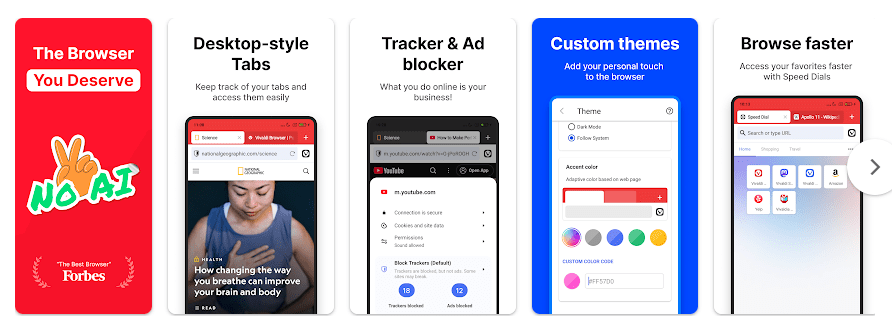
Vivaldi is a web browser for Android phones. It lets you search the web, visit websites, open tabs, save pages, and use private browsing tools.
The main use I focused on was private web browsing. Vivaldi has privacy features that give users more control while they browse. It can be used for normal daily web tasks without needing a separate browser app.
What Are the Top 5 Features That Matter?
- Private browsing: Private tabs can be used when you do not want a page to stay in your normal browsing history. This is useful when browsing something you do not want saved with regular tabs.
- Ad and tracker blocking: Vivaldi includes tools that can block ads and trackers on websites. Users can manage these settings from the browser when needed.
- Tab management: You can open several websites in separate tabs. This makes it easier to move between pages without closing the sites you are using.
- Built-in search tools: Vivaldi lets you search the web directly from the browser. You can use the search box instead of opening another app for a search.
- Bookmarks: Useful websites can be saved as bookmarks. This makes it easier to find the same pages again later.
How Much Storage and Data Does It Use?
The Vivaldi download size can change when the Play Store app is updated, so there is no fixed MB number that stays the same. The installed app also uses extra storage for browser files and cached website data.
Cache size can grow as you visit more websites, watch online content, or load images. Normal web browsing needs internet data, while browser settings and saved bookmarks can be accessed without loading a website. The exact storage and data use on your phone will depend on how you use the browser.
What Permissions and Safety Details Should You Know?
Vivaldi may ask for permissions when a website or browser feature needs them. For example, a website may ask for camera or microphone access, and Android can show a permission request before allowing it.
Google Play’s Data safety section gives information about data collection and sharing declared by the developer. These details can change with app versions, so checking the current Play Store listing before installation is a good step.
How Does It Compare to 2 Alternatives?
Vivaldi competes with browsers such as Chrome and Firefox. Like them, it supports normal web browsing, tabs, bookmarks, and private browsing, while Vivaldi also puts strong attention on browser controls and customization. Chrome is closely connected to Google’s services, while Firefox is another free browser with privacy-focused tools. Vivaldi’s main browser is free, so there is no purchase needed for basic browsing.
What Are the Good Things & Bad Things?
Pros:
- Ran smoothly during my Redmi test.
- Private browsing tools are included.
- Several browser settings are available.
- Supports tabs and bookmarks.
- Basic browser use is free.
Cons:
- App storage can increase as cache grows.
- Some settings may take time for new users to understand.
- Internet data is needed for normal website use.
- Storage and battery use can change with browsing habits.
Who Is It For?
Best For:
- People who want private browsing tools on an Android phone.
- Users who want more browser settings and controls.
Not For:
- People who want only the simplest possible browser.
- Users who prefer a browser closely tied to Google’s services.
Common Questions
Is Vivaldi Browser free?
Yes, Vivaldi is free to download for Android. Basic web browsing does not require a payment.
Does Vivaldi have private browsing?
Yes, Vivaldi includes private browsing tools. Private tabs can be used separately from normal browsing tabs.
Did Vivaldi work well on Redmi?
Yes, it ran smoothly during my two-day Redmi test. I did not face major lag, heating, crashes, or visual glitches.
Offzack Verdict & Link
Vivaldi is a useful Android browser for people who want private browsing tools and extra browser controls. My two-day Redmi test was smooth, with no major performance problems. It is worth trying if privacy features are important to your daily browsing.
Vivaldi Browser – Fast & Safe – Apps on Google Play
Final Scorecard
- Ease of Use: ⭐⭐⭐⭐☆ / 5 — The main browsing controls were easy to use during testing.
- Performance: ⭐⭐⭐⭐⭐ / 5 — Vivaldi ran smoothly on my Redmi without major issues.
- Features: ⭐⭐⭐⭐☆ / 5 — It offers private browsing, tabs, bookmarks, and other useful browser tools.
- Privacy & Safety: ⭐⭐⭐⭐☆ / 5 — Private browsing tools are included, while Play Store safety details should be checked before installation.
- Value for Money: ⭐⭐⭐⭐⭐ / 5 — The browser is free for normal Android browsing.
- Overall Rating: ⭐⭐⭐⭐½ / 5 — Vivaldi is a good free option for Android users who want private browsing tools.