Samsung Food is a food and recipe app made for people who enjoy cooking. It helps you find recipes, save food ideas, create recipes, and plan meals from your phone.
I tested Samsung Food on a Redmi Android phone for two days. It ran smoothly with no major issues, and I mainly used the recipe creation and planning tools.
The app can be useful when you do not know what to cook or want to plan meals before a busy week starts. It gives you one place to keep cooking ideas instead of saving many recipe links in different places.
Quick Pros & Cons
Pros:
- Easy way to save recipe ideas.
- Useful recipe creation and planning tools.
- Smooth performance during my Redmi test.
- Helpful for making meal plans.
- Simple cooking-focused design.
Cons:
- Some features need an internet connection.
- Saved recipes and cache can increase storage use.
- New users may need time to learn all the tools.
- Some recipes can come from outside sources.
Core Features
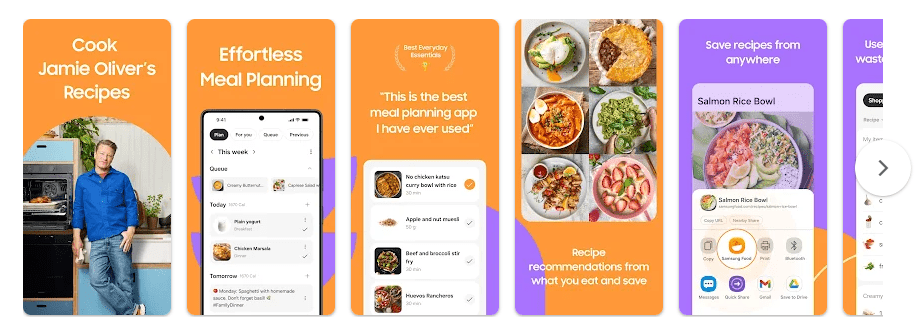
- Recipe Creation: Samsung Food lets you create and organize your own recipe ideas. This is useful when you have a family recipe or want to make changes to a dish.
- Recipe Saving: You can save recipes that you want to cook later. This means you do not have to search for the same recipe every time you want to make it.
- Meal Planning: The meal planning tools help you decide what to cook ahead of time. This can make busy days easier because your food plans are ready before cooking time.
- Shopping Lists: Samsung Food can help turn recipe needs into shopping plans. This is useful when you go to the grocery store and need to remember several ingredients.
- Recipe Discovery: The app can help you find new food ideas. It is handy when you want to try a different dish but do not know what to cook.
Real-World Performance
I used Samsung Food on a Redmi Android phone for two days. The app ran smoothly with no major issues during normal use.
Scrolling through recipes felt smooth, and I did not notice serious lag while moving through the app. I also did not face crashes or major screen bugs during my test.
The Redmi phone did not become unusually hot during regular use. Battery drain also looked normal, with no sudden battery drop while browsing recipes and using planning tools.
Space & Safety
The download size of Samsung Food can change when new app versions are released, so the current Google Play listing is the best place to check the latest size before installing. The final storage used on your phone can be higher because cached images, recipes, and other temporary files may take extra space.
Samsung Food works best with an internet connection because many recipes and food details are loaded online. Some saved information may still be available on the phone, but not every online feature should be expected to work offline.
The permissions requested can depend on the features you use and your Android version. Before allowing access, check the permission screen and Google Play Data safety section to understand what information Samsung Food may collect or share.
Competitor Check
Samsung Food can be compared with Paprika Recipe Manager and Mealime. Paprika focuses on saving recipes, organizing them, meal planning, and shopping lists, while Mealime focuses mainly on simple meal plans and grocery shopping. Samsung Food is a good choice for people who want recipe creation, discovery, saving, and planning together in one food app.
User Fit
Who Should Use It:
- People who want to save and plan recipes on their phone.
- Home cooks who want help deciding what to cook during the week.
Who Should Avoid It:
- People who rarely cook or use recipe apps.
- Users who only want a basic offline recipe notebook.
Helpful FAQs
Is Samsung Food good for meal planning?
Yes, Samsung Food is useful for planning recipes and deciding what to cook. It can help keep cooking ideas organized in one place.
Can I create my own recipes in Samsung Food?
Yes, Samsung Food includes recipe creation tools. You can use them to keep your own cooking ideas and organize recipes for later.
Did Samsung Food run well on a Redmi phone?
Yes, Samsung Food ran smoothly with no major issues during my two-day test. I did not notice serious lag, crashes, unusual heating, or major battery drain.
Offzack Verdict
Samsung Food is a useful choice for people who want one place for recipe ideas, recipe creation, and meal planning. My two-day Redmi test was smooth, and the app handled normal browsing and planning without major problems.
Download Samsung food From Playstore
Final Scorecard
- Ease of Use: 4.5/5 — The main recipe and planning tools are simple for everyday cooks.
- Performance: 4.5/5 — Samsung Food ran smoothly on my Redmi phone during two days of testing.
- Features: 4.5/5 — Recipe creation, saving, discovery, planning, and shopping tools are useful.
- Privacy & Safety: 4/5 — Users should review the current Google Play Data safety details and permissions.
- Value for Money: 4.5/5 — It provides many useful cooking and planning tools for regular home cooks.
- Overall Rating: 4.4/5 — Samsung Food is a handy app for finding, creating, saving, and planning recipes.