Meta AI is an AI assistant from Meta that works on Android phones. It can answer questions, chat with you, help with photos, create images, read files, and give ideas for daily tasks. The app is also connected with Meta services such as Instagram, Facebook, Threads, WhatsApp, and Messenger.
The main goal is simple. Instead of opening different apps for different questions, you can ask Meta AI in one place. It can also help with shopping ideas, local places, writing, pictures, documents, and other everyday tasks.
How It Ran During Testing
I tested Meta AI on a Redmi Android phone. The app opened without major problems, and moving between the main screens felt smooth during normal use. Text chats also worked without noticeable menu lag.
Simple questions were handled quickly, though response time depended on the internet connection and the type of task. Image work took longer than normal text chats, which is expected because the phone needs to send the request and wait for the result.
The phone did not show unusual heating during short testing sessions. Battery use was also reasonable for normal chatting, but longer image and video tasks can use more battery than simple text messages.
I did not notice major visual bugs while using the main features. Some tools can look different after updates because Meta keeps adding or moving features. The Play Store listing says the app was updated in July 2026.
Top Features You Can Actually Use
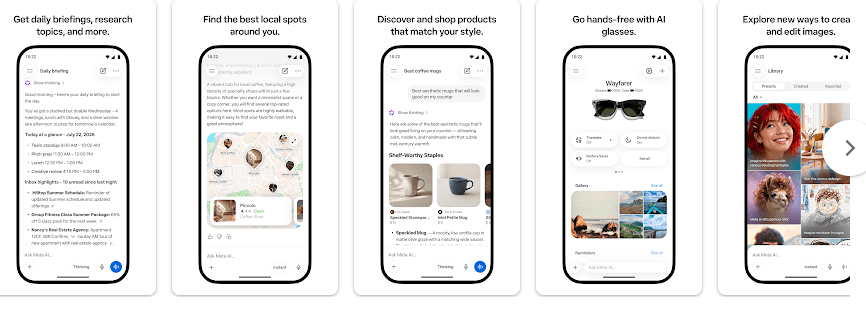
- AI Chat: You can type questions and ask for simple explanations, ideas, or help with everyday tasks. Voice and text chats are also supported, with voice conversations available in multiple languages.
- Image Creation and Editing: You can create images from your ideas and edit pictures with written instructions. The newer tools also let you sketch or write changes on an image.
- File and Photo Help: You can upload photos, PDFs, documents, spreadsheets, and other files for summaries or answers. This can save time when you need to understand a long file.
- Local Recommendations: Meta AI can suggest restaurants, activities, and places to visit. It uses posts, reviews, photos, ratings, and other information to make suggestions.
- AI Glasses Support: The app works as a companion for Meta AI glasses. It can help manage the glasses and import or share media from them.
Storage & Privacy Details
The exact download size can change with the Android version and app update, so there is no fixed MB figure that should be treated as permanent. The total storage used after installation can also grow as the app stores cache and temporary files.
Meta AI is mainly an online app. Many of its important features need an internet connection, so it is not a good choice if you need an AI assistant that works fully offline.
Privacy needs attention. Google Play says the app may share personal information and device or other IDs with third parties. It may collect location, personal information, and several other types of data, while data is encrypted during transfer. Google Play also says users can request data deletion.
How It Compares With Other AI Apps
Meta AI competes directly with apps such as ChatGPT and Google Gemini. ChatGPT is a strong choice for general questions and writing, while Gemini fits well with Google’s services. Meta AI stands out if you already use Facebook, Instagram, Threads, WhatsApp, or Meta AI glasses.
Strengths and Weaknesses
Pros
- Easy chat interface
- Useful photo and file tools
- Image creation and editing
- Local recommendations
- Works across several Meta services
Cons
- Many features need the internet
- Privacy may concern some users
- Some tools can change after updates
- Heavy image tasks can use more battery
- Features can vary by country and language
Who Should Get This App?
Best Fit
- People who want an AI helper for daily questions, photos, and files.
- Meta users who want AI tools connected with their existing services.
Worst Fit
- People looking for a fully offline AI assistant.
- Users who do not want to share personal or device-related data with a large online service.
Common User Questions
Is Meta AI free to use?
The Google Play listing shows Meta AI as a free app with in-app purchases. Some features may also depend on location, language, or gradual rollout.
Can Meta AI create images?
Yes. It can create and edit images from instructions, and newer tools include presets and simple sketch-based edits.
Does Meta AI work without internet?
Most of its main AI features need an internet connection. It is not designed as a full offline AI assistant.
Offzack Verdict
Meta AI is a useful choice for Android users who want chat, image tools, file help, and recommendations in one app. Its biggest strength is the wide range of things it can do, but privacy and internet use are worth thinking about before installing it.
Download Meta AI App from Google Play store
Final Scorecard
- Performance: 4/5 — It ran smoothly during normal testing with no major lag.
- Features: 4.5/5 — Chat, images, files, recommendations, and voice give it plenty to use.
- Ease of Use: 4/5 — The basic chat screen is simple, though some newer tools may take time to find.
- Privacy: 3/5 — Google Play lists several types of data that may be collected or shared.
- Storage & Battery: 3.5/5 — Normal use was fine, but larger AI tasks can take more storage and battery.
- Overall Rating: 4/5 stars — Meta AI is a handy everyday assistant with many useful tools, especially for people already using Meta’s apps.