I tested LocalSend on a budget Redmi Android phone for two days. During the test, the app ran smoothly and I did not notice major problems.
The app opened normally and I did not see major menu lag. The phone also did not show unusual heating while I used the app. I did not notice any clear visual bugs during my test.
I checked the sharing option and looked through the settings. The basic layout was easy to understand. I did not test every feature, so this review focuses on what I could actually check.
What This App Actually Does
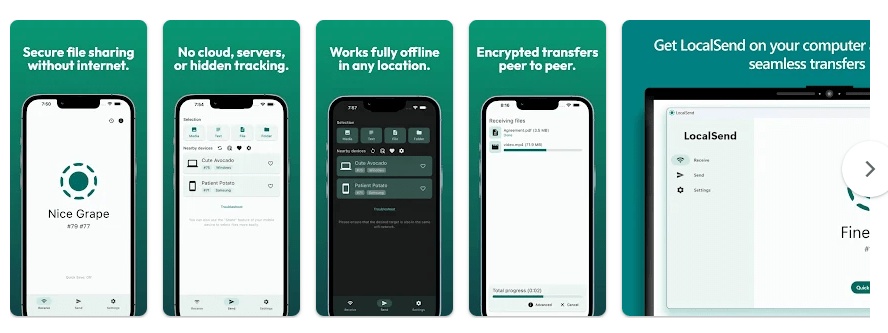
LocalSend is a file-sharing app. It lets you send photos, videos, documents, and other files between nearby devices on the same local Wi-Fi network. It does not need a cloud server for the transfer.
This can be useful when you want to move files from your Android phone to a computer or another phone. LocalSend supports Android, iPhone, Windows, Mac, and Linux, so it can help when your devices use different systems.
Top 5 Features That Matter
- Nearby file sharing: You can select files and send them to a nearby device on the same network. This is useful for moving photos, videos, and documents without uploading them first.
- Works without internet: LocalSend uses your local Wi-Fi network for file transfers. Your devices need to be on the same local network, but the transfer does not need internet access.
- Many device types: The app works on Android, iOS, Windows, macOS, and Linux. This makes it useful for sharing files between different kinds of devices.
- No account needed: LocalSend does not require you to create an account or log in. You can install it and start using the sharing system.
- Settings for receiving files: The settings let you control parts of the receiving process, including where received files are saved. This gives you more control over how files are handled on the phone.
Storage Space and Data Use
I did not record the exact APK download size, installed size, or cache size during my phone test, so I will not give made-up MB numbers. The Google Play listing available to me does not show a fixed package-size figure either.
For data use, LocalSend is different from cloud file-sharing apps. Transfers happen through the local network, so the app does not need mobile internet or an internet upload for the normal local transfer process.
Permissions and App Safety
The app needs access that allows it to find and communicate with nearby devices and handle files you choose to send or receive. The exact permission prompts can depend on the Android version and phone settings.
The Google Play Data Safety section says that LocalSend does not share data with third parties and does not collect data.
The developer also describes LocalSend as open source and says it has no ads or tracking. Transfers use encryption on the local network.
How It Compares to 2 Alternatives
Files by Google also supports nearby file sharing through Quick Share, so it can be a simple choice for Android users. Send Anywhere is another file-transfer option with a free plan, while paid plans add more features and larger transfer options. LocalSend is free and open source, with no account needed for its normal local sharing system.
Good Things & Bad Things
Pros
- Simple file-sharing purpose
- Worked smoothly in my two-day test
- No major lag noticed
- Works across many platforms
- No account needed
Cons
- Same local network is needed for normal transfers
- Exact storage use was not measured in my test
- I did not test every feature
- Not designed for sending files over the public internet
Who Is It For?
Best For
- People who often move files between nearby devices.
- Users who want local file sharing without a cloud service.
Not For
- People who need to send files to someone far away.
- Users looking for a full cloud storage service.
Common Questions
Does LocalSend need internet?
No. LocalSend can transfer files through the local Wi-Fi network without internet access. Both devices need to be connected to the same local network.
Does LocalSend need an account?
No. The app does not require an account or login. You can install it and start sharing files.
Is LocalSend free?
Yes. The official site says LocalSend is free and open source. It also says there are no ads or tracking.
Offzack Verdict & Link
LocalSend is a simple choice for people who need to move files between nearby devices. My two-day Redmi test was smooth, with no major issues noticed, but I did not test every feature.
LocalSend: Transfer Files – Apps on Google Play
Final Scorecard
- Ease of Use: ★★★★☆ — The basic sharing and settings screens were easy to understand.
- Performance: ★★★★☆ — It ran smoothly during my two-day phone test.
- Features: ★★★★☆ — It offers local sharing, cross-platform support, and useful settings.
- Privacy & Safety: ★★★★★ — Play Store says no data is shared with third parties and no data is collected.
- Value for Money: ★★★★★ — LocalSend is free and open source.
- Overall Rating: ★★★★☆ — It is a useful local file-sharing app that worked well during my basic test.