KDE Connect is an Android app that helps connect a phone with a computer. It is made for people who want to use some phone and computer features together without using cables for every task.
The main use I tested was connecting a Redmi phone with a computer. File sharing was the feature that mattered most to me because it made moving files between the two devices easier.
KDE Connect can also provide other ways for connected devices to work together. The app is free and works with computers that support KDE Connect.
How Does It Compare to Other Apps?
KDE Connect is similar to apps such as Phone Link and AirDroid because all three can connect a phone with a computer. Phone Link focuses strongly on Windows features such as messages, photos, calls, and notifications, while AirDroid offers phone management and file transfer tools. KDE Connect is free and open source, which makes it a useful choice for people who mainly need device connection and file sharing.
What Key Tools Does KDE Connect Offer?
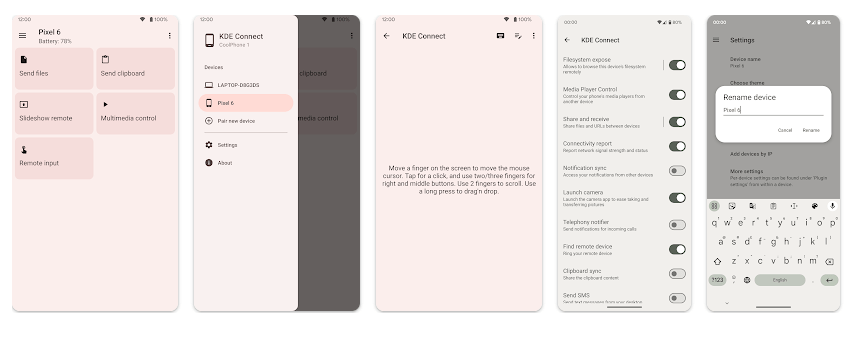
- File sharing: You can send files between connected devices. This was the most useful feature during my use because it helped move files without using a charging cable.
- Remote input: A connected phone can work as a remote input device for a computer. This can be useful when you want to control some computer actions from your phone.
- Notifications: KDE Connect can let connected devices share notifications. This helps you see some phone alerts while working on the computer.
- Clipboard sharing: The app can share clipboard content between connected devices. This can save time when moving small pieces of text from one device to another.
- Device connection: KDE Connect pairs supported devices over the same network. After the devices are connected, the available tools can be used from the app.
How Did It Perform After Two Days?
I tested KDE Connect on a Redmi Android phone for two days. The app ran smoothly with no major issues during the test.
The screens responded normally when I opened menus and checked the available tools. I did not notice serious lag while using the app, and there were no crashes during my testing.
The phone did not become unusually hot while I used KDE Connect. I also did not notice unusual battery drain during normal use, although battery use can change when devices stay connected for a long time.
The main test was connecting the phone and computer and using the file-sharing feature. The connection worked as expected during my test, which made the app useful for moving files between devices.
What About Memory, Storage, and Safety?
The exact download size shown by Google Play can change with app updates and the Android device being used. Because of this, I would not give one fixed MB number as the permanent download size.
The installed app also needs extra space for its files and cache. KDE Connect can use a network connection for device communication, but some basic app settings can be viewed without an internet connection.
KDE Connect may request permissions needed for features such as notifications, files, contacts, or other device functions. Android normally asks before granting sensitive permissions. Users can check and change these permissions in the phone’s app settings.
What Are the Upsides and Downsides?
Pros:
- Free to use.
- Connects phones and computers.
- File sharing is useful.
- Ran smoothly on my Redmi.
- No major crashes during testing.
Cons:
- Both devices need to support KDE Connect.
- Some features need permissions to work.
- Connection features depend on the network setup.
- The app may not be useful if you only need a basic file manager.
Who Should Get It?
Recommended For:
- People who want to connect an Android phone with a computer.
- Users who often move files between their phone and computer.
Not Recommended For:
- People who do not need phone-to-computer features.
- Users who want a simple file transfer app with no extra tools.
3 Quick FAQs
Is KDE Connect free?
Yes, KDE Connect is free and open source. You can use its supported connection tools without buying the main app.
Can KDE Connect share files?
Yes, file sharing is one of its useful features. You can send files between connected devices.
Did KDE Connect work well on Redmi?
Yes, it ran smoothly during my two-day Redmi test. I did not face major lag, crashes, heating, or battery problems.
Offzack Verdict
KDE Connect is a useful choice if you want to connect your Android phone and computer. File sharing was the best part of my test, and the app worked smoothly on my Redmi. It is worth trying if you often move files between your phone and computer.
Download KDE Connect – App on Google Playstore
Final Scorecard
- Ease of Use: ⭐⭐⭐⭐☆ / 5 — The main connection and file-sharing tools were easy to use during testing.
- Performance: ⭐⭐⭐⭐⭐ / 5 — KDE Connect ran smoothly on my Redmi without major problems.
- Features: ⭐⭐⭐⭐⭐ / 5 — It offers file sharing plus several useful phone-to-computer tools.
- Privacy & Safety: ⭐⭐⭐⭐☆ / 5 — The app gives users control over device permissions, but each permission should be reviewed before use.
- Value for Money: ⭐⭐⭐⭐⭐ / 5 — KDE Connect is free and provides several useful connection tools.
- Overall Rating: ⭐⭐⭐⭐½ / 5 — It is a good free option for Android users who need to connect a phone and computer.