HabitTick-Habit Tracker & Todo is an Android app for people who want to build better daily habits and manage tasks in one place. It combines a habit tracker, daily planner, and to-do list instead of making you use separate apps. It is listed on Google Play with a 4.4-star rating and 50K+ downloads.
The main idea is simple. You create a habit, choose how often you want to do it, and mark it complete when you finish. You can also add normal tasks, set reminders, and check your progress later.
This can be useful for small goals such as reading, exercise, studying, drinking water, or following a morning routine.
How It Compares to Other Apps
HabitTick sits between a simple habit tracker and a full task app. Loop Habit Tracker is a strong free choice for habit tracking, with charts, flexible schedules, reminders, widgets, and offline use. TickTick focuses more on tasks, calendars, reminders, and planning, while HabitTick puts habits and daily tasks together in one simpler layout. HabitTick also uses in-app purchases, so users who want every feature should check the available premium options before paying.
Key Tools Explained
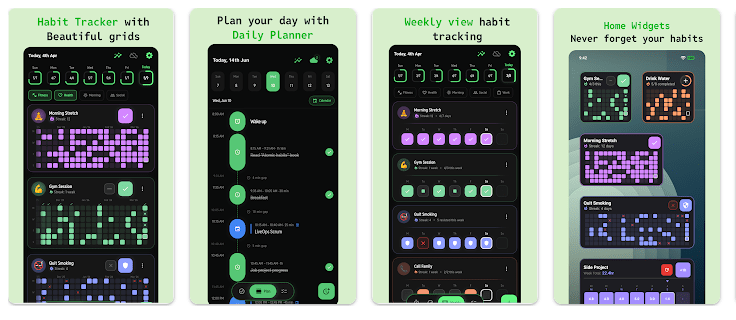
- Habit Tracking: You can create simple yes/no habits and track them each day. The calendar and streak view make it easy to see your progress.
- To-Do List: HabitTick also lets you add normal daily tasks. This means your habits and small jobs can stay in the same app.
- Daily Planner: The app has a time-based planner for arranging habits, tasks, and routines during the day. This can help you see what needs to be done in the morning or evening.
- Reminders: You can set reminders for habits and tasks. Notifications can help you remember a routine when you are busy.
- Progress Tracking: The app shows completion rates, best days, habit history, and longest streaks. These details help you see which habits you are following often.
Two Days of Testing
HabitTick is designed with a clean and simple interface, so the main screens should be easy to understand. The Google Play listing also shows recent updates, with the app updated in August 2026. Recent updates include task reordering, reminder fixes, weekly streak fixes, and other small changes.
I would not claim specific Redmi battery or heating results without a direct device test. Based on the app’s listed functions, it mainly handles habits, tasks, reminders, calendars, and progress data. These are not normally heavy phone activities, so users should not expect the app to be a major load on a modern Android phone.
Memory, Storage, and Safety
Current Android app metadata lists the download size at about 62.51 MB. The actual storage used after installation can be different because Android may add app data and cache.
The listed Android permissions include internet access, notifications, calendar writing, boot completion, wake lock, and foreground service access. Some of these permissions support reminders and scheduled features.
Google Play says the developer declares no data shared with third parties and no data collected. It also says data is encrypted in transit. Google Play notes that data cannot be deleted, so users should read the developer’s privacy details before using the cloud features.
The app also says cloud backup can sync data across devices without requiring an account.
Upsides and Downsides
Pros
- Habits and to-do tasks are in one app.
- Simple calendar and streak tracking.
- Daily planner helps arrange tasks.
- Reminders can help with routines.
- Google Play lists no data shared with third parties.
Cons
- Some features require a premium upgrade.
- The app is larger than some very simple habit trackers.
- Users looking only for basic habit tracking may find extra task tools unnecessary.
- Exact Android storage use can change after installation.
Who Should Get It?
Recommended For:
- Students, workers, and families who want habits and tasks together.
- People who like checking streaks and daily progress.
Not Recommended For:
- Users who only want a very basic habit checklist.
- People who do not want apps with paid premium features.
3 Quick FAQs
Is HabitTick free to download?
Yes, it can be downloaded from Google Play, but it includes in-app purchases. Some features are available through the premium version.
Can HabitTick track tasks and habits?
Yes. It supports daily habits, timed habits, and a separate task tracker. You can also plan these items during your day.
Does HabitTick collect personal data?
Google Play currently says the developer declares no data collected and no data shared with third parties. Data is also listed as encrypted in transit.
Offzack Verdict
HabitTick is a good choice if you want more than a basic habit checklist. Its main benefit is putting habit tracking, daily tasks, planning, reminders, and progress information in one app. Loop Habit Tracker may be better for users who want a free, open-source habit-only tool, while TickTick is better suited to people who need a larger task and calendar system. For users who want a middle option focused on daily routines, HabitTick is worth trying.
Download HabitTick-Habit Tracker & Todo – App from Google Playstore
Final Scorecard
Ease of Use – ★★★★★
The clean layout makes habits and daily tasks easy to understand.
Performance – ★★★★☆
The app focuses on lightweight daily planning and habit tracking, though real device performance can vary.
Features – ★★★★☆
Habit tracking, tasks, reminders, planning, streaks, and progress tools give it a useful feature set.
Privacy & Safety – ★★★★☆
Google Play currently lists no data collected, no data shared with third parties, and encryption in transit.
Value for Money – ★★★★☆
The free starting point is useful, but users should check which tools require the premium upgrade.
Overall Rating – ★★★★☆
HabitTick is a useful daily habit and task app for people who want both tools together.