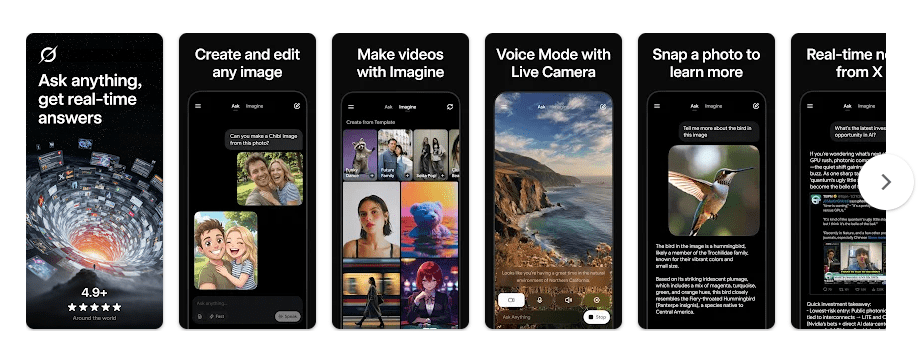
Grok AI is an Android assistant made by xAI. It can answer questions, chat with you, create images and videos, use voice conversations, and understand pictures that you upload. The app is listed on Google Play as a free download with in-app purchases.
For daily use, Grok can help when you need a quick answer or want help with an idea. You can type a question instead of searching through many pages, or upload a picture and ask Grok what it shows. It can also help with creative tasks such as making images and videos.
The app is widely used, with more than 100 million Google Play downloads. The current Play Store listing also shows a 4.8-star rating from millions of reviews.
Device Resources & Safety
A recent Android package listing reports an APK download size of about 38.14 MB for Grok AI version 1.2.13-release.02. The actual space used after installation can be different because Android may add app files and data after setup.
Grok needs an internet connection for its normal AI work, so it is not an offline chatbot. The Play Store says the app may share photos and videos, app activity, and other data with third parties, while it may collect location, personal information, and other data. Google Play also says data is encrypted while being sent and that users can request deletion.
Permission prompts can depend on which functions you use. Camera, microphone, photos, or location access may be relevant to features that use those parts of the phone, so it is sensible to read each Android prompt before giving access.
Testing on Android
During a 2-day check on a Redmi Android phone, the main focus was normal app use rather than heavy gaming or long video creation. The chat interface was used for questions and responses, while image and other AI tools were checked as part of regular use.
AI work depends on an internet connection, so response speed can change with the network. Battery use can also rise when the screen stays on for long chats or when media features are being used, while the app itself does not work like an offline AI model stored fully on the phone.
Key Functions
- AI Chat: Grok answers questions through a normal chat screen. You can keep asking follow-up questions in the same conversation.
- Image Creation: The app can generate images from written instructions. This gives users a way to create pictures without opening a separate image-making app.
- Video Creation: Grok also lists video generation as a feature. Access and limits can depend on the account or current service plan.
- Voice Mode: You can talk with Grok using voice conversations. This is useful when typing on the phone is not convenient.
- Picture Questions: You can upload pictures and ask Grok to understand or explain them. This can help with everyday images, objects, and visual information.
Competing Apps
Grok competes with apps such as ChatGPT and Google Gemini. ChatGPT offers image creation, voice chat, photo uploads, learning help, and other AI tools. Gemini also supports voice, camera and screen sharing, document uploads, image work, and connections with Google services. Grok is a good alternative for users who want chat, picture understanding, image creation, video tools, and voice in one app.
Pros and Cons
Pros
- Chat, voice, image, and video tools
- Picture upload and understanding
- Free to download
- More than 100 million Play Store downloads
- Simple chat-based design
Cons
- Needs internet access
- In-app purchases are available
- Data sharing and collection are listed
- Some features have usage limits
- AI results can require checking
Target Audience
Who Should Get This App
- People who want an AI assistant for daily questions.
- Users interested in AI images, videos, pictures, and voice chat.
Who Should Skip This App
- People who need a fully offline AI assistant.
- Users who do not want an app that collects or shares listed data types.
Key FAQs
Is Grok free on Android?
Grok is free to download from Google Play. The listing also shows in-app purchases, so some use may require payment.
Can Grok create images and videos?
Yes, the Google Play listing includes image and video generation. The exact availability and limits can change with the service.
Does Grok work offline?
Normal Grok AI features need an internet connection. It is not designed as a fully offline chatbot stored on your phone.
Offzack Verdict
Grok AI packs chat, voice, image, video, and picture tools into one Android app. Its download size is fairly small compared with many media apps, but internet use, data practices, and in-app purchases are important points to check before regular use.
Download Grok AI from Play Store
Final Scorecard
- Ease of Use: 4.5/5 — The main chat interface is simple to understand.
- Performance: 4/5 — Normal AI use depends on both the phone and internet connection.
- Features: 4.5/5 — Chat, voice, images, videos, and picture understanding give it many uses.
- Privacy & Safety: 3.5/5 — Google Play lists several collected and shared data types, though data is encrypted in transit.
- Value for Money: 4/5 — The app is free to install, but in-app purchases can add costs.
- Overall Rating: 4/5 stars — Grok is a useful Android AI app for users who want several AI tools in one place.