Have you ever experienced that heart-sinking moment when you accidentally hit “delete” on a precious family photo or a vital work screenshot? We’ve all been there—scouring the trash folder only to find it’s already been emptied. DigDeep Image Recovery is a specialized utility tool designed to act as a digital forensic expert for your smartphone, scanning the deep corners of your storage to bring those “permanently” lost files back to life.
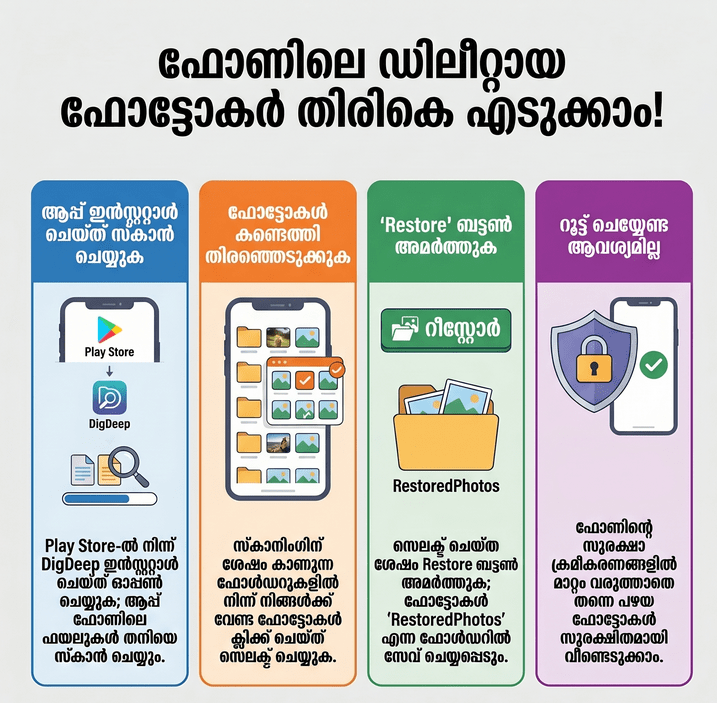
App Overview & Market Position
Developed by GreatStuffApps, DigDeep Image Recovery is a veteran in the data recovery niche, specifically tailored for Android users. Unlike many “all-in-one” recovery tools that attempt to fix everything from contacts to call logs, DigDeep focuses almost exclusively on image restoration. It operates by scanning both internal storage and external SD cards, identifying cached fragments and hidden directories where deleted image data often lingers.
In a market crowded with complex tools like DiskDigger or cloud-based recycle bins like Dumpster, DigDeep stands out for its extreme simplicity and “No-Root” requirement. While competitors often require advanced technical permissions (Rooting) to access deep system folders, DigDeep utilizes a powerful scanning algorithm that works on standard retail devices. This makes it a go-to solution for everyday users who need a quick fix without risking their device’s security.
Key Features at a Glance
- Deep Memory Scanning: Scans both your phone’s internal memory and external SD card for traces of deleted media.
- Format Versatility: Supports a wide array of image types including JPG, JPEG, and PNG.
- No Root Required: Recovers lost images without needing to bypass your device’s original security settings.
- Pre-Installation Recovery: Capable of finding images that were deleted even before the app was installed on your device.
- Intuitive UI: Features a simple folder-based layout that organizes found images by their original location for easier browsing.
User Data & Market Reach
| Platform | Star Rating | Total Reviews | Downloads |
| Google Play Store | 4.0/5 | 360K+ | 38M+ |
| iOS App Store | N/A* | N/A* | N/A* |
> Note: DigDeep is currently an Android-exclusive utility; iOS alternatives like “DiskDigger” serve similar functions on Apple devices.
Technical Performance Review
- Storage: The app is incredibly lightweight, with an APK size of approximately 5.14 MB, making it perfect for devices already low on space.
- Data Usage: It is highly optimized for offline use; the actual scanning and recovery process requires zero data consumption.
- Battery/Efficiency: While the “Deep Scan” is intensive and may cause a temporary spike in battery usage, it is generally fast and does not cause long-term lag.
Offzack.in Advice: To increase your chances of recovery, stop using your phone (especially taking new photos) immediately after a loss. New data can overwrite the “deleted” space where your old photos are still hiding.
Head-to-Head Comparison: DigDeep vs. DiskDigger
| Attribute | DigDeep Image Recovery | DiskDigger (Basic) |
| Root Requirement | Never Required | Required for “Full Scan” |
| File Types | Images only (JPG, PNG) | Images & Videos |
| User Interface | Simple Folder Grid | List with Metadata |
Best Practices & Safety
- Privacy Awareness: DigDeep scans your entire storage; ensure you are in a private setting when previewing results as it will display all found images, including those you might have forgotten.
- Selective Restore: Don’t restore everything at once. Go through the folders one by one to avoid cluttering your gallery with irrelevant system thumbnails.
- Data Security: The app does not share data with third parties, but always download the official version from the Play Store to ensure you are getting the genuine, ad-supported version rather than a tampered APK.
Setup Guide
- Download: Install DigDeep Image Recovery from the Google Play Store.
- Initialize: Open the app and wait for the “Loading” screen as it builds a map of your device’s folders.
- Search: Browse through the generated folders to find the specific images you wish to bring back.
- Restore: Select the images and tap the “Restore” button; they will be instantly sent back to a dedicated “RestoredPhotos” folder in your gallery.
Common Questions (FAQ)
Q: Why does the app show photos that are already in my gallery?
A: DigDeep scans hidden folders and cache files. It often finds thumbnails or copies of existing photos that the system stores in the background.
Q: Can I recover videos with this app?
A: No, this specific version of DigDeep is dedicated to images. For video recovery, the developer offers separate tools like TrashDigger.
Q: Where do the photos go once they are restored?
A: They are saved in a new folder on your internal storage usually named RestoredPhotos or DigDeepRecovery.
Download the Official Version
- Android: Google Play Store Link
The Offzack.in Final Verdict
DigDeep Image Recovery is a “miracle worker” for the average user who isn’t tech-savvy but needs a fast way to undo a mistake. It is perfect for casual users and students who need to recover accidental deletes without spending money on professional forensic software. However, it may be too limited for power users or those looking to recover documents and high-resolution video files.
Rating Scorecard

- Ease of Use: 5/5
- Speed & Performance: 4.5/5
- Feature Set: 3.5/5
- Privacy & Safety: 4/5
- Value for Money: 5/5 (Free)
Overall Offzack.in Score: 4.4 / 5