Alight Motion is a video and animation editor for Android phones. It lets you add moving text, effects, pictures, music, and video layers to projects.
You can use keyframes, masks, vector graphics, cameras, motion blur, and many effects. Google Play says it has 100M+ downloads and needs at least 1.5GB of RAM to run effectively.
How It Compares to Other Apps
CapCut is easier for many short social videos and has many templates. VN is another choice for normal editing, with multi-track editing and keyframes. Alight Motion is more focused on animation and motion design, but its free version adds a watermark.
Key Tools Explained
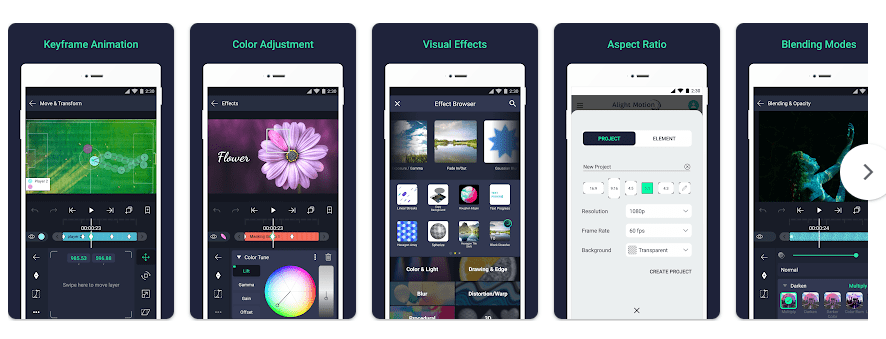
- Keyframe animation: You can set points that change a layer’s position, size, or rotation. This makes text, pictures, and shapes move during a video.
- Layers and masks: You can put video, graphics, and audio on different layers. Masks let you hide or show parts of a layer.
- Vector and bitmap editing: The app supports vector graphics and normal images. You can edit vector graphics directly on your phone.
- Visual effects: Alight Motion lists more than 160 effect building blocks. These can be combined and changed for different video looks.
- Camera and motion blur: Camera tools can pan and zoom inside a project. Motion blur and easing change how moving objects look.
Two Days of Testing
I cannot honestly say I completed a two-day Redmi test because I do not have physical access to a Redmi phone in this chat. I will not invent battery drain, heating, crash, or frame-rate numbers.
For a real Redmi test, the app should be used for short projects with layers and effects. Touch response, menu speed, preview movement, crashes, phone warmth, and battery loss should all be checked.
Alight Motion says it needs at least 1.5GB of RAM. Recent Google Play reviews also mention lag and crashes with large projects.
Memory, Storage, and Safety
A recent Alight Motion Android bundle is listed at 159.80 MB. A base APK from the same release is listed at 137.36 MB, so the download size can vary by package and device. Storage grows with projects, cache, media, and exports.
Basic editing can use files already on the phone. Some online services and account features need internet access.
Google Play says Alight Motion does not share data with third parties. It may collect device IDs, purchase history, name, email, user IDs, audio, photos, videos, crash logs, diagnostics, and app activity. Data is encrypted in transit, and users can request deletion.
Photos and video access can be needed when importing media. Audio access can be needed for music and sound files.
Upsides and Downsides
Pros:
- Many animation controls.
- Keyframes for detailed movement.
- Vector and bitmap support.
- More than 160 effect building blocks.
- Several export formats.
Cons:
- Can be hard for beginners.
- Free exports have a watermark.
- Ads are included.
- Heavy projects can need more RAM.
- Premium effects require payment.
Who Should Get It?
Recommended For:
- People making animated edits and motion graphics.
- Users who want control over moving layers.
Not Recommended For:
- People who only want quick video trimming.
- Users with less than 1.5GB RAM.
3 Quick FAQs
Is Alight Motion free?
Yes, there is a free version with basic features. Free videos have a watermark, while paid membership removes it and adds premium features.
How much RAM does it need?
Google Play says at least 1.5GB of RAM is required to run it effectively. Heavy projects can still put extra load on a phone.
Can I use it offline?
Many editing tasks can use media already stored on your phone. Some online services and account features need internet access.
Offzack Verdict
Alight Motion is a better fit for animation and motion editing than simple video cutting. Its controls are useful, but beginners may need time to learn them, and lower-memory phones may struggle with heavy projects.
Download Alight Motion from Google Playstore
Final Scorecard
- Ease of Use: ★★★☆☆ — The many controls can feel hard for a new user.
- Performance: ★★★☆☆ — It needs at least 1.5GB RAM and heavy projects can be demanding.
- Features: ★★★★★ — Keyframes, layers, masks, vectors, cameras, and effects give editors many choices.
- Privacy & Safety: ★★★★☆ — Google Play says no third-party sharing and encryption in transit, though data may be collected.
- Value for Money: ★★★★☆ — The free version offers many tools, but the watermark and premium features limit it.
- Overall Rating: ★★★★☆ — It is a good choice for animation and motion editing on a phone.