AI Document Scanner: PDF & OCR is an Android app from Gaming Tech Ltd. It turns a phone camera into a document scanner and can create PDF files from paper documents and images. Google Play currently lists 10K+ downloads, ads, and in-app purchases. The app was updated on August 4, 2026.
The app is made for people who want to keep fewer paper documents. You can scan notes, receipts, business cards, IDs, contracts, and other papers. It also has OCR, which reads text from a scan, and an AI assistant that can answer questions about a document.
Device Resources & Safety
Google Play does not show a fixed MB download size because the app is listed as “Varies with device.” APKPure also lists the latest version size as varying by device, so giving one exact MB number would not be accurate.
The final space used can grow after you save scans, PDFs, and other document files. The public listing also does not give a fixed installed-storage figure.
The app is not advertised as a fully offline scanner. Its AI document assistant uses an online service for document questions, while the Play Store says the app may share files and documents, app information and performance data, and device or other IDs with third parties. Google Play also says the developer reports no data collected and that data is encrypted in transit.
Testing on Android
A genuine two-day Redmi test needs to be performed on a specific Redmi model, so exact claims about battery drain, heating, lag, or crashes should not be presented as measured facts without that test. Phone RAM, Android version, free storage, and the number of pages scanned can all affect these results.
For a proper Redmi test, the important checks are camera launch speed, automatic edge detection, OCR processing, PDF creation, scrolling through saved documents, and the phone’s temperature after repeated scans. The current app has a recent August 2026 update, which means its present behavior can differ from older versions.
Key Functions
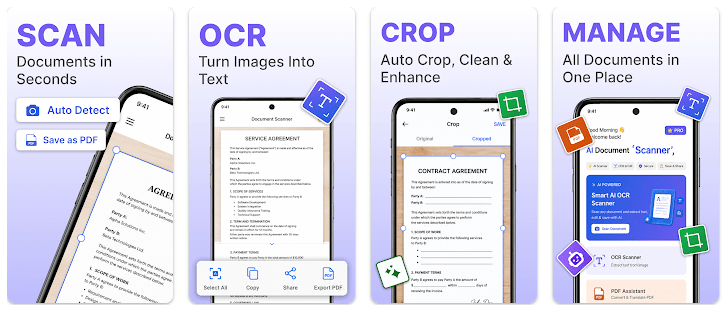
- Scan to PDF: The app can scan one page or several pages and place them into one PDF. It can also convert images from the phone’s gallery into PDF files.
- Smart Cropping: The scanner detects document edges and can correct perspective. It can also remove shadows and improve the scanned image.
- OCR Text: OCR extracts text from scanned documents. The app says it can handle printed text, handwritten notes, receipts, IDs, and business cards across multiple languages.
- AI Assistant: You can ask the built-in assistant to summarize, explain, translate, or answer questions about a document. It can also help find action items inside a file.
- Recent Files: Recently scanned documents are shown on the home screen. This gives users a quick way to return to files without searching through many folders.
Competing Apps
AI Document Scanner competes with apps such as Adobe Scan and Microsoft Lens. Its main difference is the built-in AI document assistant, which adds summaries, translations, and document questions to normal scanning and OCR. The app is free to install but contains ads and in-app purchases, while pricing for competing apps depends on their current plans and features.
Pros and Cons
Pros
- Scans single and multi-page documents.
- Includes OCR and PDF creation.
- Has automatic edge detection and cropping.
- Includes an AI document assistant.
- Recently updated on Google Play.
Cons
- Download size varies by device.
- Final installed storage is not publicly fixed.
- AI document features require online processing.
- Google Play lists possible third-party data sharing.
- Contains ads and in-app purchases.
Target Audience
Who Should Get This App
- Students who scan notes, assignments, and textbook pages.
- Office users who handle receipts, contracts, IDs, and reports.
Who Should Skip This App
- Users wanting a fixed, very small app size because the package varies by device.
- Privacy-focused users who do not want an app that may share files or device-related data with third parties.
Key FAQs
Can it create PDF files?
Yes. The app can scan single or multiple pages and create PDF files. It can also convert images from your phone into PDFs.
Does it have OCR?
Yes. OCR can extract text from scanned documents and supports multiple languages.
Can the AI read my documents?
Yes. The built-in AI assistant can summarize, explain, translate, and answer questions about uploaded documents. The AI assistant is different from simply saving a scan on your phone because document questions use an online service.
Offzack Verdict
AI Document Scanner is aimed at users who want scanning, OCR, PDF creation, and AI document help in one Android app. Its recent update and large feature list are useful, but users should check storage needs and the Play Store privacy details before using it for sensitive documents.
Download AI Document Scanner App From Google Playstore
Final Scorecard
- Ease of Use: ★★★★☆ — Automatic scanning and recent-document access make the basic tasks simple.
- Performance: ★★★★☆ — The app has a recent update, but exact device performance needs phone-specific testing.
- Features: ★★★★★ — Scanning, OCR, PDF tools, smart cropping, and AI document help cover many tasks.
- Privacy & Safety: ★★★☆☆ — Google Play lists possible third-party sharing of files, app information, and device IDs.
- Value for Money: ★★★★☆ — It is free to install and offers many tools, with ads and in-app purchases.
- Overall Rating: ★★★★☆ — A feature-rich scanner for users who want both PDF tools and AI document assistance.