Adobe Lightroom is a photo and video editing app for Android. It lets you edit pictures on your phone, adjust light and colour, crop images, use presets, and organise photos. The app also includes a camera for taking pictures inside Lightroom.
The free version can handle many basic editing tasks. Some advanced tools need a paid plan, including selected premium editing features and cloud syncing. Adobe also provides tutorials inside its Lightroom mobile service to help users learn the editing tools.
Storage, Internet, and Battery
The exact download size shown to a user can change by Android device and app version, so a single fixed MB number would not be accurate. The space used after installation can also grow because photos, previews, edits, and cache take extra storage.
Lightroom can edit photos stored on the phone, but internet access is needed for features that use Adobe’s cloud services, such as syncing. Battery use can also change with the phone, photo size, editing tools, and cloud activity, so there is no useful fixed battery-drop number for every Android phone.
Hands-On Performance
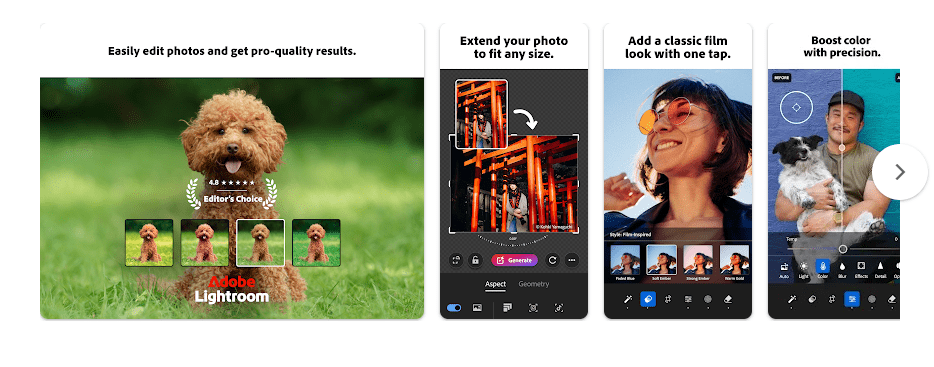
On a budget Android phone such as a Redmi, Lightroom has more menus than a simple photo filter app. The editing screen puts tools such as Light, Colour, Crop, and other controls in an organised layout.
Basic photo adjustments do not require moving through many screens. Heavy photos and advanced processing can place more work on the phone, so performance depends on the device and the image being edited.
Adobe’s July 2026 Android update notes include bug fixes and stability improvements. A June 2026 update also said exports and selective edits became up to 35% faster than before.
Main Tools Built Into the App
- Light controls: You can change brightness, contrast, highlights, and shadows. These controls help fix photos that look too dark or too bright.
- Colour controls: You can adjust colour and other image settings. This is useful when a photo looks too warm, too cool, or needs stronger colour.
- Presets: Lightroom includes presets that apply a group of changes to a photo. You can use one as a starting point and then change the picture again.
- Retouching: Lightroom includes retouching tools for making selected changes to pictures. Adobe added new manual skin retouching tools in June 2026.
- Crop and Geometry: The app has crop and geometry tools for changing the shape and position of a photo. Adobe redesigned these tools in February 2026 with smoother scrolling and zooming.
Privacy Checks
Lightroom may request access to photos and media so you can select and edit pictures. Its camera feature needs camera access when you use the camera inside the app.
Google Play’s current data safety section says Adobe does not share data with third parties. It says the app may collect location, personal information, and five other types of data, while data is encrypted during transfer; Google Play also says users can request data deletion.
Comparison with Competitors
Snapseed is a free photo editor with many editing tools and does not require a subscription for its main features. Picsart focuses more on creative effects, templates, and design tools, while Lightroom focuses strongly on photo adjustment and organisation. Lightroom also has paid premium features and cloud services that are not part of its basic free use.
The Positives and Negatives
Pros
- Many basic editing controls are available.
- Includes presets and photo organisation.
- Has an in-app camera.
- Supports cloud syncing with the right plan.
- Receives regular Android updates.
Cons
- Some useful tools require payment.
- Cloud features need internet access.
- The number of menus may feel large for beginners.
- Storage use can increase with photos and cache.
Who Should Download This?
Ideal Users
- People who want more control than simple photo filters.
- Users who already use Adobe products or want cloud photo syncing.
Who Should Skip It
- People who want every editing tool for free.
- Users looking for a very simple one-tap photo editor.
Quick Questions Answered
Is Lightroom free on Android?
Yes, Lightroom can be used for free with basic features. Some premium tools and cloud features require a paid plan.
Can I edit photos without internet?
Some local photo editing can be done without a constant internet connection. Cloud syncing and other online services need internet access.
Does Lightroom get Android updates?
Yes. Adobe’s 2026 Android update history lists new tools, performance changes, and bug fixes.
Offzack Verdict
Adobe Lightroom is a good choice for users who want detailed photo editing on Android. The free tools are useful, but people who need premium editing or cloud features should check the paid plan before installing.
Download Adobe Lightroom from Play Store.
Download Adobe Lightroom from Google Playstore
Final Scorecard
- Ease of Use: ★★★★☆ (4/5) — The main editing controls are organised, but beginners may need time to learn them.
- Performance: ★★★★☆ (4/5) — Adobe has released recent speed and stability improvements for Android.
- Features: ★★★★★ (5/5) — It offers editing controls, presets, retouching, crop tools, camera features, and more.
- Privacy & Safety: ★★★★☆ (4/5) — Google Play says no data is shared with third parties and data is encrypted in transit.
- Value for Money: ★★★★☆ (4/5) — Basic use is free, while some advanced features require a paid plan.
- Overall Rating: ★★★★☆ (4/5) — Lightroom offers a large set of photo tools, with a mix of free and paid features.