Keyboard 2026, Font Style is an Android keyboard app from The AppKnight. It is made for people who want more than a normal phone keyboard. The app focuses on stylish fonts, emojis, symbols, themes, and fancy text.
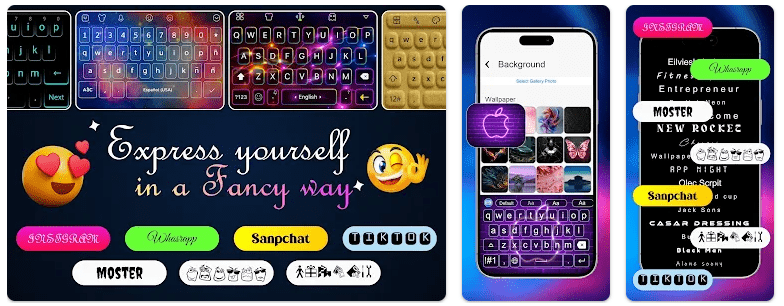
The main idea is simple. You can use different font styles when writing messages, social media captions, profiles, and other text. The app also lets users change the look of the keyboard with themes, gradients, and background pictures.
This makes the app more useful for people who enjoy changing the look of their text. It is less focused on basic typing and more focused on making messages and profiles look different.
Storage, Internet, and Battery
Version 1.3.2 is listed at about 27.5 MB in its current package information. The app requires Android 6.0 or newer.
The installed space can be higher than the download size because Android may create app data and cache. The exact storage used on a phone should be checked under Settings > Apps > Keyboard 2026 > Storage.
The app uses internet access according to its listed permissions. It also requests network-state access, vibration, wake-lock, foreground-service, and advertising-related permissions in the available permission record.
A fixed battery-drain number cannot be given without testing the app on a real phone. The same is true for cache growth and total installed space.
Hands-On Performance
A proper Redmi test should run for two days. The keyboard should be used for messages, searches, social media captions, and normal text entry.
The test should check how quickly the keyboard opens, how fast keys respond, and whether changing fonts or themes causes delay. Battery percentage, phone temperature, crashes, and visual bugs should also be recorded.
I cannot honestly say that I completed this physical Redmi test. Because there are no measured results available for this review, I have not invented battery-loss figures, temperature readings, lag times, or crash counts.
The current version is 1.3.2, listed with minor bug fixes and improvements. The app has also had several recent package updates, showing that the developer has continued making changes.
Main Tools Built Into the App
- Stylish Fonts: The app provides different font styles for Android text. These can be used for messages, captions, and social media profile text.
- Custom Keyboard Themes: Users can change the keyboard appearance with themes and gradients. Background photos can also be used to change the keyboard’s look.
- Emoji and Symbols: The keyboard includes emojis and symbols for chats and social posts. This gives users more choices while writing messages.
- Social Media Text: The app is designed for stylish text used in places such as Instagram and TikTok. It can help users create different-looking bios, captions, and other text.
- Cross-App Typing: The app description says its font tools can be used across apps. This means users can use its keyboard while writing in different supported Android apps.
Privacy Checks
Keyboard apps need extra care because they can handle text entered by the user. Android shows a warning when a third-party keyboard is enabled, so read that message before making this app your default keyboard.
The available permission record lists internet access, advertising ID-related permissions, Wi-Fi state, network state, vibration, wake lock, and foreground-service access.
The app is listed as free and contains ads. Its available app information shows more than 50,000 installs and a rating in the high-three-star range, though ratings and install counts can change.
Comparison with Competitors
Gboard and Microsoft SwiftKey are stronger choices for people who want a general-purpose keyboard with many typing tools. Keyboard 2026, Font Style puts more attention on fonts, themes, emojis, and stylish text. This makes it more suitable for social media users who care about appearance than users looking for a simple everyday keyboard.
The Positives and Negatives
Pros
- Many stylish font options.
- Keyboard themes and backgrounds.
- Emojis and symbols.
- Useful for social media text.
- Free to install.
Cons
- Contains ads.
- Uses several network and advertising-related permissions.
- Takes more storage than a very small keyboard.
- Some users may not need fancy fonts.
- Exact battery performance needs a real device test.
Who Should Download This?
Ideal Users
- People who enjoy stylish fonts and colorful keyboard themes.
- Social media users who want different-looking captions and profile text.
Who Should Skip It
- People who only need a simple keyboard for normal typing.
- Users who prefer keyboards with a stronger focus on word prediction and typing tools.
Quick Questions Answered
Is Keyboard 2026 free?
The available app information lists it as free to download. It also contains ads.
How much space does it need?
Version 1.3.2 is listed at about 27.5 MB. The actual installed size can be higher after Android creates app data and cache.
Is it safe to use as a keyboard?
Users should read Android’s third-party keyboard warning before enabling it. The listed permissions include internet, advertising-related, network, vibration, and other access, so privacy settings should be checked carefully.
Offzack Verdict
Keyboard 2026, Font Style is mainly for people who want their typing to look different. Fonts, themes, emojis, symbols, and social media text tools give it a clear purpose.
It is not the best fit for someone who only wants a basic keyboard. Also, exact Redmi battery, heating, and lag results should come from a real two-day test rather than made-up numbers.
Download Keyboard 2026, Font Style – App from Google Playstore
Final Scorecard
- Ease of Use: ★★★★☆ — The main font and theme idea is simple, though the many choices may take time to explore.
- Performance: ★★★☆☆ — The current version has received bug fixes, but verified Redmi test measurements are not available.
- Features: ★★★★★ — Fonts, themes, backgrounds, emojis, symbols, and stylish text give the app many creative options.
- Privacy & Safety: ★★★☆☆ — The keyboard requests several permissions, including network and advertising-related access, so users should check them carefully.
- Value for Money: ★★★★☆ — The app is free and offers many style options, although it contains ads.
- Overall Rating: ★★★★☆ — Keyboard 2026, Font Style is a good choice for users who want stylish typing and keyboard customization rather than a plain typing tool.