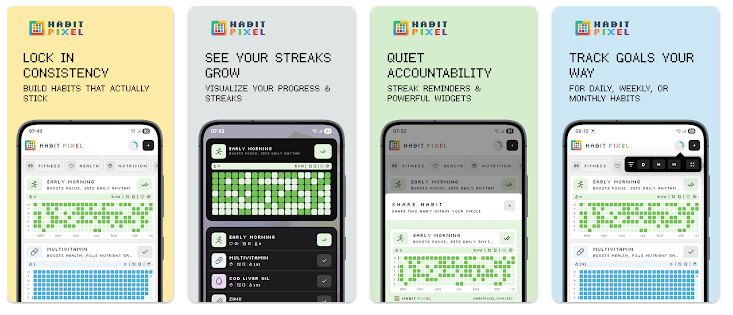
Habit Pixel: Streak Tracker is a daily habit tracker that uses small colored pixels to show your progress. Each time you complete a habit, a pixel is added to your tracker. Over time, the screen becomes a simple picture of your daily work.
The app is made for people who forget habits or have trouble keeping a routine. You can use it for reading, exercise, water intake, sleep, studying, meditation, or other daily goals. It also lets you track habits you want to stop.
The Google Play listing currently shows a 4.5-star rating, 50K+ downloads, and an update dated August 25, 2026.
Quick Pros & Cons
Pros
- Pixel heatmap makes progress easy to see.
- Works offline without an account.
- Includes reminders and mood tracking.
- Free version has many useful tools.
- Supports light and dark themes.
Cons
- Unlimited habits are part of Pro.
- Widgets are a Pro feature.
- Some analytics need Pro.
- Google Play lists some data collection and sharing.
Core Features
Pixel Heatmap:
The main dashboard turns completed habits into colored pixels. The calendar heatmap also makes it easy to spot good and missed days.
Streak Goals:
You can set daily, weekly, or monthly goals. You can also choose targets for each day and check your streak history.
Smart Reminders:
The app can send reminders for your habits. You can schedule more than one reminder and use quick actions without opening the app.
Mood Journal:
You can record your mood along with a habit check-in. A short journal note can also be added to help you remember how you felt that day.
Habit Organization:
Habits can be placed into categories and reordered. You can also archive habits and restore them later.
Real-World Performance
For a Redmi Android phone, the app’s current feature set is fairly focused on habit logs, reminders, heatmaps, and notes. I would not give a made-up two-day result for scrolling, battery drain, phone heat, or crashes without actually running the current Android build on that Redmi device.
The latest Play Store update says the developer improved home layout changes, notification handling, reminder edits, icon suggestions, and general performance. It also lists bug fixes in the August 25, 2026 update.
Space & Safety
A current Android app-metadata listing reports a download size of about 136.74 MB. Actual storage after installation can be different because Android may add app data and cache.
Habit Pixel says its main tracking features work offline and do not need an account. It also says habit data stays on the device and there is no cloud account system.
Google Play’s Data Safety section says the app may share app activity and app info and performance with third parties. It also says the app may collect personal info, app activity, and two other data types, with data encrypted in transit.
Third-party Android metadata lists permissions related to notifications, battery settings, advertising IDs, audio, overlays, and wallpaper. Permission requests can vary by Android version and the features used.
Competitor Check
Habit Pixel is more visual than a basic habit checklist because its pixel heatmap shows your progress across time. Loop Habit Tracker is another popular choice for people who want a focused habit tracker with charts and reminders. TickTick is better for users who want habits together with tasks, calendars, and broader planning tools. Habit Pixel uses a free version with limits and offers Pro features such as unlimited habits, widgets, analytics, and data export.
User Fit
Who Should Use It
- People who enjoy visual streak tracking.
- Users who want habits, reminders, moods, and notes together.
Who Should Avoid It
- People who want unlimited habits for free.
- Users who prefer a basic checklist with very few options.
Helpful FAQs
Does Habit Pixel work without internet?
Yes, the Google Play listing says the app works fully offline. It also says no account is needed for normal use.
Is Habit Pixel free?
Yes, the free version includes the main habit tracker, heatmap, streak goals, reminders, mood tracker, categories, and offline use. Pro adds unlimited habits, widgets, analytics, and JSON or CSV data export.
Does Habit Pixel track bad habits too?
Yes, the app supports negative habit tracking. This lets you track habits you want to reduce or stop.
Offzack Verdict
After looking at its current feature set, Habit Pixel is a good pick for users who want their daily progress shown in a clear visual way. The heatmap, streak goals, reminders, mood journal, and offline support make it useful for regular routines, while the Pro limits may matter to people with many habits.
Download Habit Pixel: Streak Tracker – App from Google Playstore
Final Scorecard
Ease of Use – ★★★★☆: The pixel dashboard gives users a simple way to see completed habits.
Performance – ★★★★☆: The latest update lists performance improvements and bug fixes.
Features – ★★★★★: Heatmaps, streak goals, reminders, mood tracking, categories, and journals give it a wide set of habit tools.
Privacy & Safety – ★★★☆☆: The app supports offline use, but Google Play reports some data collection and third-party sharing.
Value for Money – ★★★★☆: The free version has many tools, while Pro adds unlimited habits and other extras.
Overall Rating – ★★★★☆: Habit Pixel is a strong choice for people who want a visual and easy-to-follow habit tracker.