MoneyLife: Expense Tracker is a personal finance app from Fivestars Studio. It helps users record daily expenses and income in one place. The main goal is simple: help you see where your money goes.
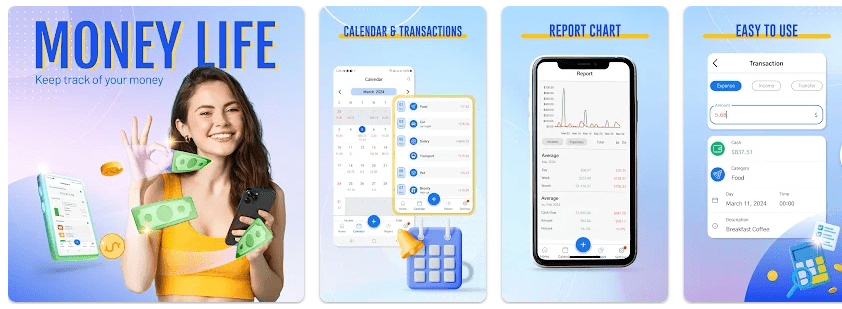
The app can also help with monthly budgets, spending reports, bill reminders, and calendar-based money tracking. It has a home screen widget for quick entries. Google Play currently shows a 4.6-star rating and 50K+ downloads.
MoneyLife is useful for people who often forget small expenses. Adding a coffee, shopping bill, travel cost, or other payment can make your monthly spending easier to understand.
Quick Pros
- Simple way to record income and expenses.
- Budget tools help track monthly spending.
- Calendar view makes money records easier to check.
- Bill reminders can help users remember payments.
- Home screen widget supports quick entries.
Quick Cons
- The app contains ads and in-app purchases.
- Some users have reported bugs and crashes.
- Users have asked for features such as tags and receipt photos.
- Google Play lists some data collection and sharing.
- It may feel basic for users wanting advanced money tools.
Core Features
Expense Tracking
MoneyLife lets you record your daily income and expenses. This can make it easier to see how much money you spend during the week or month.
Budget Planning
You can create budgets to keep your spending under control. This is useful when you have a fixed monthly amount for food, shopping, travel, or other needs.
Spending Insights
The app provides spending insights to help you understand your money habits. Looking at your spending can show which areas take up most of your money.
Bill Reminders
MoneyLife includes bill reminders for upcoming payments. This can be helpful for people who manage several regular bills each month.
Home Widget
The home screen widget gives users a faster way to enter income or expenses. You do not need to open the full app every time you want to record a small payment.
Real-World
For a Redmi Android test, the main things to watch are app opening speed, scrolling, expense entry, battery use, heat, and screen bugs. Public Google Play feedback says the interface is clean and easy to use, but one recent reviewer reported crashes and periods when the app stopped working.
So, performance may not be perfect for every user. The app was last listed as updated on October 16, 2025, so checking the current version before installation is a good idea.
Space Safety
Third-party Android app data lists MoneyLife at about 23 MB, while another listing reports an APK size of about 12.2 MB. The final storage used on a phone can be higher after installation and as app data grows.
The Google Play data safety section says the app may collect location, personal information, app activity, and other data. It may also share location, app activity, and other data with third parties. Google Play also says data is encrypted during transfer, while the listing states that data cannot be deleted.
Permission needs can change between Android versions and app updates. Users should check the permission prompts before allowing access.
Competitor Check
MoneyLife is a simpler choice than apps such as Money Manager and Wallet. Money Manager offers detailed reports, asset tracking, passcode protection, recurring transactions, backups, and more account tools.
Wallet goes further with bank synchronization, automatic transaction updates, budgets, reports, cloud sync, and support for multiple currencies. MoneyLife may suit users who mainly want manual expense and budget tracking without needing a larger finance system.
User Fit
Who Should Use It
- People who want a simple daily expense tracker.
- Users who want basic budgets, reminders, and spending insights.
Who Should Avoid It
- People who need advanced bank-sync features.
- Users who do not want ads or data-sharing considerations.
Helpful FAQs
Is MoneyLife free to download?
Yes. Google Play lists MoneyLife as an app with ads and in-app purchases. Some features or options may therefore depend on the app’s current purchase system.
Can MoneyLife track daily expenses?
Yes. The app is designed to record daily expenses and income. It also provides calendar tracking and spending insights.
Is MoneyLife safe to use?
Google Play says data is encrypted in transit, but it also lists several types of data that may be collected or shared. Users should read the current Data Safety details and permission requests before using the app.
Offzack Verdict
MoneyLife: Expense Tracker is a useful option for basic personal money tracking. Its expense records, budgets, calendar, bill reminders, spending insights, and widget cover many everyday needs. Its main limits are ads, in-app purchases, privacy considerations, and reports from some users about bugs.
Download MoneyLife: Expense Tracker From Google Playstore
Final Scorecard
Ease of Use: ★★★★☆ — The app focuses on quick expense and income entry.
Performance: ★★★★☆ — The feature set is fairly light, though some users have reported bugs.
Features: ★★★★☆ — Budgets, insights, calendar tracking, reminders, and widgets give it a useful feature set.
Privacy & Safety: ★★★☆☆ — Data is encrypted in transit, but Google Play lists data collection and sharing.
Value for Money: ★★★★☆ — The basic expense-tracking purpose can be useful for everyday users.
Overall Rating: ★★★★☆ — A good basic expense tracker for users who want a simple way to watch daily spending.