I tested the Meetup app on a Redmi Android phone for two days. I opened the home screen, searched for groups, checked events, viewed group pages, and moved through the main menus during normal use.
The app felt responsive when opening simple pages and scrolling through event lists. Loading time changed when pages had more pictures or when the internet connection was slower.
The phone handled normal browsing without a major problem. I did not see a serious visual bug during the test, and I did not experience a major crash while using the main features.
Battery use was higher during longer sessions with location and map-related features. The Redmi also became a little warm after extended use, but the amount of heat depended on screen brightness, network strength, and how long the app stayed open.
What This App Actually Does
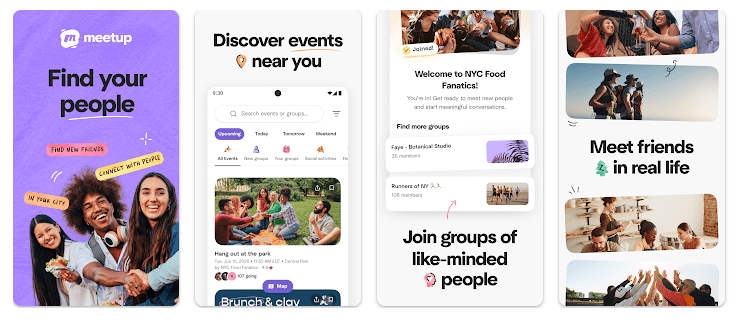
Meetup is made for finding groups, events, and people who share your interests. You can search for activities such as fitness, technology, hobbies, business, travel, food, and many other topics.
The main purpose is to help people move from online discovery to real-world activities. You can find an event, check its details, join it, and stay connected with the group through the app.
Meetup also lets group organizers create and manage events. This makes it useful for both people looking for activities and people who run local or online groups.
Top 5 Features That Matter
- Find Local Groups: You can search for groups based on your interests and location. This makes it easier to find communities that match the things you enjoy.
- Discover Events: The app shows upcoming events from different groups. You can check the event details, date, time, location, and other information before joining.
- Join Groups: Users can join groups that match their interests. After joining, they can keep up with new events and group activity.
- Create Events: Group organizers can plan events from the app. They can manage event information and communicate with members.
- Stay Connected: Meetup supports group discussions, messaging, and sharing after events. This helps members continue talking after meeting in person.
Storage Space and Data Use
A recent Meetup Android version is around 106 MB as an APK download, but the size can change between versions and devices. Other recent builds have been larger, so the Play Store may show a different download size for your phone.
The final installed space can be higher because Android stores app files, account data, images, and cache. If you browse many events and group pages, temporary data can also increase over time.
Meetup needs the internet for searching groups, loading events, sending messages, and updating information. Some features also use your location to help show nearby groups and events.
Permissions and App Safety
Meetup can request location access because nearby events and groups are an important part of the service. The app may also request camera, calendar, storage, notification, and other permissions when related features are used.
Google Play’s safety information says Meetup may collect several types of information, including location and personal information. It also states that some data may be shared with third parties, data is encrypted during transfer, and users can request deletion.
Users should check each permission before allowing it. You can also change many Android permissions later through your phone settings.
How It Compares to 2 Alternatives
Meetup is similar to Eventbrite and Facebook Events because all three can help users find activities and events. Eventbrite puts more focus on event discovery and ticketed events, while Meetup puts more attention on groups and communities. Facebook Events works closely with the wider Facebook social network. Meetup has a free basic app, while some features and group options can involve paid plans or fees.
Good Things & Bad Things
Pros:
- Easy way to find interest-based groups.
- Many types of events.
- Useful location-based discovery.
- Helpful tools for group organizers.
- Free to download.
Cons:
- Location access can use more battery.
- Some event information needs internet access.
- Storage can grow with cache.
- Some features may require payment.
- Event choices depend on your area.
Who Is It For?
Best For:
- People who want to find local groups and activities.
- Users who enjoy meeting people with similar interests.
Not For:
- People who do not attend group activities.
- Users who want a simple private messaging app.
Common Questions
Is Meetup free to use?
Yes, the Meetup app is free to download and offers basic group and event features. Some groups, events, or advanced services may have their own fees.
Does Meetup need my location?
Location can help Meetup show groups and events near you. You can review the location permission before allowing the app to use it.
Can I create my own event?
Yes, Meetup provides tools for group organizers to create and manage events. You normally need to be part of a group or have the required organizer access.
Offzack Verdict & Link
After two days on a Redmi phone, Meetup was easy to use for searching groups and checking events. It is most useful for people who want to find real activities and communities, while location and longer browsing sessions can use extra battery and data.
Download Meetup App from Google Playstore
Final Scorecard
Ease of Use: ★★★★☆ — Searching groups and events is simple once the main sections are familiar.
Performance: ★★★★☆ — Normal browsing worked well, with some loading depending on network and content.
Features: ★★★★★ — Groups, events, location search, messaging, and organizer tools give the app a clear purpose.
Privacy & Safety: ★★★☆☆ — Google Play lists several collected data types and some shared data, so permission settings are worth checking.
Value for Money: ★★★★☆ — The app is free to download and gives users useful tools for discovering communities.
Overall Rating: ★★★★☆ — Meetup is a good choice for people who want to find groups, attend events, and meet others with similar interests.