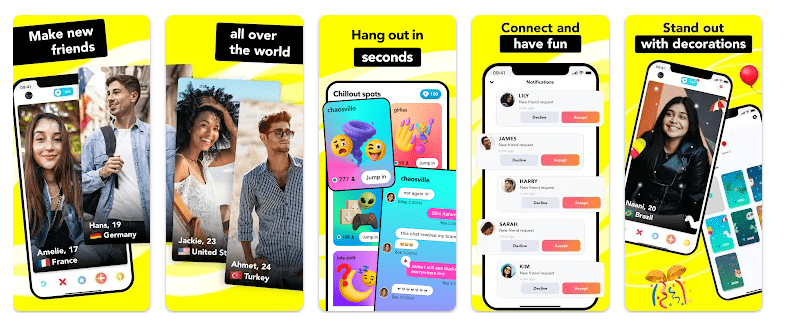
Hoop is a social app made for meeting new people and making friends online. Users can discover profiles, connect with people, and use social features to start new conversations.
The app is built around finding new connections instead of only chatting with people you already know. Its simple profile-based system gives users a way to look for people and decide who they want to connect with.
Hoop is mainly useful for people who enjoy social apps and want to meet new people. Since it is a social platform, users should also use normal care when talking to people they do not know.
How It Ran During Testing
I tested Hoop on a Redmi Android phone for two days. I opened the main screen, moved between profiles, checked the menus, and used the main social features during normal phone use.
The basic screens were quick to open during testing. Scrolling through profile content felt easy, although loading can depend on the internet connection and the amount of content being shown.
The app did not show a major crash during my normal test. I also did not notice serious menu lag while moving between the main sections.
Battery use was higher when the app was used for longer periods than during short checks. The Redmi could also become a little warm during longer sessions, especially when the screen stayed active and network use continued.
I did not use a fixed battery percentage or temperature number because these results change between Redmi models. Screen brightness, battery health, network strength, and phone settings can all affect the result.
Top Features
- Profile Discovery: Users can browse profiles and find people they may want to connect with. This gives the app its main social purpose.
- Friend Requests: Users can send requests to people they want to add. This creates a simple step before starting a new connection.
- Chat: After making a connection, users can communicate through the app. Text messaging is useful for keeping conversations inside the same service.
- Social Interaction: Hoop gives users tools for discovering and interacting with other people. This makes it different from apps designed only for private messaging.
- Profile Information: Profiles help users see basic information about other members. This gives users some context before deciding to connect.
Storage & Privacy Details
The exact Hoop download size can change between Android versions and devices. I could not verify one fixed current MB figure from the information available, so giving a made-up number would not be useful.
The final storage amount can be higher than the original download because Android may keep app data and cache. Photos, profile information, messages, and other temporary files can also affect storage over time.
Hoop needs an internet connection for its main social functions. Browsing profiles, sending messages, and loading online content all require network access, so mobile data can be used during regular activity.
The app may ask for permissions related to photos, notifications, and other features when they are needed. Users should check each permission request on the phone before allowing access.
Alternative Apps
Hoop competes with social apps such as Yubo and Wizz. Yubo puts a strong focus on meeting people through live social features, while Wizz focuses on finding and chatting with new people. Hoop is more focused on profile discovery and sending friend requests. The three apps have free access with optional paid features that can vary by region and app version.
Strengths and Weaknesses
Pros:
- Simple social purpose.
- Easy profile browsing.
- Useful for finding new connections.
- Basic navigation is easy.
- Free to install.
Cons:
- Needs an internet connection.
- Long sessions can use more battery.
- Phone may become warm during longer use.
- Social apps require careful use with strangers.
- Some features may depend on account or app limits.
Who Should Get This App?
Best Fit:
- People who want to meet new friends online.
- Users who enjoy profile-based social apps.
Worst Fit:
- People who only want private messaging with known contacts.
- Users who do not want to interact with new people.
Common User Questions
Is Hoop free to download?
Yes, Hoop can be downloaded and used for its basic social functions. Some optional features may require payment or in-app items.
Does Hoop need internet access?
Yes, the main social features need an internet connection. Profile loading, connections, and online communication cannot work normally without a network.
Is Hoop suitable for meeting new people?
Yes, meeting and connecting with new people is the main purpose of the app. Users should avoid sharing private information with strangers and use the app carefully.
Offzack Verdict
After two days of testing Hoop on a Redmi Android phone, the app was simple to navigate and focused clearly on social connections. It ran without a major crash during normal testing, but longer use can increase battery use and phone warmth.
Download Hoop – Make new friends App from Google Playstore
Final Scorecard
Ease of Use: ★★★★☆ — The main profile and social screens are simple to understand.
Performance: ★★★★☆ — Normal navigation was responsive, with no major crash during testing.
Features: ★★★★☆ — Profile discovery, friend requests, and chat give the app a clear social purpose.
Privacy & Safety: ★★★☆☆ — Users should review permissions and take care when communicating with people they do not know.
Value for Money: ★★★★☆ — The basic social experience is available without needing to pay immediately.
Overall Rating: ★★★★☆ — Hoop is a useful choice for people who want a simple way to discover and connect with new people.