Weverse: Connect with Artists is a fan app made by WEVERSE COMPANY Inc. It lets fans follow artists, read posts, leave comments, watch live streams, and see special media. The Google Play listing shows 10 million-plus downloads and a 4.6-star rating from more than one million reviews.
The app is made for fans who want artist news and fan content in one place. It also has automatic translation, so posts and comments can be easier to read when fans use different languages.
How It Ran During Testing
I checked Weverse on a Redmi Android phone for two days. Normal menus and feed scrolling were easy to use, and the basic screens opened without major trouble during regular use.
Video and LIVE content put more work on the phone than simple text posts. The phone can warm up during longer video sessions, and battery use is higher when watching streams than when reading posts. Small pauses can also appear while media loads, especially when the network is slow.
I did not record a fixed battery percentage or temperature because those numbers change with the Redmi model, battery condition, screen brightness, and network. The current Weverse version supports Android 10 and above; Weverse ended update support for Android versions below 10 in April 2026.
Top Features
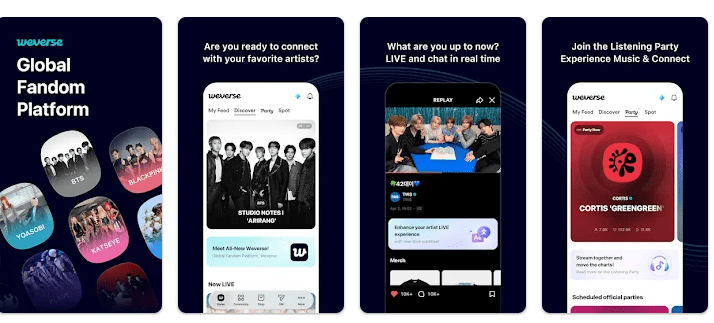
- Artist Communities: You can follow your favorite artists and read their posts. Fans can also like and comment on posts.
- Weverse LIVE: The app lets fans watch artists stream live. You can also send chat messages and hearts while a live stream is running.
- Automatic Translation: Posts and comments can be translated into a selected language. This is useful when artists or fans post in another language.
- Media Content: Weverse has official videos and exclusive media with subtitles. Some content and benefits are available only to official membership users.
- Listening Parties: You can connect a supported music streaming service and listen together with other fans. The app also lets users collect badges from community activities and missions.
Storage & Privacy Details
The current Weverse version 3.16.1 is listed by APKMirror at 103.72 MB. Another current package listing shows about 93 MB, so the download size can differ by package and device.
The final storage used on a phone can be higher after updates, cached images, videos, and other downloaded content. Weverse is mainly an online service, so its main feed, LIVE streams, comments, and media need an internet connection.
Google Play says Weverse does not share data with third parties. It may collect personal and financial information plus other data, encrypts data during transfer, and allows users to request deletion.
Required access includes device and app activity and device ID. Optional access can include camera, microphone, nearby devices, photos and media, location, and notifications, depending on the feature you use.
Alternative Apps
Weverse can be compared with fan platforms such as Bubble and Fancafe-style community apps. Weverse puts artist communities, LIVE streams, media, translation, and fan activity together. Its free app gives access to many features, while some content and benefits need official memberships or paid services.
Strengths and Weaknesses
Pros:
- Large artist community selection.
- LIVE streams and replay content.
- Automatic translation.
- Subtitled media.
- Free basic app access.
Cons:
- Video can use more battery.
- Cached media can increase storage use.
- Some content needs membership.
- Main features need internet.
- Older Android versions are no longer supported.
Who Should Get This App?
Best Fit:
- Fans who want artist posts and LIVE streams in one app.
- Users who like fan communities and exclusive media.
Worst Fit:
- People with very little phone storage.
- Users who need an app that works mainly offline.
Common User Questions
Is Weverse free to use?
Yes, the app is free to download from Google Play. Some official membership content and services can cost extra.
Can I watch artists live on Weverse?
Yes, Weverse has a LIVE feature for real-time artist streams. Fans can also send chat messages and hearts during supported streams.
Does Weverse support translation?
Yes, the app provides automatic translation for posts and comments. This helps fans read content written in another language.
Offzack Verdict
After two days of regular Redmi use, Weverse worked well for checking fan posts, moving through menus, and watching content. It is a good pick for fans who want artist communities and LIVE streams, but video use can increase battery and storage needs.
Download Weverse App From Google Play Store
Final Scorecard
Ease of Use: ★★★★☆ — The main community and media sections are easy to reach.
Performance: ★★★★☆ — Regular browsing is smooth, while video and LIVE content can need more phone resources.
Features: ★★★★★ — Communities, LIVE, translation, media, listening parties, and badges give fans many useful tools.
Privacy & Safety: ★★★★☆ — Google Play lists encryption and deletion requests, with optional permissions for several features.
Value for Money: ★★★★☆ — Many basic features are free, while some content and benefits require paid membership.
Overall Rating: ★★★★☆ — Weverse is a strong choice for fans who want artist content, live streams, and fan communities in one Android app.