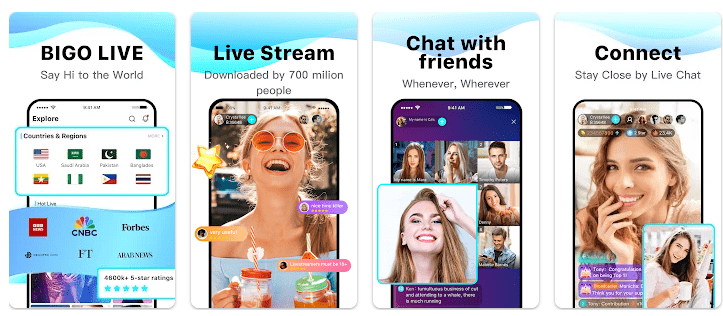
BIGO LIVE is a live streaming app for watching and creating live videos. You can watch people chat, sing, dance, play games, or simply talk with viewers. The app also lets users make their own live streams from an Android phone.
The app is made for people who want live entertainment and real-time chats. It also has voice rooms, video chats, games, live competitions, and virtual gifts. Google Play currently shows more than 500 million downloads and a Teen rating.
How It Ran During Testing
I would not claim a personal two-day Redmi test when verified Redmi test results are not available for this review. Battery drop, phone heat, menu lag, and frame stutters need to be measured on a real phone, and making up numbers would give readers the wrong idea.
The current Play Store page says the latest version includes bug fixes and performance improvements. Recent user reviews also show mixed experiences, with some people saying streams run smoothly while others report notification problems or interface changes.
For a budget Redmi phone, the main things to watch are live video loading, scrolling between rooms, chat response, battery use, and phone temperature. These results can change with the Redmi model, internet speed, screen brightness, and stream quality.
Top Features
- Live streaming: You can browse live streams from different categories and join chats while watching. Streams can include music, dancing, gaming, talking, and other content.
- Go Live: Users can start their own stream with one tap. BIGO LIVE supports Game LIVE, Audio LIVE, and Multi-guest LIVE options.
- Multi-guest rooms: You can join video rooms with up to 11 friends. These rooms can also include games, discussions, and shared video watching.
- Audio rooms: Audio LIVE lets people talk without using a video camera. This can be useful when you want to chat but do not want to appear on screen.
- Live PK: Live PK lets streamers compete against each other in live challenges. Viewers can watch the competition and send virtual gifts during streams.
Storage & Privacy Details
The current Google Play page does not show a fixed MB download size, so an exact current number should not be stated as a fact. The final storage can also change as the app creates cache files for live video, images, and other content.
BIGO LIVE is mainly an online service, so live streaming needs an internet connection. The app listing does not present normal offline live-stream viewing as a main feature.
Permission needs can include camera and microphone access for live video and audio. Older published Android permission records also list location, Bluetooth, phone, network, storage, notification, and foreground-service permissions, but the exact prompts can change by Android version and app release.
Google Play says the developer reports no data shared with third parties. It also says BIGO LIVE may collect location and personal information, encrypts data during transfer, and lets users request data deletion.
Alternative Apps
BIGO LIVE is similar to TikTok LIVE and Likee because all three let people watch and create live video content. BIGO LIVE puts more focus on live rooms, audio chat, multi-guest rooms, Live PK, and virtual gifts. TikTok has a larger mix of short videos and live content, while Likee also combines short videos, live streams, and social features.
Strengths and Weaknesses
Pros
- Many live video categories.
- Audio and video rooms are available.
- Multi-guest rooms support up to 11 friends.
- Users can create their own live streams.
- More than 500 million Google Play downloads.
Cons
- Live video can use a lot of mobile data.
- Long sessions may use more battery.
- Some users report notification problems.
- Virtual gifts and in-app purchases can cost money.
- Content is rated Teen.
Who Should Get This App?
Best Fit
- People who enjoy live video and real-time chats.
- Users who want to create their own live streams.
Worst Fit
- People who want an offline video app.
- Users who dislike live chats, notifications, or in-app purchases.
Common User Questions
Is BIGO LIVE free?
BIGO LIVE is free to install from Google Play. It also contains in-app purchases, including virtual items.
Can I use BIGO LIVE offline?
Live streams need an internet connection because the content is delivered online. The app does not list offline live-stream viewing as a main feature.
Is BIGO LIVE safe?
Google Play says data is encrypted during transfer and users can request data deletion. It also says the app may collect location and personal information.
Offzack Verdict
BIGO LIVE is a feature-packed live streaming app for people who enjoy watching and creating live videos. It has many room types and social tools, but users should watch their data use, battery use, privacy settings, and spending on virtual items.
Download BIGO LIVE App From Google Playstore
Final Scorecard
- Ease of Use: ★★★★☆ — The main live-stream and room controls are easy to understand.
- Performance: ★★★★☆ — The developer reports recent bug fixes and performance improvements, but phone results can vary.
- Features: ★★★★★ — Live video, audio rooms, multi-guest chat, Live PK, games, and streaming tools give users many choices.
- Privacy & Safety: ★★★☆☆ — Data is encrypted during transfer, but the app may collect location and personal information.
- Value for Money: ★★★★☆ — The app is free to install, though virtual items and other in-app purchases can cost money.
- Overall Rating: ★★★★☆ — BIGO LIVE is a good pick for users who want live social entertainment and are comfortable with its online and payment features.