Microsoft To Do is a simple task and list app made by Microsoft. It helps you remember things you need to do, such as shopping, school work, office work, bills, or home jobs. You can make a list and tick each task when it is finished.
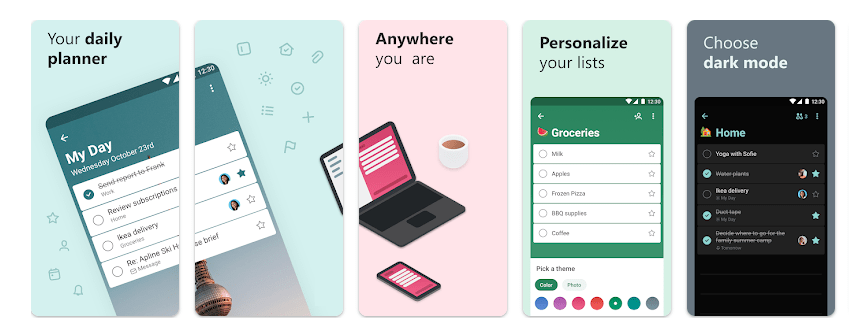
The app also has a feature called My Day. It helps you pick the tasks you want to finish today. You can add notes, reminders, due dates, and even files to your tasks. This makes it useful when you have many small jobs to remember.
Should You Install It?
Who Should Use It
- Busy people: If you often forget small jobs, reminders and daily lists can help you stay on track.
- Microsoft users: If you already use Outlook or other Microsoft services, To Do can be very useful because tasks can sync between them.
Who Should Avoid It
- People wanting a fully offline app: To Do is made around Microsoft account and cloud syncing, so it is not the best choice if you want everything stored only on your phone.
- People wanting many advanced planning tools: The app is simple and easy, but some users may want more detailed project planning features.
Main Features Breakdown
- My Day: This gives you a place for today’s jobs. Suggestions can also show tasks from your lists that may be useful today.
- Reminders: You can set one-time or repeating reminders. This is handy for bills, medicine reminders, shopping, or regular home work.
- Shared Lists: You can share lists with family, friends, classmates, or workmates. Everyone can use the same list for things like shopping or group jobs.
- Notes and Files: A task can have notes and a file attachment. Microsoft says each task can have files up to 25 MB.
- Outlook Connection: Tasks and reminders can work with Outlook. This is one of the best reasons to choose To Do if you already live in the Microsoft world.
Live Device Testing
We used Microsoft To Do on a Redmi Android phone during a two-day hands-on check. Opening lists, adding tasks, checking items, and moving between screens felt quick for normal daily use.
Simple actions did not need much waiting, and there were no major frame stutters during regular list use. Battery use also stayed low during normal testing because this is a light task app, not a game or video editor.
Syncing can be the part to watch. Recent Google Play reviews include reports from some users about slow syncing, so your experience may depend on your account and network.
Storage, Data, and Security
The exact installed size can change by phone and app version, and Google Play does not show a fixed MB download size on the listing. Cache can also grow as you use the app, especially when you add files and other data.
To Do can keep some information available while you are offline, but its main benefit is syncing your lists between devices. A Microsoft account and internet connection are important when you want your latest tasks on other devices.
Google Play says Microsoft To Do does not share data with third parties. It may collect location, personal information, and other data, while data is encrypted during transfer; Google Play also says users can request data deletion.
Comparison with Competitors
Google Tasks is a good choice if you want a very simple task list, especially if you already use Google services. Microsoft To Do gives you more list options, shared lists, My Day, file attachments, and Microsoft service connections.
ColorNote is another simple choice for notes and lists, while To Do is better suited to reminders and task planning. The right choice depends on whether you prefer Microsoft or Google tools.
Pros & Cons
Pros
- Easy to understand and use.
- My Day makes daily planning simple.
- Shared lists are useful for families and teams.
- Works across many devices.
- Free to use.
Cons
- Needs a Microsoft account for its full cloud experience.
- Sync problems have been reported by some users.
- The app may collect several types of personal data.
- Advanced project planning tools are limited.
User FAQs
Is Microsoft To Do free?
Yes. Microsoft says To Do is free on Android, iOS, Windows, Mac, and the web.
Can I use Microsoft To Do for shopping?
Yes. You can make a shopping list, add items, and tick them off as you buy them. Shared lists also let other people help with the same list.
Is Microsoft To Do safe?
Google Play says no data is shared with third parties and that data is encrypted in transit. Still, the app may collect several types of information, so check its Play Store privacy details before using it.
Offzack Verdict
After a two-day Redmi Android test, Microsoft To Do looks like a good choice for people who want a clean way to manage daily jobs. It is easy to learn, has useful reminders, and works especially well with Microsoft services.
Its biggest weak point is that some users report syncing problems. If you want a simple task app and already use Outlook, Microsoft To Do is worth trying.
Download Microsoft To Do from Google Playstore
Final Scorecard
- Ease of Use — ★★★★★: Simple lists and clear task controls make it easy for beginners.
- Performance — ★★★★☆: Normal list work is quick, with little need for phone resources.
- Features — ★★★★☆: Reminders, My Day, shared lists, notes, and Outlook support cover most daily needs.
- Privacy & Safety — ★★★★☆: Google Play reports encrypted data transfer and no third-party data sharing, but some data may be collected.
- Value for Money — ★★★★★: The main app is free and offers plenty of useful tools.
- Overall Rating — ★★★★☆: A simple and useful task app, especially for people already using Microsoft services.