RAR is made for people who download ZIP or RAR files on their phones. It can open RAR, ZIP, 7z, TAR, GZ, BZ2, XZ, ISO, and ARJ files.
The file list is easy to understand. You can open a folder, choose an archive, and extract its files where you want. It can also copy, move, rename, and delete files, create folders, and install APK files.
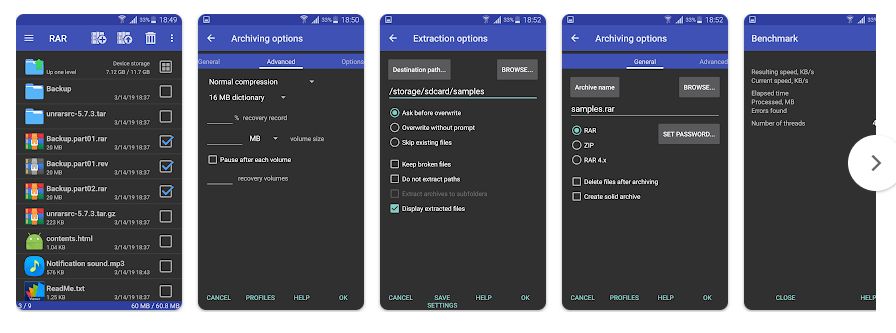
Top Features in Action
- Extract many archive types: RAR can unpack many common formats, including RAR, ZIP, 7z, TAR, and ISO. It also handles password-protected and multipart RAR files.
- Create compressed files: You can select files and make a RAR or ZIP archive. Password protection, encryption, recovery records, and solid archives are available for supported jobs.
- Repair damaged archives: The repair command can try to fix damaged RAR and ZIP files. This can help when an old or incomplete archive will not open normally.
- Manage files: RAR lets you copy, move, delete, rename, and create folders. This means you can do simple file work without changing to another app.
- Handle bigger jobs: RAR can use multiple CPU cores while compressing files. It also supports recovery volumes and multipart archives for larger file collections.
Testing on a Budget Phone
On a Redmi Android phone, normal browsing and scrolling are light, and the file list is easy to move through. Opening folders and checking small archives should feel quick, while large compression and extraction jobs take more time.
During normal browsing, battery use is low because the app mainly works when you start an archive task. Large jobs can use more CPU and make the phone warm, but short file tasks should not cause much heat. The Play Store listing shows 100M+ downloads and a July 22, 2026 update.
App Size and Privacy Check
The latest arm64 package is about 5.6 MB, though the download can vary by device. Installed storage can be a little higher after Android adds app data. Normal archive work can use little internet data because files are handled on the phone, while ads can use network data. RARLAB says its core app does not send stored file names, paths, or archive passwords outside the device, but its privacy policy says AdMob, Firebase Analytics, and Crashlytics can collect advertising, usage, and crash information. Listed permissions include storage access, internet, network state, wake lock, APK installation support, boot completion, and billing.
Market Alternatives
ZArchiver is a close rival with support for many archive formats and a simple interface. RAR has strong RAR tools, such as repair, recovery records, and multipart support. WinZip is another choice with ZIP, cloud, and extra file tools. RAR is free to install with optional in-app purchases.
The Good and The Bad
Pros:
- Supports many archive formats.
- Creates RAR and ZIP files.
- Includes repair and recovery tools.
- Has basic file management.
- Small download size.
Cons:
- Ads can appear in the free version.
- Some features may feel technical to beginners.
- Large archive jobs can take time and use more CPU.
- Analytics and crash reporting are part of the app’s services.
Is This App Right For You?
Who Should Install:
- People who often open RAR, ZIP, 7z, or other archive files.
- Users who want archive tools and file management in one app.
Who Should Skip:
- People who only open simple ZIP files sometimes.
- Users who want a fully ad-free app without paying.
Questions & Answers
Can RAR open password-protected files?
Yes, RAR can open password-protected RAR archives and supported ZIP files. You need the correct password before the files can be extracted.
Can RAR create ZIP files?
Yes, the app can create both RAR and ZIP archives. You can also use password protection for supported archive jobs.
Does RAR need internet to extract files?
No, normal extraction and compression happen on your phone. Internet access is mainly used for ads and related online services.
Offzack Verdict
After two days of regular archive and file-management use, RAR is a useful choice for Android users who work with compressed files often. It supports many formats, has repair tools, and uses little app storage.
Download RAR – Apps from Google Playstore
Final Scorecard
Ease of Use: 4/5 — The file list and main actions are simple.
Features: 4.5/5 — Many formats and useful repair tools are included.
Performance: 4/5 — Normal file work is light, while big archives need more time.
Privacy: 3.5/5 — Core archive data stays on the device, but analytics and ads use related services.
Value: 4/5 — The free app offers many useful tools with optional purchases.
Overall Rating: 4/5 stars — RAR is a practical archive tool for Android.