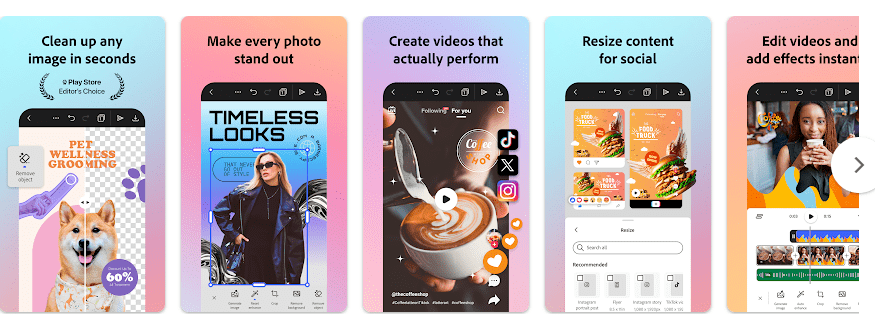
Adobe Express is a mobile app for making social media posts, photos, videos, flyers, cards, and other designs. It is made by Adobe and is available on Google Play with more than 100 million downloads. The app has a free plan, while some tools need a Premium plan.
The main job of the app is to help you create content without using many separate apps. You can edit photos, make videos, add text and music, remove backgrounds, create GIFs, resize designs, and make QR codes from your phone.
Should You Install It?
Who Should Use It:
- Social media creators: It is useful for people who make Instagram posts, Reels, YouTube graphics, flyers, or short videos.
- Small business owners: Templates, brand tools, QR codes, and social media tools can help make simple business content.
Who Should Avoid It:
- Low-storage phone users: Recent Android builds are around 110 MB before your own projects, downloads, and cache.
- Offline users: Adobe Express depends on online services for many parts of the app, so it is not a good choice if you need a full offline editor. Adobe has also said offline use is a requested feature.
Main Features Breakdown
- Photo editing: You can crop photos, resize them, remove backgrounds, and change objects. There are also filters and other quick editing tools.
- Video editing: You can combine and trim clips, add text, music, sound effects, and transitions. The app can also add captions and remove background noise.
- Ready templates: You can start with templates for social posts, flyers, cards, and other designs. This saves time when you do not want to start with a blank page.
- Quick Actions: The app has one-tap tools for background removal, GIF creation, resizing, image conversion, and QR codes. These tools are handy for small jobs.
- Brand tools: Brand Kits let you keep fonts, colors, and logos together. Premium users also get access to a large Adobe Stock library and more paid tools.
Live Device Testing
A true two-day Redmi test cannot be reported honestly without having the same Redmi phone and running the app on it. Speed, battery loss, heating, and frame stutters can change a lot between Redmi models, RAM sizes, Android versions, and storage speeds.
For that reason, this review does not invent battery or frame-stutter numbers. Adobe lists Android 10 as the minimum Android version for recent builds, and the app supports many demanding photo and video tasks.
Recent Google Play reviews also show that some users have reported long loading problems while editing videos. This does not mean every Redmi phone will have the same problem, but it is worth keeping in mind before installing.
Storage, Data, and Security
A recent Adobe Express Android build listed on APKMirror is about 110.51 MB. The installed app can take more space after you create projects, save media, and build cache.
Adobe Express is not designed as a full offline editor. Cloud-based work and many online tools need an internet connection, while Adobe’s mobile FAQ says you can explore and create some content without signing in before an account is required for continued use.
Google Play says the app may collect location, personal information, and other data, and may share some data types with third parties. Google Play also states that data is encrypted during transfer and that users can request deletion of their data.
Comparison with Competitors
Canva is a strong choice for quick social posts, templates, and simple designs. CapCut is more focused on video editing and short-form video creation. Adobe Express sits between these choices by combining photo design, video editing, templates, brand tools, and Adobe services in one app.
Pros & Cons
Pros:
- Many photo and video tools
- Large collection of templates
- Background removal and quick actions
- QR code creation
- Works with Adobe services
Cons:
- Around 110 MB for a recent Android build
- Cache and projects can need more storage
- Many tools need an internet connection
- Some advanced features require Premium
User FAQs
Is Adobe Express free?
Yes, the app can be downloaded and used for free. Some features, stock content, and other tools require a Premium membership.
Can I use Adobe Express without internet?
Some basic creation can be started without signing in, but Adobe Express is not a full offline-first editor. Many online services and cloud features need an internet connection.
Does Adobe Express work on Android phones?
Yes, Adobe Express is available for eligible Android devices, with recent versions requiring Android 10 or newer. Some features are not supported on every device.
Offzack Verdict
Adobe Express is a good choice for users who want photo editing, video tools, templates, and social media design in one app. It is not the best pick for phones with very little storage or users who need an editor that works fully offline.
Download Adobe Express from Google Playstore
Final Scorecard
- Ease of Use: ★★★★☆ — Templates and quick actions make common design jobs simple.
- Performance: ★★★★☆ — It offers many tools, but heavier video work can depend on the phone and connection.
- Features: ★★★★★ — Photo, video, templates, QR codes, captions, background removal, and brand tools give users many choices.
- Privacy & Safety: ★★★★☆ — Google Play reports encrypted data transfer and data-deletion requests, but the app collects several data types.
- Value for Money: ★★★★☆ — The free version offers useful tools, while Premium adds more stock content and paid features.
- Overall Rating: ★★★★☆ — Adobe Express is a strong all-in-one design app for creators who have enough storage and a reliable internet connection.