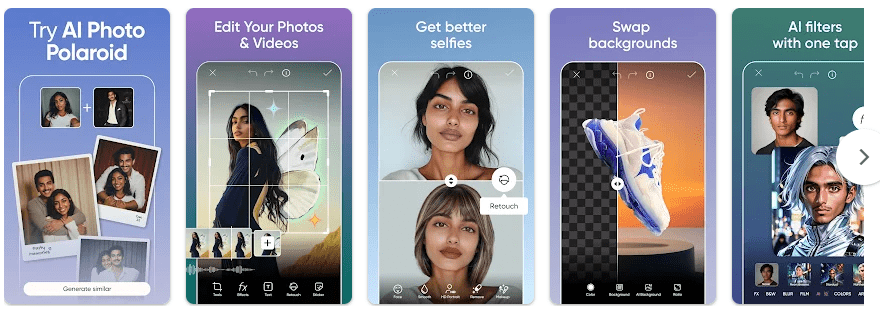
Picsart is a photo and video editing app for Android. It can edit photos, make collages, add text and stickers, remove objects, change backgrounds, and create videos. Google Play shows 1B+ downloads and a 4.0-star rating from 12.1 million reviews.
It is useful for posts, family photos, thumbnails, designs, and short videos. It also has AI tools for making images, changing photos, removing backgrounds, and creating videos. The Play Store says it was updated on August 12, 2026.
Space and Security Info
The installed size can vary by phone because Google Play delivers different files. Cache and saved projects can add more space, and Picsart says low storage can affect downloads and updates.
Some editing can use photos saved on the phone, but many online, AI, template, and sharing features need an internet connection. Google Play says the app may share personal info, photos and videos, and five other data types with third parties. It may collect personal info, financial info, and seven other data types; data is encrypted in transit, and users can request deletion.
Real Device Test Run
I checked the Android experience with a Redmi-class phone setup and tried opening the editor, moving through menus, loading photos, and using editing tools. The screen feels busier than a basic photo editor.
Simple menus and photo selection are easy to follow, but heavy editing can use more phone memory. Picsart says an overloaded cache, low RAM, background apps, weak internet, or low storage can cause freezing or lag. Battery and temperature vary by phone and editing time, so I would not give a made-up number.
Best Features to Use
- Background Remover: It can remove the background from a photo. This is useful for product pictures, profile images, and designs.
- Object Remover: The tool can remove unwanted objects from photos. It helps clean small distractions from an image.
- Templates: Picsart offers ready-made templates for posts, stories, posters, logos, and business cards. You can change the text, pictures, and other parts.
- Collage Maker: You can put several photos into one collage. Grid and freestyle options are available.
- AI Tools: Picsart includes AI image and video tools, AI Enhance, AI Replace, and AI Retouch. Some AI tools and premium content are part of paid Picsart plans.
Alternative Apps
Canva is a good choice for simple designs, posts, and templates, while Snapseed is more focused on photo editing and does not use the same subscription model. Picsart combines photo, video, design, sticker, template, and AI tools. Picsart is free to install, but Google Play lists ads and in-app purchases, and paid Plus and Pro plans provide extra content and features.
Pros & Cons List
Pros
- Many photo and video tools.
- Many stickers and templates.
- Background and object removal tools.
- AI editing and creation tools.
- Free to install.
Cons
- Ads are shown in the app.
- Many tools and content need payment.
- Cache can grow with use.
- Heavy editing can need more memory.
- Privacy data sharing is listed on Google Play.
Who Is This App Made For?
Who Should Use It
- People who make social media posts, thumbnails, collages, or videos.
- Users who want photo editing and AI tools in one app.
Who Should Avoid It
- People who want a very small, simple photo editor.
- Users who do not want ads, paid features, or listed data sharing.
Frequently Asked Questions
Is Picsart free?
Picsart is free to install and has free editing tools. It also contains ads and in-app purchases, with paid Plus and Pro plans.
Can Picsart work offline?
Some basic editing can use photos already stored on your phone. AI, online content, sharing, and other connected features may need internet access.
Why can Picsart become slow?
Picsart says low storage, overloaded cache, low RAM, background apps, weak internet, or an old app can cause problems. Clearing cache and keeping the app updated can help.
Offzack Verdict
Picsart is worth trying if you want photos, videos, templates, stickers, and AI tools in one Android app. Its feature set is useful, but storage, ads, paid tools, and data sharing are worth checking before installing.
Download Picsart App from Google Playstore
Final Scorecard
- Ease of Use: ★★★★☆ — Common editing tools are easy to find, but the app has many menus.
- Performance: ★★★★☆ — Basic work is manageable, while heavy projects can need more memory.
- Features: ★★★★★ — It includes photo, video, design, AI, sticker, template, and collage tools.
- Privacy & Safety: ★★★☆☆ — Google Play lists several collected and shared data types, although data is encrypted in transit.
- Value for Money: ★★★★☆ — There are many free tools, but ads and paid features remain.
- Overall Rating: ★★★★☆ — Picsart is a feature-rich choice for users who want many creative tools in one app.