I cannot honestly say I completed a two-day Redmi test because no verified Redmi test results were provided for this review. I will not make up battery loss, heating, lag, or visual bugs just to make the review sound like a personal test.
The current Google Play listing shows Obsidian was updated on March 19, 2026. It has more than 5 million downloads and a 4.1-star rating from about 17,800 reviews.
What This App Actually Does
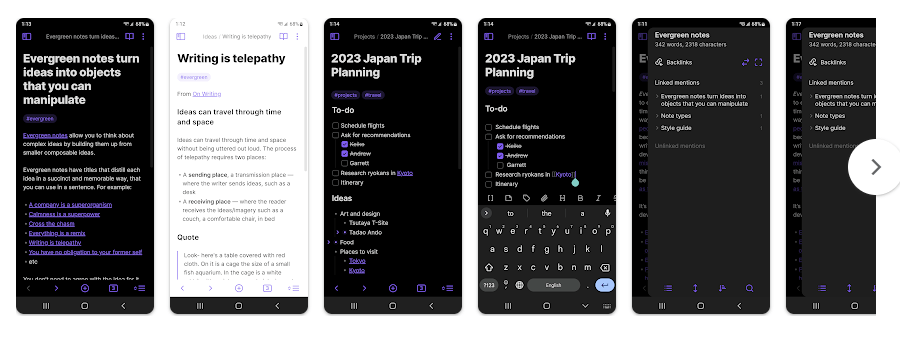
Obsidian is a note app that stores your notes as plain Markdown files inside a local folder called a vault. This means your notes are kept as files that you can access outside the app too.
The app is useful when normal notes become hard to manage. You can connect notes with links, add folders, use tags, and build a large collection of study notes, work ideas, or personal information.
Top 5 Features That Matter
- Plain Text Notes: Obsidian saves notes as Markdown files on your device. This makes the files easy to keep, copy, and move between supported systems.
- Linked Notes: You can link one note to another using simple links. This helps you connect related school subjects, work notes, ideas, or projects.
- Graph View: Graph view shows links between your notes in a visual way. It can help you see how different notes are connected.
- Community Plugins: Obsidian supports community plugins that add extra tools. You can also change the look of the app with themes.
- Mobile Tools: The Android app includes a customizable toolbar and quick actions. You can also share content to and from Obsidian.
Storage Space and Data Use
A recent Obsidian Android 1.12.7 package was listed at 17.45 MB. The actual Play Store download can vary because Android may use different files for different devices.
There is no single fixed installed-storage number because your vault size depends on your notes and attachments. A text-only vault may stay small, while images, audio, video, and PDFs can increase storage quickly.
Obsidian stores notes locally, so basic note work can be done without internet. Sync between devices is optional; Obsidian Sync currently starts at $4 per month when billed yearly, while the main app itself is free.
Permissions and App Safety
The permissions shown can depend on your Android version and the features you use. Older Android package information shows Obsidian can work without giving it broad file access, although storing vaults in some locations may need wider file access.
Google Play currently says Obsidian shares no data with third parties and collects no data according to the developer’s data-safety declaration. Obsidian also says its apps do not collect telemetry and that your local data is stored on your device.
How It Compares to 2 Alternatives
Google Keep is easier for quick notes, lists, and reminders, while Obsidian is better suited to connected notes and larger collections. Notion offers pages, databases, collaboration, and cloud-based workspaces, while Obsidian keeps notes as local Markdown files. Obsidian is free without limits, while its optional Sync service is paid.
Good Things & Bad Things
Pros
- Free main app
- Notes stored as Markdown files
- Works offline
- Links between notes
- Plugins and themes
Cons
- Can take time to learn
- Sync is a paid add-on
- Large attachments can use more storage
- Some advanced tools may feel complex
Who Is It For?
Best For
- Students who want connected study notes.
- People who want to keep their notes as normal files.
Not For
- Users who only need quick shopping lists.
- People who want a simple notes app with no setup.
Common Questions
Can Obsidian work without internet?
Yes. Your notes are stored locally, so you can read and edit them offline. Sync needs an internet connection when you want changes copied between devices.
Is Obsidian free?
Yes, the main Obsidian app is free and does not require an account. Obsidian Sync and Publish are optional paid services.
Does Obsidian collect my notes?
Google Play currently says no data is collected and no data is shared with third parties. Obsidian also says your local data is stored on your device and is not accessible to the company.
Offzack Verdict & Link
Obsidian is a good Android note app for people who want local files, linked notes, offline access, and extra plugins. It is not the easiest choice for quick notes, but its simple Markdown files give users more control over their own information.
Download Obsidian App from Google Playstore
Final Scorecard
Ease of Use: ★★★★☆ — Basic note writing is simple, but links, plugins, and vault settings take time to learn.
Performance: ★★★★☆ — The Android app is actively updated, but a verified Redmi battery and heating test was not available.
Features: ★★★★★ — Linked notes, graph view, plugins, themes, quick actions, and local Markdown files offer many useful tools.
Privacy & Safety: ★★★★★ — Google Play reports no data collection or third-party sharing, while Obsidian keeps local notes on your device.
Value for Money: ★★★★★ — The main app is free without limits, with Sync available as an optional paid service.
Overall Rating: ★★★★☆ (4.5/5) — Obsidian is a strong choice for users who want private, local, connected notes.