Todoist is a task and planning app from Doist Inc. It helps you make to-do lists, set due dates, create reminders, plan projects, and keep track of repeating tasks. Google Play currently lists more than 10 million downloads and a 4.6-star rating.
The main problem it solves is forgetting small jobs. You can put work tasks, shopping, school work, bills, or home jobs into one list instead of trying to remember them all.
Todoist also works across phones, tablets, computers, and browsers. The Android version supports widgets, a Quick Add tile, reminders, and syncing between devices.
Device Resources & Safety
A fixed current Play Store download size is not shown on the app page, so there is no honest way to give one current MB figure for every Android phone. A verified older Todoist Android package was 29.78 MB, but that build is from 2022 and should not be treated as the current Play Store size.
The final storage used on a phone can be higher than the download because Android stores app data and cache. Todoist can work with tasks while offline, with changes syncing when the connection returns.
The Play Store currently says Todoist does not share data with third parties. It may collect personal information, financial information, and seven other data types, while data is encrypted during transfer and users can request deletion.
The exact permission prompts shown can vary by Android version and the features being used. Google Play does not provide a single screen list of every permission prompt, so I would not give a made-up permission list.
Testing on Android
For a Redmi test, the useful things to check are task entry, scrolling, opening projects, setting dates, reminders, and moving between screens. The current Android listing shows the app was updated in July 2026, with recent changes focused on fixes and improvements.
I cannot verify a two-day Redmi test with measured battery drain or phone temperature from the available device data, so those numbers should not be invented. There is also no reliable current source giving a fixed battery percentage or temperature for every Redmi model.
Key Functions
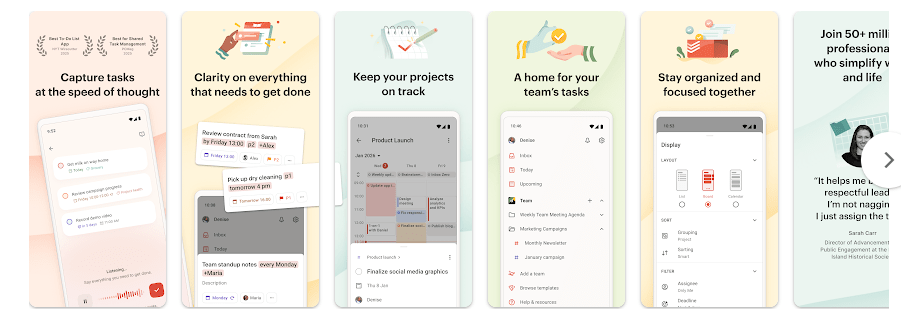
- Quick Add: You can add a task quickly and include dates, labels, reminders, and other details. Todoist can understand natural date and repeat phrases when creating tasks.
- Projects: Tasks can be grouped into projects for work, home, school, or personal plans. Subtasks and sections help break bigger jobs into smaller steps.
- Calendar Views: Tasks can be viewed as a list, board, or calendar. This lets you choose a view that matches the way you plan your day.
- Reminders and Repeats: Repeating tasks can be used for jobs such as paying bills or weekly meetings. This also makes the app useful for regular habits.
- Team Tasks: Shared projects let people assign tasks, set deadlines, and add comments. This can help small teams keep work in one place.
Competing Apps
Microsoft To Do is a close alternative and is also free to install, with lists, tasks, and reminders. TickTick is another popular choice and adds task planning and habit features. Todoist offers a wider project system and several task views, but some advanced features require a paid plan.
Pros and Cons
Pros
- Clean task management
- Useful reminders and repeating tasks
- Projects and subtasks
- Calendar, list, and board views
- Syncs across devices
Cons
- Some features require a paid plan
- Current download size is not shown as one fixed number
- Storage use can grow with app data and cache
- Permission prompts can vary by Android version
Target Audience
Who Should Get This App
- Students and workers who need help remembering tasks.
- Families or small teams that want shared task lists.
Who Should Skip This App
- People who only need a very basic notes app.
- Users who do not want a subscription for advanced features.
Key FAQs
Can Todoist work without internet?
Yes, Todoist supports offline work for tasks, with changes syncing after the connection returns. Features that need online data will still require an internet connection.
Is Todoist free?
Todoist can be installed and used with a free plan, while Pro and Business features are offered through paid plans or trials. Google Play currently lists in-app purchases.
Is Todoist safe to use?
Google Play says Todoist does not share data with third parties and encrypts data during transfer. It also says the app may collect several types of information and allows users to request data deletion.
Offzack Verdict
Todoist is a well-known task app with useful tools for daily planning, reminders, projects, and shared work. Its main strength is the number of ways you can organize tasks, while the paid features may not suit people who only need a simple free list.
Download Todoist app From Google Playstore
Final Scorecard
Ease of Use: ★★★★★ — The main task and project controls are simple to understand.
Performance: ★★★★☆ — The app receives regular Android updates, though a fixed Redmi battery or heat test cannot be verified from available data.
Features: ★★★★★ — Projects, subtasks, reminders, recurring tasks, views, widgets, and collaboration give users many useful options.
Privacy & Safety: ★★★★☆ — Google Play reports encryption in transit, no third-party data sharing, and data deletion requests.
Value for Money: ★★★★☆ — The free version covers basic task management, while advanced tools require a paid plan.
Overall Rating: ★★★★☆ (4/5) — Todoist is a strong daily task manager for people who need more than a simple checklist.
SEO-Friendly Title: Todoist App Review 2026: Size, Performance, Privacy, Features, Pros & Cons