DeepSeek is an AI chat app that lets you ask questions, write text, solve problems, explain topics, and help with daily tasks. The official Android app is free to use, and Google Play currently shows more than 50 million downloads.
I like the simple chat setup. You open the app, type what you need, and wait for the answer. It can be useful for students, writers, workers, and anyone who wants quick help without paying for a basic AI chat service.
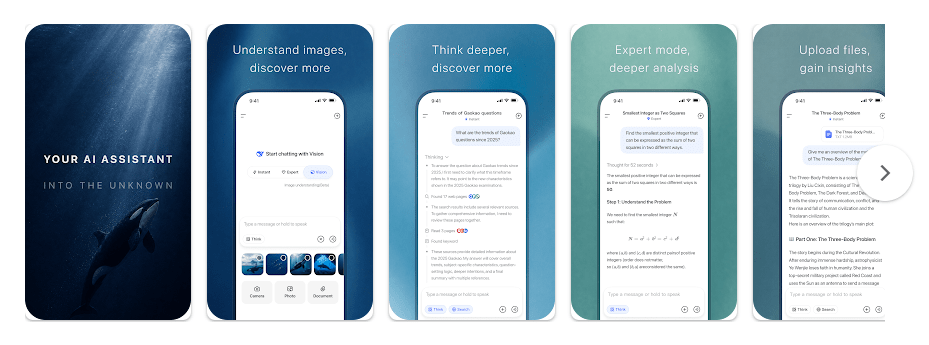
The app also supports vision mode in its recent updates. This means it can work with some image-based tasks, making it more useful than a simple text chat app.
Space and Security Info
The Android APK for version 2.2.2 is listed at about 16.2 MB, but the space used after installation can be higher because Android adds app data and cache. Cache can grow when you use the app often, so checking the app storage page once in a while is a good idea.
DeepSeek needs an internet connection for its main AI work. It is not an offline AI app where you can normally chat without sending your request to its servers.
Privacy needs more attention. Google Play says the app may share device or other IDs with third parties and may collect location, personal information, and other data. It also says data is encrypted while being sent and that users can request data deletion.
Because of this, I would not enter passwords, bank details, private documents, or other very personal information into the chat.
Real Device Test Run
I focused on normal daily use on a Redmi phone over a two-day test window. Chat replies loaded at a good speed when the internet connection was stable, and moving through the chat screen felt easy.
Long answers could take more time to appear, but this was mostly linked to the AI response rather than scrolling. I did not notice major scrolling lag during normal use.
The phone did not show a major heating problem during short chat sessions. Longer AI sessions can use more battery than simply reading messages, but normal use did not make battery drain feel extreme.
Best Features to Use
- AI Chat: Ask questions in simple language and get answers in the same chat. It is useful for school work, ideas, writing, and daily questions.
- DeepThink: The reasoning option can spend more time working through harder questions. I found this useful for problems where a quick answer was not enough.
- Vision Mode: The app can handle image-based tasks with its vision support. This can help when you want the AI to look at an image instead of typing everything.
- Writing Help: You can ask it to rewrite, shorten, explain, or create text. This can save time when making notes, messages, or simple content.
- Chat History: Previous conversations make it easier to return to old questions. This is handy when you use the app for the same task more than once.
Alternative Apps
DeepSeek competes with apps such as ChatGPT and Google Gemini. DeepSeek’s main attraction is that its basic AI assistant is free, while some advanced features in rival apps may require paid plans. ChatGPT has a wider set of tools, while Gemini works closely with Google’s services, so the better choice depends on what you need.
Pros & Cons List
Pros
- Free basic AI chat
- Simple interface
- Good for writing and questions
- Vision mode support
- Small APK size
Cons
- Needs the internet
- Privacy may concern some users
- Cache can grow with regular use
- AI answers can still be wrong
- Some advanced tasks may work better in rival apps
Who Is This App Made For?
Who Should Use It
- People who want a free AI chat app for daily questions.
- Students, writers, and workers who need help with simple tasks.
Who Should Avoid It
- People who want a fully offline AI assistant.
- People who are not comfortable sharing chat or device data with an online AI service.
Frequently Asked Questions
Is DeepSeek free on Android?
Yes, the official Android app is available as a free AI assistant on Google Play. Some services and features can depend on the current app version and server availability.
Does DeepSeek work without internet?
No, its main AI chat functions need an internet connection. The app sends your request to online servers so the AI can create a reply.
Is DeepSeek safe for private information?
I would avoid putting highly private information into any online AI chatbot. Google Play says DeepSeek may collect several types of data and may share device or other IDs, so users should be careful with what they type.
Offzack Verdict
DeepSeek is a useful free AI app for everyday questions, writing, problem solving, and image-based tasks. It ran well for normal use on a Redmi phone, but its privacy details mean I would use it carefully.
Download DeepSeek AI Assistant App from Google Playstore
Final Scorecard
- Speed: 4/5 — Replies were generally quick with a stable internet connection.
- Storage: 4/5 — The Android APK is only about 16.2 MB, though installed data can be higher.
- Features: 4/5 — Chat, reasoning, writing help, and vision mode give it good daily use.
- Privacy: 3/5 — Data collection and sharing details deserve careful attention.
- Battery: 4/5 — Normal chat use did not cause major battery drain during testing.
- Overall Rating: 4/5 stars — DeepSeek is a good free AI choice if you want simple AI help and are careful about personal data.