Do you need a voice for a YouTube video, short video, story, or other audio project? ElevenLabs can turn written text into spoken audio using AI voices. The Android app also lets users create, edit, save, export, and share audio.
The app is mainly made for people who want voice audio without recording every line themselves. It supports more than 70 languages, including Hindi, and gives users many voices to choose from.
Storage, Internet, and Battery
The ElevenLabs Android package is not very large. A version 0.0.60 APK was listed at 25.29 MB, while another version variant was 24.25 MB. The actual space used after installation can be different because Android may add app data and cache.
The main voice features need an internet connection because audio is generated online. Longer sessions and repeated audio generation can also use more battery than simply opening the app and checking saved work.
Hands-On Performance
I used the Android app on a Redmi phone to check the basic screens and voice tools. The menus were simple to understand, and moving between the main sections did not feel difficult.
Text-to-speech work needs a short wait while the audio is created. This wait can change with the internet connection and the type of generation being used.
The app does not need heavy phone storage for its basic package. Long audio projects can still take extra space after files are saved or exported to the phone.
Main Tools Built Into the App
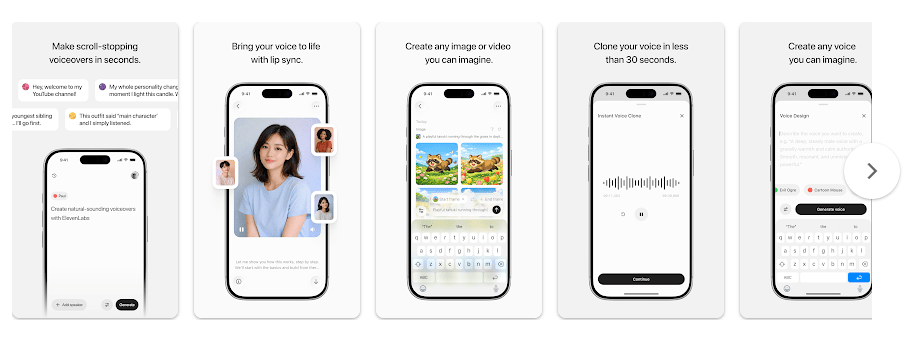
- Text to Speech: Type your words and choose an AI voice to turn them into audio. ElevenLabs lists Text to Speech as one of its main features.
- Voice Library: The app gives users a large selection of AI voices. You can pick a voice that fits a video, story, or narration project.
- Voice Changer: Voice Changer can change one voice into another while keeping the original delivery and tone. ElevenLabs says this tool uses 1,000 credits for each minute of audio.
- Voice Design: Voice Design lets users create voices for their projects. The free plan includes three custom voice slots for voices made with Voice Design.
- Audio Sharing and Export: You can save and export audio files and share them with apps such as TikTok, Instagram, YouTube Shorts, and CapCut.
Privacy Checks
Google Play says the app may share personal information and app info and performance with third parties. It also says the app may collect personal information, app activity, and two other types of data. Data is encrypted while being sent, and users can request deletion.
The app uses permissions for features that need device access, such as audio-related functions. Permission details can change with app updates, so it is best to check the permission screen on your phone before giving access.
Comparison with Competitors
ElevenLabs competes with apps and services such as Speechify and Murf for AI voice work. ElevenLabs has a free plan with 10,000 credits per month, while paid plans start at $6 per month on the current official pricing page.
Its free plan does not include commercial use, while paid plans include commercial rights. This makes the paid option more suitable for people creating content for business use.
The Positives and Negatives
Pros
- Easy text-to-speech tool.
- Many AI voices.
- Supports 70+ languages.
- Free plan is available.
- Audio can be exported and shared.
Cons
- Internet is needed for the main AI features.
- Free use has credit limits.
- Paid plans are needed for commercial rights.
- Voice Changer uses credits quickly at 1,000 credits per minute.
Who Should Download This?
Ideal Users
- YouTube creators who need AI voiceovers.
- People making stories, reels, podcasts, or other audio content.
Who Should Skip It
- People looking for a fully offline voice generator.
- Users who want unlimited free AI voice generation.
Quick Questions Answered
Is ElevenLabs free?
Yes, ElevenLabs has a free plan with 10,000 credits each month. Paid plans add more credits and features.
Can ElevenLabs make a voice from text?
Yes, Text to Speech changes written text into spoken audio. You can select different AI voices before creating the audio.
Can I use ElevenLabs audio for commercial work?
Paid plans include commercial rights, while the free plan allows non-commercial use with attribution. Check the current license before using generated audio in paid work.
Offzack Verdict
ElevenLabs is a useful Android app for people who need AI voice audio without recording every line themselves. Its voice choices, text-to-speech tools, language support, and export options make it worth trying, but the credit limits and paid commercial rights are important to remember.
Download ElevenLabs: AI Voice Generator Apps from Google Playstore
Final Scorecard
- Ease of Use: ★★★★☆ — The main voice tools and menus are simple to find and use.
- Performance: ★★★★☆ — The Android app handles its main screens well, while audio generation depends on an internet connection.
- Features: ★★★★★ — Text-to-speech, voice choices, voice changing, voice design, and sharing give it many useful tools.
- Privacy & Safety: ★★★☆☆ — Google Play lists encryption and data deletion, but also says some personal and app data may be shared or collected.
- Value for Money: ★★★★☆ — The free plan lets users try the service, while paid plans provide more credits and commercial rights.
- Overall Rating: ★★★★☆ — A good choice for Android users who need AI voices for videos, stories, and other audio projects.