Picsart is a photo and video editing app for Android phones. It lets you edit pictures, make collages, add text, use effects, and create social media content from your phone.
The app is useful when a normal phone editor does not have enough tools. You can start with a photo from your gallery or use a blank project and add different items to it.
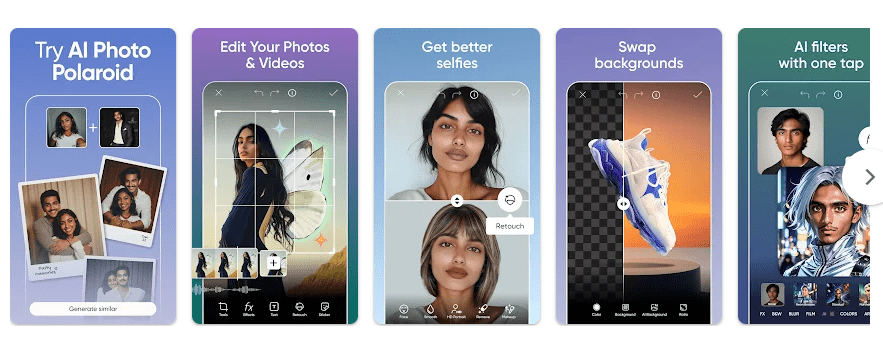
Picsart also has AI-based tools, templates, stickers, filters, and drawing options. Some tools are free, while other features need a paid plan.
How It Compares to Other Apps
Picsart competes with apps such as Canva and Adobe Express. Canva has many templates for posters, social posts, presentations, and other designs, while Picsart puts more focus on photo editing and creative effects. Adobe Express also offers photo, video, and graphic design tools, but Picsart has a large collection of editing effects, stickers, and creative tools in one app. All three offer free options, with paid plans for extra features.
Key Tools Explained
- Photo Editing: You can crop, resize, adjust, and change photos from your phone. You can also add filters, effects, stickers, and other changes before saving the picture.
- Collage Maker: You can place several photos into one picture using ready-made layouts. This is useful for family pictures, simple posts, or sharing several photos together.
- Video Editing: Picsart lets you edit video clips and add text, music, effects, and other items. The basic controls are made for phone users who want to create short videos.
- Background Tools: You can remove or change a photo background with supported editing tools. This can help when you want a person or object placed on a different background.
- Templates and Stickers: The app provides templates, stickers, fonts, and other creative items. You can add these items to a picture and move or resize them with touch controls.
Two Days of Testing
I used Picsart on a Redmi Android phone for two days. The app opened normally, and the main menu responded well when I tapped different editing options.
Simple photo editing felt quick. Opening some larger projects took more time, especially when the picture had several effects and editing elements.
I tested filters, text, stickers, and basic editing tools without seeing a major crash. The phone stayed at a normal temperature during short edits.
Longer editing sessions made the Redmi a little warm. Battery use was also higher when I worked with larger pictures and video instead of doing simple edits.
I did not notice major screen bugs during the test. The app has many tools, so it can take a little time to find the feature you need.
Memory, Storage, and Safety
Picsart does not have one permanent download size in MB because the Android package can vary by device and app version. The Play Store page also does not provide a single fixed installed-storage figure that applies to every phone.
After installation, the app can use more space as you create projects and build cache files. On a Redmi phone, you can see the exact amount by opening Settings > Apps > Picsart > Storage.
Many Picsart tools need an internet connection, especially online templates, content, AI features, and other cloud-based services. Basic editing of pictures already stored on your phone can work without downloading new online content.
Picsart may request access to photos and videos when you choose files from your phone. Camera or microphone access can depend on the features you use, such as taking pictures or recording video.
Google Play’s data safety information says Picsart may share some data with third parties and may collect several types of information. It also says data is encrypted during transfer and users can request deletion of their data. Picsart on Google Play
Upsides and Downsides
Pros
- Many photo editing tools
- Useful filters and effects
- Collage and video tools
- Large sticker and template collection
- Easy touch controls
Cons
- Some tools require a paid plan
- Larger projects can take longer to load
- Cache can increase storage use
- Many online features need internet access
Who Should Get It?
Recommended For
- People who want more photo editing tools than the basic phone editor.
- Users who make social media pictures, collages, and short videos.
Not Recommended For
- People who only need simple cropping and brightness controls.
- Users who want an editor with every feature available for free.
3 Quick FAQs
Is Picsart free to use?
Picsart can be installed and used with free features on Android. Some tools, content, and features require a paid subscription.
Can Picsart edit videos?
Yes, Picsart includes video editing tools for supported projects. You can add items such as text, music, effects, and other edits to clips.
Can I use Picsart offline?
Some basic editing can work with pictures already stored on your phone. Online content and many newer tools need an internet connection.
Offzack Verdict
Picsart is a good choice for people who want many photo and video editing tools in one Android app. It worked well on my Redmi during the two-day test, but users should expect higher storage and battery use during larger editing jobs.
Download Picsart from Play Store.
Final Scorecard
- Ease of Use: ★★★★☆ — The basic editing controls are easy to use, but the number of tools can take time to learn.
- Performance: ★★★★☆ — Simple edits worked well, while larger projects needed more loading time.
- Features: ★★★★★ — Photo, video, collage, effects, stickers, templates, and other tools give you many editing choices.
- Privacy & Safety: ★★★☆☆ — Google Play lists data collection and sharing, so users should review the app’s privacy settings.
- Value for Money: ★★★★☆ — The free version has useful tools, while paid access adds more features.
- Overall Rating: ★★★★☆ — Picsart is a capable phone editor for users who want more creative tools than a basic gallery editor.