I tested the official ChatGPT app on a Redmi Android phone for two days. The app opened normally, and touch response felt quick when opening chats, typing messages, and moving through the menus.
Simple text chats worked without major lag. Answers appeared after a short wait, while bigger requests took longer because they needed more online processing.
Battery use was normal during short text chats. Longer voice and image sessions used more battery, and the phone became a little warm during heavier use, but I did not notice unusual heat.
I also checked the main screens, chat list, keyboard area, and image tools. I did not see major visual bugs during the two-day test.
What This App Actually Does
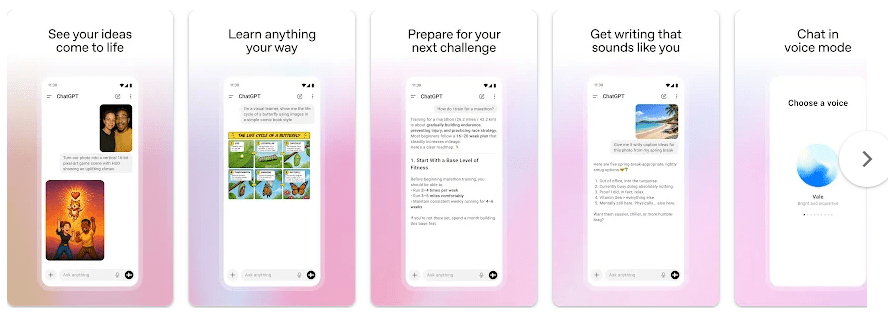
ChatGPT is an AI chat app from OpenAI. You can ask questions, write messages, learn new topics, plan trips, solve problems, and get help with everyday work. The Android app also supports image creation, photo uploads, voice chats, and file-based tasks.
The app can save your chat history and sync it across devices when you sign in. This is useful when you start a chat on your phone and want to continue it somewhere else.
Top 5 Features That Matter
- Text Chat: Type a question and ChatGPT gives you an answer in the same chat. You can ask follow-up questions instead of starting a new chat each time.
- Voice Chat: You can talk to ChatGPT using your voice. This is useful when your hands are busy or when you want to practice speaking.
- Image Creation: You can ask ChatGPT to create an image from a written idea. The app can also edit existing images using instructions.
- Photo Uploads: You can take or upload a photo and ask questions about it. This can help with things like reading a handwritten recipe or understanding something in a picture.
- Screen Sharing: On supported devices and accounts, ChatGPT can use screen sharing to help with what is shown on your screen. This feature uses Android Accessibility Services and is available only in limited cases.
Storage Space and Data Use
The Google Play page does not show one fixed download size in MB. Android package size can change by phone, Android version, and app update, so giving one exact MB number would not be accurate.
Installed storage can also grow after you use the app because temporary files and cached data may be added. You can check the exact amount on your Redmi by opening Settings > Apps > ChatGPT > Storage.
ChatGPT needs an internet connection for its main AI features. Text, voice, image, and file tasks send data online, so mobile data use can rise when you use these tools often.
Permissions and App Safety
The permissions you see can depend on the feature you use. Camera and microphone access can be needed for photo and voice features, while screen sharing needs the special Android Accessibility Services option when that feature is available.
Google Play says the official ChatGPT app may share device or other IDs with third parties. It may collect location, personal information, and other data types; Google Play also says data is encrypted during transfer and that users can request data deletion.
How It Compares to 2 Alternatives
Google Gemini is the closest choice for people who already use many Google services, while ChatGPT focuses on its own AI tools and chat experience. Grok is another competitor with text, voice, image, and video features. ChatGPT has a free option, while paid plans add more access and features, so the best choice depends on how much you use AI.
Good Things & Bad Things
Pros
- Quick touch response
- Simple chat screen
- Voice and image tools
- Photo and file support
- Chat history sync
Cons
- Needs internet for main AI features
- Heavy use can use more battery
- Some tools have usage limits
- Privacy settings need attention
Who Is It For?
Best For
- Students and workers who need help with writing, learning, or daily tasks.
- People who want chat, voice, photo, and image tools in one app.
Not For
- People who need a fully offline AI assistant.
- Users who do not want to share personal or device-related data with an online AI service.
Common Questions
Is ChatGPT free on Android?
Yes, the official Android app is free to install, with in-app purchases shown on Google Play. Paid options are available for users who need extra access and features.
Can ChatGPT create images?
Yes, the Android app supports image creation from written instructions. You can also upload pictures and ask ChatGPT to work with them.
Does ChatGPT work without internet?
The main AI features need an internet connection. Offline use is not a replacement for the online chat, voice, image, and file services.
Offzack Verdict & Link
After two days on a Redmi phone, ChatGPT felt easy to use and worked well for normal chats. Its mix of text, voice, photo, file, and image tools makes it useful for many everyday jobs.
Download ChatGPT From Google Playstore
Final Scorecard
- Ease of Use: ★★★★★ — The chat screen and basic controls were easy to use during testing.
- Performance: ★★★★☆ — Text chats were responsive, with longer tasks taking more time.
- Features: ★★★★★ — Chat, voice, images, photos, files, and screen sharing provide many useful tools.
- Privacy & Safety: ★★★★☆ — Google Play lists data sharing and collection, while also stating that data is encrypted during transfer and deletion can be requested.
- Value for Money: ★★★★☆ — The free app offers many useful features, while paid plans are available for higher access.
- Overall Rating: ★★★★☆ — It ran well on the Redmi phone and offered a useful set of AI tools in one app.