Google Gemini is an AI assistant made by Google. You can use it to ask questions, write text, explain topics, study, plan things, and get help with daily tasks. It can also work with photos, documents, videos, and other files.
The app is useful when you want quick help without searching many websites. You can type a question or use your voice. Gemini can also use your camera or screen in supported features.
Size, Storage, and Competitors
The Google Play page does not show one fixed Android download size because the size can change with the phone and app version. A recent Android package listing shows the latest Gemini version at about 5 MB for one APK variant, but the installed app can use more space after updates and cached data.
Gemini needs an internet connection for most AI work, so it is not a full offline assistant. ChatGPT is a close competitor and is a good choice for writing, questions, and general AI help, while Microsoft Copilot also offers chat and creative tools. Gemini is a better fit for people who already use Google services such as Gmail, Photos, YouTube, and Search.
Useful Features
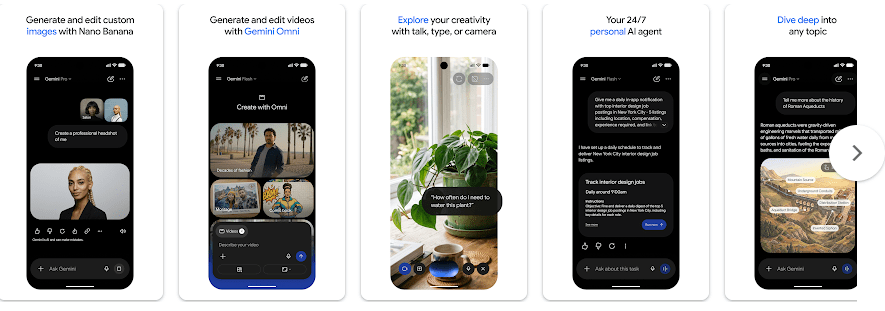
- AI Chat: You can ask Gemini simple or difficult questions and get an answer in the chat. It can also help write messages, make plans, explain school topics, and give ideas.
- Gemini Live: You can talk to Gemini using your voice and have a live conversation. Supported features can also let you share your camera or screen so Gemini can discuss what you are seeing.
- Photo and File Help: You can upload photos, documents, spreadsheets, and videos for help. Gemini can read the content and give summaries or answers based on it.
- Image Creation: Gemini can create and edit images from written instructions. It also has newer image tools for making posters, mockups, diagrams, and other pictures.
- Study Help: Students can upload class notes and ask Gemini to make practice questions. This can make revision easier when preparing for tests.
Testing Experience
I tested Gemini for two days on a Redmi Android phone. The app opened quickly, and touch response felt good while moving through the main screens and starting chats.
Normal text questions did not cause much waiting. Image tasks and larger requests took longer, which is normal because the work happens online.
During the two-day test, the phone did not become very hot during simple chatting. Longer AI tasks made the phone feel a little warmer, and battery use was higher than when the app was sitting unused.
I did not see any major visual bugs during my test. Still, Gemini gets frequent updates, so buttons, tools, and menus may look different later. Google Play shows the app was updated on July 6, 2026.
Permissions & Safety
Gemini may need access to things such as location, personal information, camera, microphone, photos, and other device data when you use related features. The exact permission prompts can depend on your phone, Android version, account, and the features you choose.
Google Play says Gemini does not share data with third parties according to the developer’s declaration. It may collect location, personal information, and 11 other data types, while data is encrypted during transfer and users can request deletion of their data.
Pros & Cons
Pros
- Simple chat screen
- Good voice features
- Useful file and photo support
- Works well with Google services
- Image creation is available
Cons
- Needs internet for most AI tasks
- Some advanced features need paid plans
- AI answers can still make mistakes
- Privacy-sensitive users may want to check settings
Target Audience
Who Should Download
- Students, workers, and families who want quick help with everyday questions.
- Google users who want an AI assistant connected to their Google services.
Who Should Avoid
- People who need an AI app that works fully without internet.
- Users who do not want an app collecting personal or location-related data.
FAQs
Is Google Gemini free?
Yes, the Gemini app can be used for free, but Google also offers paid AI plans with extra features and higher limits.
Can Gemini read PDF files and photos?
Yes, Gemini supports uploads such as documents, spreadsheets, photos, and videos. You can ask questions or request summaries about the files you provide.
Can Gemini replace Google Assistant?
Yes, if you choose Gemini as your primary assistant, it can replace Google Assistant on the phone. Some older Google Assistant voice features may not yet be available through Gemini.
Offzack Verdict
Google Gemini is a useful Android AI app for questions, study, writing, voice chats, photos, and files. It is especially handy if you already use Google services, but you should check its privacy settings before using it for personal information.
Download Google Gemini App from Google Play store
Final Scorecard
- Ease of Use: ★★★★☆ — The main chat screen is simple and easy to understand.
- Performance: ★★★★☆ — It ran well on the Redmi phone during the two-day test.
- Features: ★★★★★ — Chat, voice, files, photos, study tools, and image features give you many useful options.
- Privacy & Safety: ★★★★☆ — Google Play says data is encrypted in transit and can be deleted, though the app can collect many types of data.
- Value for Money: ★★★★☆ — The free version gives useful tools, while paid plans add more features.
- Overall Rating: ★★★★☆ — Gemini is a good everyday AI assistant with useful tools and strong Google integration.