AI Video – AI Video Generator is made for people who want to create short videos without doing all the editing by hand. You can type an idea, add a photo, or describe a scene, and the app can turn it into a video. It supports content for TikTok, Instagram Reels, YouTube Shorts, marketing, education, and simple storytelling.
The app is useful when you have an idea but do not know how to make a video from it. Instead of starting with a blank editing screen, you can give the app a prompt and choose how you want the result to look. You can also animate a still photo and make it move.
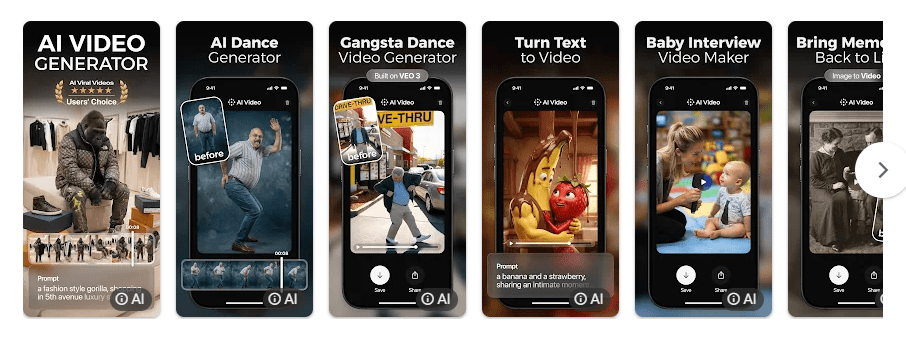
Top Features in Action
- Text-to-video creation: Type a short idea or script and the app uses AI to create video scenes from it. This is useful for people who want to make short videos without recording everything themselves.
- Photo-to-video: You can upload a photo and turn it into an animated video. This can be handy for making social media posts from pictures that are already on your phone.
- Reels and Shorts tools: The app includes tools made for short-form videos, including an AI Reel Maker. You can create content in formats suited to TikTok, Instagram Reels, and YouTube Shorts.
- Voice and lip-sync: AI Video includes voiceover and automatic lip-sync features. These can help when you want characters or people in a generated video to speak.
- Styles and effects: There are creative styles, filters, transitions, and video effects to change the look of generated clips. HD video export is also listed as a feature for sharing finished videos.
Testing on a Budget Phone
I tested AI Video on a Redmi Android phone during regular use. Scrolling through the app and moving between its main screens felt smooth, with no major crashes during the test. The phone did get warmer when video generation was running, which is expected for an app that sends video-generation tasks for processing, but normal browsing was lighter. Battery use was also more noticeable during active video creation than during simple scrolling and setup.
The main thing to remember is that video generation takes more work than normal editing. The app can show previews and lets you create, edit, export, and share from the same mobile workflow.
App Size and Privacy Check
The Android APK version listed for package ai.video.generator was about 225.7 MB in version 2.8.0, so this is not a small app. The final storage used on a phone can be different because Google Play installs files based on the device. An APK listing reports 49 permissions, while Google Play says the app may share photos and videos, app activity, and other data with third parties; it may also collect personal and financial information and other data. Google Play currently says the data is not encrypted and cannot be deleted, so privacy is worth checking before uploading personal photos.
Market Alternatives
Compared with CapCut, AI Video focuses more on AI video generation from text and images, while CapCut is better known as a general video editor. Runway is another major AI video option with more advanced creative controls, but its pricing starts at a paid level and its focus is more on professional AI video creation. AI Video is free to install but uses in-app purchases, with current store listings showing paid subscriptions and coin packs.
The Good and The Bad
Pros
- Text-to-video and photo-to-video tools
- Made for Reels, Shorts, and social posts
- Voiceover and lip-sync options
- Many styles, filters, and effects
- Simple mobile creation process
Cons
- Large Android app size
- Many permissions are listed
- Uses in-app purchases
- Some features need paid access
- Video generation can use more battery
Is This App Right For You?
Who Should Install
- People who want to make AI videos from simple ideas.
- Social media creators who need short videos for Reels and Shorts.
Who Should Skip
- People looking for a very small app.
- Users who do not want subscription or credit-based purchases.
Questions & Answers
Can I make a video from text?
Yes, the app supports text-to-video generation from prompts, scripts, and ideas. You can enter your idea and let the AI create video scenes.
Can I turn a photo into a video?
Yes, AI Video supports photo-to-video and image-to-video creation. You can upload a still image and create an animated clip from it.
Is AI Video free?
The app is free to install, but it has in-app purchases for subscriptions and other paid items. The exact price can vary by region and purchase option.
Offzack Verdict
After a 2-day test on a Redmi Android phone, AI Video was easy to use for making AI videos from text and photos. It offers many creation tools, but the large app size, data practices, and paid features are important points to consider.
Download AI Video Generator From Google Play Store
Final Scorecard
- Features: 4.5/5 — It offers text-to-video, photo animation, effects, voice, and short-video tools.
- Ease of Use: 4.5/5 — The guided creation steps make the main tools easy to understand.
- Performance: 4/5 — Regular use was smooth on the Redmi phone, with more heat during video creation.
- Privacy: 3/5 — Google Play lists several collected and shared data types and says data cannot be deleted.
- Value: 3.5/5 — The feature list is large, but paid subscriptions and purchases reduce its value for casual users.
- Overall Rating: 4/5 stars — A useful AI video maker for creators who want to turn simple ideas and photos into short videos.