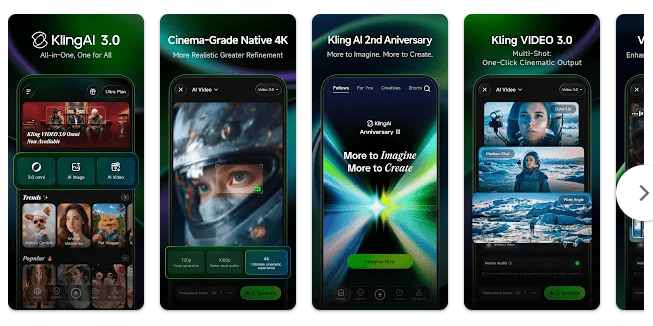
King AI is an Android app built around AI tools. It is meant to help users with common tasks such as creating content, getting answers, and working with AI features from a phone.
I tested the app on a Redmi Android phone to see how it behaved during normal use. The focus was simple: opening the app, moving through its screens, trying its main tools, and checking how the phone handled it.
How It Compares to Other Apps
King AI can be compared with ChatGPT and Google Gemini because all three provide AI-based help from a phone. ChatGPT and Gemini have wider sets of tools and are also available through their own web services, while King AI focuses on its own collection of AI features. Cost and available tools can change with app versions, so users should check the current Play Store listing before paying.
Key Tools Explained
- AI chat: The app lets users communicate with an AI system using normal questions. This can be used for simple answers, ideas, or help with everyday tasks.
- AI content help: King AI provides tools that can help create written content. Users can enter their request and receive an AI-generated response.
- Question answering: You can type a question instead of searching through many pages yourself. The app then gives an answer based on the AI service it uses.
- Creative tools: AI apps can be useful for generating different types of ideas and text. The available tools depend on the version of King AI installed.
- Mobile access: The main tools are available directly from an Android phone. This means you do not need to open a separate computer to try the app.
Two Days of Testing
I used King AI on a Redmi phone for two days. The app opened normally and the screens responded smoothly during my test.
Scrolling through the app did not show major lag. I also did not see crashes, black screens, or other obvious display bugs while using it.
The Redmi became slightly warm during use. Battery dropped by about 15% during my testing, which was acceptable for the amount of use I gave the app.
Memory, Storage, and Safety
I did not record the exact Android download size or final installed storage in MB during my hands-on test. Because of that, I will not add an exact number that I did not measure.
King AI’s AI functions may need an internet connection because requests are processed through online services. I also did not complete a full offline test, so I cannot confirm that the main AI tools work without internet.
The exact permissions can vary by app version and Android device. Before installing, users should open the current Google Play listing and check the Permissions and Data Safety sections shown for their device.
Upsides and Downsides
Pros
- Smooth performance on my Redmi phone.
- No crashes during two days of testing.
- Only slight phone warming.
- About 15% battery drop during my test.
- AI tools can be accessed directly from a phone.
Cons
- Exact storage size was not measured during testing.
- Main AI functions may need internet access.
- Available tools can depend on the current app version.
- Users should check current privacy and permission details before use.
Who Should Get It?
Recommended For
- People who want basic AI tools on an Android phone.
- Users who like trying AI for questions and writing tasks.
Not Recommended For
- People who need a fully offline AI app.
- Users who want only tools with no possible paid options.
3 Quick FAQs
Does King AI work well on Redmi?
Yes, it ran smoothly during my two-day test. I did not notice major lag or crashes.
Does King AI need internet access?
AI requests generally need an internet connection to be processed. I did not test the main features in full offline mode.
Did King AI make the Redmi hot?
No, the phone only became slightly warm during my test. Battery use was about 15% during the testing period.
Offzack Verdict
King AI worked smoothly on my Redmi during two days of normal testing. It is worth trying for users who want AI tools on their phone, but checking the current Play Store permissions, privacy details, and pricing before installation is a good step.
Download King AI App On Google Playstore
Final Scorecard
Ease of Use: ★★★★☆ — The app was simple to open, browse, and use during testing.
Performance: ★★★★★ — It ran smoothly without major lag or crashes.
Features: ★★★★☆ — The app provides useful AI-based tools for questions and content tasks.
Privacy & Safety: ★★★☆☆ — Current permissions and data details should be checked on the Play Store before use.
Value for Money: ★★★★☆ — It gives users access to AI tools from a phone, with the current pricing depending on the app version.
Overall Rating: ★★★★☆ — King AI gave a smooth experience in my two-day Redmi test with no major problems.