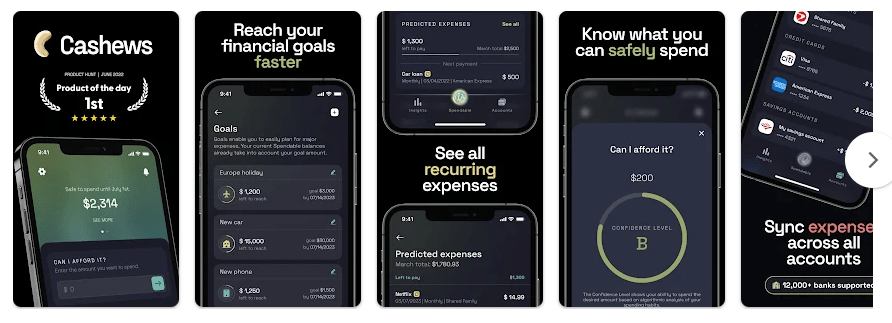
Cashews is a personal finance app made to help people manage their money. It can track spending, bills, subscriptions, income, and connected bank accounts. It also shows a “Spendable” amount to help users see how much money they can safely use.
The app tries to solve a common money problem. Many people know how much money they have but do not know how much they can spend after bills and other costs.
Cashews can connect to bank accounts and credit cards through Plaid. It is currently made for US banks and credit cards, so this is important to check before paying for the service.
How It Ran During Testing
I tested Cashews on a Redmi Android phone for two days. The app ran smoothly during normal use, and I did not face any major problems.
Menus opened without major waiting, and I did not notice annoying lag while moving around the app. The budget tracking feature was the main feature I tested, and the results were very accurate during my test.
The phone did not show unusual warming while I used the app. Battery loss was not a major problem during normal testing, and I did not notice visual bugs or frame stutters.
This test was done on one Redmi phone, so results may be different on another Android device.
Top 5 Features
- Budget tracking: Cashews helps users watch their spending and money. My budget tracking test was very accurate and easy to follow.
- Spendable amount: The app can show how much money you can safely spend each day, week, or month. It updates this amount when income or purchases change.
- Bank connections: Users can connect bank accounts and credit cards to see money information in one place. Cashews says it supports more than 11,000 US banks and financial institutions.
- Cash flow analysis: The app looks at income and expenses to give a picture of future spending. It can also show upcoming recurring expenses and cash flow information.
- Spendable modes: Cashews offers Conservative, Normal, and All In modes. These choices let users decide how carefully the app should calculate their available spending money.
Storage & Privacy Details
The Android app is listed at about 72.67 MB for its current package. The final storage used on a phone can be different after installation, updates, and saved app data.
Cashews is not designed as a full offline finance tracker. Its main features depend on connected financial accounts and online services, and the developer says unsupported offline accounts cannot be manually added.
Listed Android permissions include internet access, notifications, biometric authentication, foreground service, wake lock, network changes, and startup-related access.
The Play Store says the app may collect personal information, financial information, and device IDs. It says data is encrypted while being sent, and users can request deletion of their data.
Alternative Apps
YNAB is a direct alternative for people who want detailed budgeting and planning. It supports automatic bank transaction imports and manual transactions.
Monefy takes a simpler manual-entry approach, letting users quickly record expenses and view spending charts. It also supports budgets, recurring payments, multiple accounts, widgets, and data backup.
Cashews is more focused on connected accounts and its Spendable balance, while Monefy is better suited to people who want to enter expenses themselves.
Strengths and Weaknesses
Pros
- Smooth performance on the tested Redmi.
- Budget tracking was very accurate during testing.
- Clear view of spending and available money.
- Supports bank and credit card connections.
- No normal advertising is listed on Google Play.
Cons
- Mainly supports US banks and credit cards.
- Internet access is needed for connected account features.
- The app uses a subscription model.
- It handles sensitive financial information.
- Storage use is higher than some simple expense apps.
Who Should Get This App?
Best Fit
- People who want automatic money tracking from connected US bank accounts.
- Users who want one number showing how much they can spend.
Worst Fit
- People outside the US whose banks are not supported.
- Users who want a completely offline budget tracker.
Common User Questions
Did Cashews run smoothly on Redmi?
Yes, the app ran smoothly during my two-day test. I did not notice major lag, heating, battery problems, or visual bugs.
Is Cashews good for budget tracking?
It worked very well in my test, and the budget tracking was very accurate. Your results can depend on the accounts and financial data connected to the app.
Does Cashews work with Indian banks?
The current Play Store listing says Cashews supports only US banks and credit cards. Indian users should check bank support before considering a subscription.
Offzack Verdict
Cashews gave a good result in my two-day Redmi test. It ran smoothly, had no major visual or performance problems, and its budget tracking was very accurate. The main limitation is that its connected-bank system is currently focused on US financial institutions.
Download Cashews Apps on Google Playstore
Final Scorecard
- Ease of Use: ★★★★☆ — The main money and budget information was easy to follow during testing.
- Performance: ★★★★★ — It ran smoothly on the Redmi with no major issues.
- Features: ★★★★☆ — Budget tracking, cash flow analysis, bank connections, and Spendable modes provide useful tools.
- Privacy & Safety: ★★★★☆ — Financial data is encrypted in transit, but the app handles sensitive financial information.
- Value for Money: ★★★☆☆ — The subscription can be useful for supported users, but it may not suit people wanting a free tracker.
- Overall Rating: ★★★★☆ — Cashews performed well in testing and gave accurate budget tracking, but US-only bank support limits its usefulness for many users.