Pocket Casts is a podcast app for Android. It helps you find, follow, download, and play podcast episodes from one place.
The main daily job is simple: listen to podcasts without needing a different app for each show. You can stream episodes online or download them first and listen later without an internet connection.
I mainly tested podcast playback. The audio was clear during my test, and I did not have problems while listening on my Redmi phone.
Quick Pros & Cons
Pros:
- Clear podcast playback during my test.
- Easy way to find and listen to podcast episodes.
- Episodes can be downloaded for offline listening.
- Supports automatic episode downloads.
- Has tools to manage downloaded episodes.
Cons:
- Downloaded episodes use phone storage.
- Some features are part of Pocket Casts Plus.
- Streaming needs an internet connection.
- Mobile data use needs attention when streaming or downloading.
Core Features
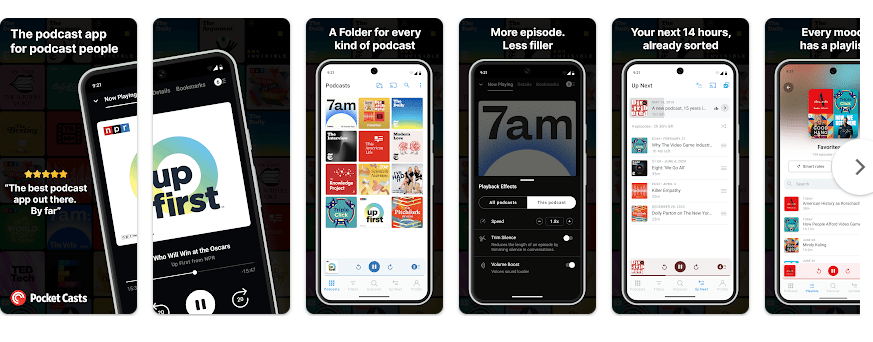
- Podcast playback: Pocket Casts lets you stream podcast episodes directly from the app. My two-day test had clear playback with no audio problems.
- Episode downloads: You can download episodes before leaving home. Downloaded episodes can then be played without an internet connection.
- Auto downloads: The app can automatically download new episodes from podcasts you follow. You can also set downloads to use Wi-Fi and manage how many episodes are kept.
- Storage controls: Pocket Casts has tools for managing downloaded episodes and clearing stored files. This helps when podcast downloads start using too much phone space.
- Files: You can add your own audio and video files to the mobile app. These files can be played from the Files section inside Pocket Casts.
Real-World Performance
I tested Pocket Casts on a Redmi Android phone for two days. The app ran smoothly with no major issues during normal use.
Podcast playback was the main test, and the audio stayed clear. I did not notice playback lag, crashes, or UI bugs while using the app.
The phone did not become unusually hot during my test. I also did not notice major battery drain from normal podcast playback.
This was a short personal test, so battery use can still change with screen brightness, network strength, playback time, and other apps running in the background.
Space & Safety
Pocket Casts does not have one permanent download size because app packages can change with updates. The final storage used can also grow after you download podcast episodes and build a cache.
Downloaded episodes can take much more space than the basic app because each audio file is stored on the phone. Pocket Casts lets Android users manage downloads, and Android can also be set to save episode data to an SD card.
Normal streaming needs internet data. Pocket Casts says it uses a small amount of mobile data for tasks such as syncing and checking for new episodes, while downloads and streaming can use much more data.
Permission prompts can depend on the feature you use and the Android version. Users should read each permission request before allowing access.
Pocket Casts also recently listed an Android issue involving unusually high mobile data use from two AI features. The company said those features were turned off on its side as a precaution while a fix was being prepared.
Competitor Check
AntennaPod is a free, open-source Android podcast app with no app ads, while Pocket Casts offers a free version and a paid Plus plan. Pocket Casts Plus currently has a base price of $3.99 per month or $39.99 per year for new subscribers, before taxes and fees. AntennaPod is a good pick for users who want a fully free app, while Pocket Casts gives users a different set of podcast tools and paid extras.
User Fit
Who Should Use It:
- People who listen to podcasts regularly.
- Users who want podcast downloads for offline listening.
Who Should Avoid It:
- People who rarely listen to podcasts.
- Users who do not want an app that can use storage for downloaded episodes.
Helpful FAQs
Can Pocket Casts work offline?
Yes, you can download podcast episodes and play them without an internet connection. Playback history may wait to sync until the phone connects again.
Was podcast playback clear on Redmi?
Yes, the audio was clear during my two-day test. I did not notice playback problems or major glitches.
Does Pocket Casts use mobile data?
Yes, streaming and some podcast tasks can use mobile data. You can download episodes over Wi-Fi to reduce mobile data use.
Offzack Verdict
Pocket Casts is a practical podcast app for Android users who want simple listening and offline downloads. My two-day Redmi test was smooth, and podcast playback was clear with no major issues.
Download Pocket Casts Podcast App on Google Playstore
Final Scorecard
- Ease of Use: ⭐⭐⭐⭐☆ / 5 — The main podcast playback experience was simple during testing.
- Performance: ⭐⭐⭐⭐⭐ / 5 — Pocket Casts ran smoothly on my Redmi without major problems.
- Features: ⭐⭐⭐⭐⭐ / 5 — It offers playback, downloads, auto downloads, storage tools, and file support.
- Privacy & Safety: ⭐⭐⭐⭐☆ / 5 — Permission use should be checked on the phone, and users should also watch their mobile data settings.
- Value for Money: ⭐⭐⭐⭐☆ / 5 — The app has free use, while Pocket Casts Plus adds paid features through a subscription.
- Overall Rating: ⭐⭐⭐⭐½ / 5 — It gave me clear podcast playback and smooth performance during my Redmi test.