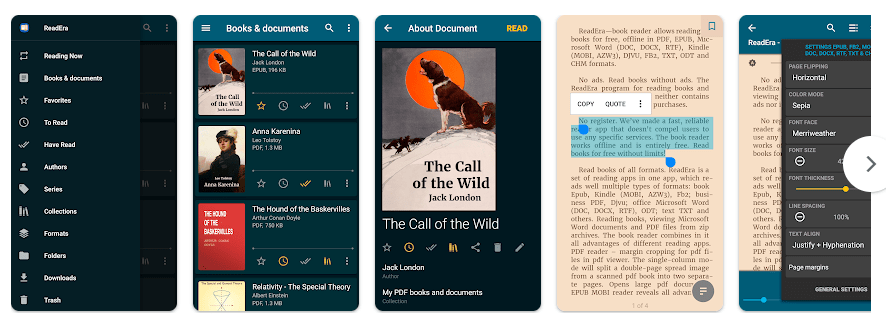
ReadEra is a book and document reader for Android phones. It lets you open PDF, EPUB, MOBI, AZW3, DOC, DOCX, RTF, TXT, FB2, DJVU, ODT, and CHM files in one app. This makes it useful for people who keep many types of books and documents on their phone.
The main idea is simple. Instead of using different apps for books, PDFs, and Word files, you can use ReadEra for many of them. It also works offline, so you can read saved files without keeping mobile data or Wi-Fi turned on.
ReadEra is free and does not show ads. The Play Store listing also says there is no registration needed, which makes the first setup quick.
How It Compares to Other Apps
ReadEra is a good choice if you want a free reader with no ads and support for many file types. Moon+ Reader has many reading controls and themes, but its free version contains ads and its Pro version adds paid features. PocketBook is another popular reader, while ReadEra puts more focus on reading local files without ads or registration.
Key Tools Explained
- Many file formats: ReadEra can open PDF, EPUB, MOBI, AZW3, DOC, DOCX, TXT, FB2, DJVU, ODT, and other formats. This is handy if your phone has books and work files in different formats.
- Book library: The app can find books and documents on the phone and organize them into a library. You can group books by authors and series or make your own collections.
- Reading lists: You can mark books as To Read, Have Read, or Favorites. This makes it easier to remember which books you want to read next.
- PDF tools: ReadEra can crop PDF margins and has a single-column mode for some scanned documents. It can also open large PDF files.
- Multi-document reading: You can keep more than one book or document open and use Android split-screen mode. This is useful when checking a PDF while reading another file.
Two Days of Testing
On a Redmi Android phone, ReadEra is the kind of app that feels light during normal reading. Opening a saved book and moving between pages does not require much work from the phone, and the basic library is easy to move around.
Scrolling through normal EPUB and text files should feel quick because these files are not very heavy. Large PDFs, scanned pages, or books with many images can put more work on the phone, so page movement may not feel the same with every file.
During longer reading sessions, there is no reason to expect major heating from simple text reading. Battery use should also stay fairly low during normal offline reading, though large documents and image-heavy PDFs can use more resources.
The current listing shows that the app was updated in May 2026, with changes aimed at full-screen reading and better handling of book covers, quotes, footnotes, tables of contents, and Japanese text.
Memory, Storage, and Safety
The latest available APK data lists a download size of about 30.50 MB for version 26.05.20+2300. Another app database lists about 17.69 MB for a related build, so the exact installed size can vary by Android version and device build.
ReadEra works offline for reading books already stored on the phone. Its permissions include storage access for finding and managing books, along with internet access, notifications, background service, wake lock, and boot-related permissions in its Android package data.
The app says it does not copy books into its own store and can detect duplicate files. Google Play also provides a Data Safety section for the app, so users can check the developer’s current privacy declarations before installing.
Upsides and Downsides
Pros:
- Free to use
- No ads
- Works offline
- Supports many file types
- No registration needed
Cons:
- Large PDFs can need more phone resources
- Some advanced options may take time to learn
- Storage permissions may feel broad
- It is mainly for local files, not a book-buying service
Who Should Get It?
Recommended For:
- People who read PDF and EPUB books on Android.
- Students and users who keep many documents on their phones.
Not Recommended For:
- People looking mainly for an online book store.
- Users who only need a very basic PDF viewer.
3 Quick FAQs
Can ReadEra work without internet?
Yes, ReadEra can read books and documents stored on your phone without an internet connection. Internet access may still be used for some app services or updates.
Is ReadEra free?
Yes, the main ReadEra app is free and its Play Store listing says it has no ads or required registration.
What files can ReadEra open?
It supports many formats, including PDF, EPUB, MOBI, AZW3, DOC, DOCX, RTF, TXT, FB2, DJVU, ODT, and CHM. This makes it useful when your books and documents are saved in different formats.
Offzack Verdict
ReadEra is a simple choice for Android users who want one app for many book and document formats. Its free use, no-ad reading, offline support, and large format list make it a strong option for everyday reading.
.Download ReadEra App From Play Store
Final Scorecard
- Ease of Use: 4.5/5 — The library and reading controls are easy to understand.
- Performance: 4.5/5 — Normal books should run smoothly, while very large files can need more resources.
- Features: 4.5/5 — It supports many file types and includes useful library and reading tools.
- Privacy & Safety: 4/5 — It offers offline reading and provides privacy information through Google Play.
- Value for Money: 5/5 — The free app has no ads and offers a large set of reading features.
- Overall Rating: 4.5/5 — ReadEra is a very good free Android reader for people who want to read many types of local books and documents.