Goblin Tools is a unique collection of small, single-purpose utilities designed to help people manage tasks that feel overwhelming or overly complicated. The app is specifically built for neurodivergent individuals, including those dealing with ADHD, autism, executive dysfunction, and related daily challenges. Its primary purpose is to simplify everyday problem-solving by taking ambiguous tasks or overwhelming thoughts and processing them into clear, actionable steps.
Whether you need to organize a cluttered mind, decipher a confusing message, or figure out what to cook with limited ingredients, this tool provides direct, automated assistance. Many people use it to tackle chores, manage work projects, or ease the mental load of organizing their daily schedules. It acts as an objective, emotionless assistant that removes the friction from starting and finishing duties.
While it targets people who struggle with executive function, anyone looking for an efficient way to break down their day can benefit from it. It offers a practical, structured environment designed to minimize stress when regular life demands feel too heavy to handle.
Key Features
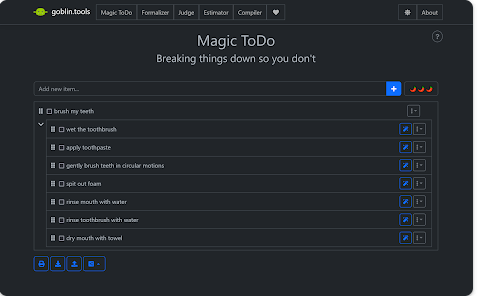
The application consists of several specialized mini-tools that handle specific cognitive challenges. The most popular component is Magic ToDo, which allows you to type in any large task and automatically breaks it down into clear, tiny steps. For everyday use, this helps you overcome procrastination by giving you a simple starting point rather than a massive, intimidating goal.
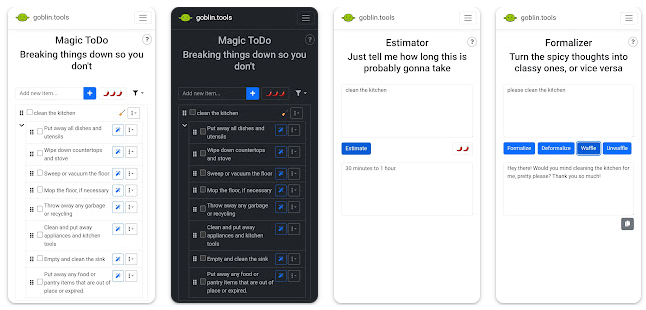
Another highly useful tool is the Formalizer, which takes your raw thoughts or poorly phrased drafts and instantly rewrites them into a chosen tone, such as a professional email or a polite response. This is incredibly helpful for communication when you are unsure how your words might come across to others.
The Judge functions as an emotional decoder by reading a message you paste into it and explaining the underlying mood or tone, helping you understand if a text is critical, neutral, or friendly. For managing daily schedules, the Estimator provides rough time frames for specific activities, making it easier to plan out your day realistically.
The Chef tool helps you invent creative recipes out of random food items left in your kitchen pantry, which is great for saving money and reducing food waste. Finally, the Compiler lets you perform a complete brain dump of unorganized thoughts and automatically structures them into a tidy, actionable checklist.
Testing Experience
During our real-world testing across different mobile devices, the application delivered a highly consistent, stable, and smooth performance. Navigating between the different modules like Magic ToDo, the Chef, and the Formalizer felt incredibly fast, with no lag when entering text or generating lists. The user interface is intentionally simple and clear, avoiding flashy animations or complex menus that could distract or overwhelm users who already struggle with focus.
The menus are very easy to understand, and moving from one tool to another requires only a single tap. Throughout our extensive testing, the application did not crash, freeze, or display any noticeable bugs. The layout remains clean and functional at all times.
Importantly, because this is a paid application, there are absolutely no ads to interrupt your workflow. You can read, write, and process tasks without unexpected pop-ups breaking your concentration.
The background processes are lightweight, meaning the app does not drain your phone battery quickly or cause your device to heat up, even during extended brainstorming sessions. The overall interface is designed to keep your attention strictly on the tasks at hand, ensuring a calm, distraction-free environment that functions reliably whenever you open it.
Privacy & Safety
Privacy is a crucial factor for an application designed around daily personal planning and private communication drafts. Goblin Tools does not require any account creation or personal sign-in to use its core features. You can simply open the application and begin typing immediately, which protects your identity.
The data safety documentation indicates that data is encrypted in transit while interacting with the server to generate responses. However, users should note that the developer states data cannot be deleted through an automated option, and the app may share certain activity data with third parties to maintain functionality.
Because there are no ads or in-app paid subscriptions after the initial purchase, the app does not track your behavior for advertising purposes. It offers a straightforward, private user experience where your primary inputs stay focused on processing your tasks rather than feeding data trackers.
Storage & Data Usage
The application requires very minimal storage space on your mobile device, making it perfect for older phones or devices with low internal memory. The base download size is tiny, and because it relies on active cloud processing for its intelligent tool generation, the local cache growth remains extremely low over time.
You do need an active internet connection to utilize the generation features, such as breaking down new tasks or translating text tones. However, once a task list is created in Magic ToDo, it remains accessible on your screen.
There is currently no cloud account syncing to automatically transfer your saved lists directly between the desktop web version and the mobile application, so it functions as a localized tool on your specific phone.
Pros & Cons
What I Liked
- Excellent task breakdown capability that turns large projects into manageable steps.
- Completely free of intrusive ads and recurring subscription fees.
- Minimalist and clean user interface that prevents visual distraction.
- High processing speed with zero lag during text generation.
- Diverse tool collection that covers writing, cooking, and time estimation.
What Could Be Better
- Requires an active internet connection to generate new lists and text tones.
- Lacks an account system to sync tasks between desktop and mobile devices.
- Data cannot be manually deleted from the system history settings.
Frequently Asked Questions
Do I need to pay a monthly subscription to use this app?
No, the application requires only a one-time upfront purchase fee to download from the store, and it includes no hidden subscription costs.
Can I use the app when my phone is completely offline?
You need an active internet connection to generate new task lists, rephrase text, or create recipes, though existing text can be viewed.
Does the app save my personal data or require a login?
The app does not require a login or personal user account, meaning you can use the features anonymously right after installation.
Is this app helpful for people without ADHD or autism?
Yes, while it was specifically designed with neurodivergent users in mind, anyone looking to simplify heavy workloads can find it useful.
TipZoom Verdict
Goblin Tools offers exceptional value for anyone looking to reduce the mental friction of daily organization and communication. It is highly recommended for neurodivergent individuals, students, and professionals who frequently experience executive dysfunction or task paralysis. The upfront cost is well worth it, considering the app provides a completely ad-free environment without forcing users into predatory monthly subscriptions.
Those who need advanced project management features like calendar integration might find it too simple, but for pure task decomposition, it excels. The free version remains available on their official website, but the mobile app provides an incredibly convenient, stable option for on-the-go organization.
Download Link
You can install the official application directly from the Google Play Store.
Final Scorecard
Ease of Use: ★★★★★ (4.8/5)
Performance: ★★★★★ (4.7/5)
Features: ★★★★☆ (4.6/5)
Privacy & Safety: ★★★★☆ (4.2/5)
Value for Money: ★★★★★ (4.9/5)
Overall Rating: ★★★★★ (4.6/5)