Finding a quiet, uninterrupted space to enjoy regional literature on a smartphone has become incredibly frustrating. Most digital reading applications are stuffed to the brim with flashing banner ads, aggressive video pop-ups that interrupt you mid-sentence, and sudden paywalls that break your focus just as a story gets interesting. It is a massive daily annoyance for book lovers who simply want to dive into deep Malayalam novels, poetry, or travelogues without closing a dozen promotional screens every time they turn a digital page.
This text-heavy headache is exactly what the Aksharathalukal app (com.aksharathalukal.android) aims to resolve. Built specifically as a community platform for readers and writers of Malayalam literature, the app promises a peaceful, ad-free reading environment where you can explore indie novels, listen to stories via audiobooks, and even support local authors. Over a continuous 2-day evaluation window, I set out to see if this app truly provides the clean literary escape it claims to offer, or if it falls into the same frustrating traps as its digital competitors.
My Phone Testing Setup
I conducted this entire evaluation using a Samsung Galaxy A55 running One UI 6.1. My reading and browsing routines were split evenly between my home Wi-Fi network and standard mobile data networks while traveling to see how well the text loads under fluctuating signal conditions. I monitored the application across 2 full days of regular, daily routines, keeping it open alongside messaging tools and social feeds to observe how the background processing holds up under standard multitasking schedules.
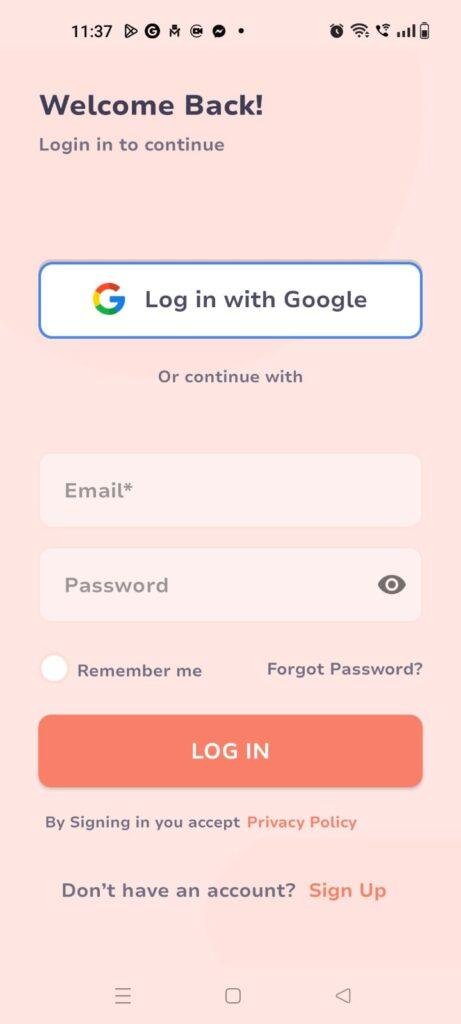
Real-World Hands-On Analysis
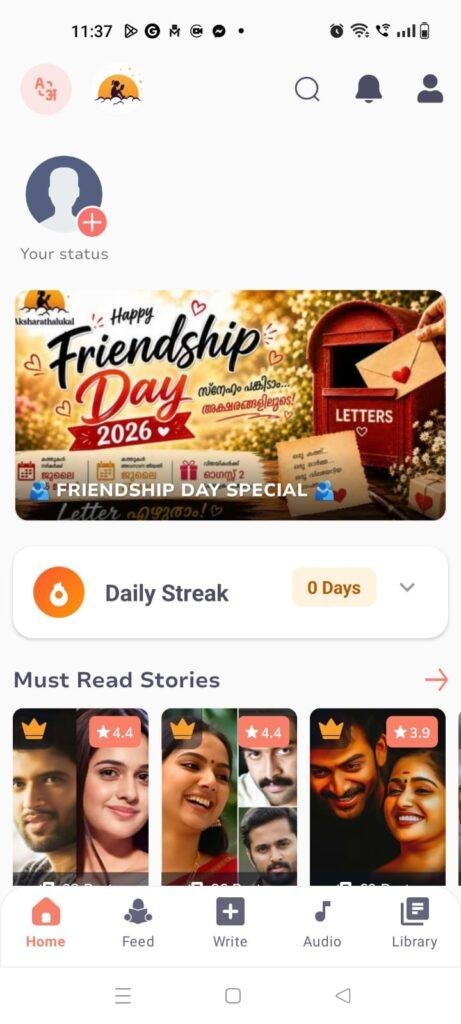
- Scenario 1: Reading a Multi-Part Novel During My Evening CommuteWhile sitting on a crowded public bus under an unstable mobile data connection, I opened the app to check out a trending romantic novel series. The interface loaded the text formatting smoothly, letting me scroll vertically through several long chapters without waiting for heavy graphics to render. Tapping the display layout to adjust text sizing worked right away, making it easy to read on my screen even as the bus bounced along bumpy roads.
- Scenario 2: Testing the AI Voice Audio Feature While Doing ChoresTo see how well the platform handles hands-free utility, I activated the built-in AI voice audiobook tool while washing dishes in my kitchen. The app began reading a non-fiction travelogue aloud in a clear, natural-sounding rhythm, translating the Malayalam script into spoken narration without clipping the ends of long words. I was able to set my phone on the counter and listen continuously for twenty minutes without the playback pausing or crashing unexpectedly.
- Scenario 3: Setting Up a Draft Entry as a CreatorI wanted to test the platform from a writer’s perspective, so I navigated to the creation menu to drop a short poem draft into the editor pane. The writing interface kept things simple, giving me a clean virtual canvas to type my text, adjust section headers, and add a local image asset from my phone directory. The app preserved my spacing perfectly when I saved the project as a personal draft, keeping it ready for future edits.
App Permissions & Device Safety
Understanding what parts of your mobile device a software package wants to access is key to maintaining long-term data safety. Here is a clear breakdown of the hardware permissions requested by Aksharathalukal during my 2 days of testing, organized in a checklist format:
- Network Access / Internet Connection: Requested immediately upon opening. The app requires constant network privileges because the massive library of stories, poems, audio files, and user comments are hosted on external cloud databases rather than inside the initial setup file.
- Photos, Media, and Files Storage: Requested only when you attempt to perform specific creation tasks. The app asks for storage access so you can upload cover graphics for your custom stories or change your profile avatar image. It did not demand broad storage access during my standard text-reading sessions.
- Notifications: Requested during the initial app setup. This allows the system to send you text updates when an author you follow publishes a new chapter or when someone responds to your story reviews.
- Microphone & Camera: Not requested during my testing window. The app does not feature live audio recording or custom in-app photography tools, so these sensitive sensors remain completely untouched.
- Location Data: Not requested. The system does not monitor your physical coordinates or tracking logs while you browse the library categories.
Speed & Everyday Performance
The overall responsiveness of a reading application dictates whether you will stick with a novel or lose patience entirely. Below is my performance summary based on direct observations from my device menus during my 2-day test:
- Download & Install Time: The app downloads from the store under a few seconds, taking up minimal processing time before placing a launch icon on your home screen.
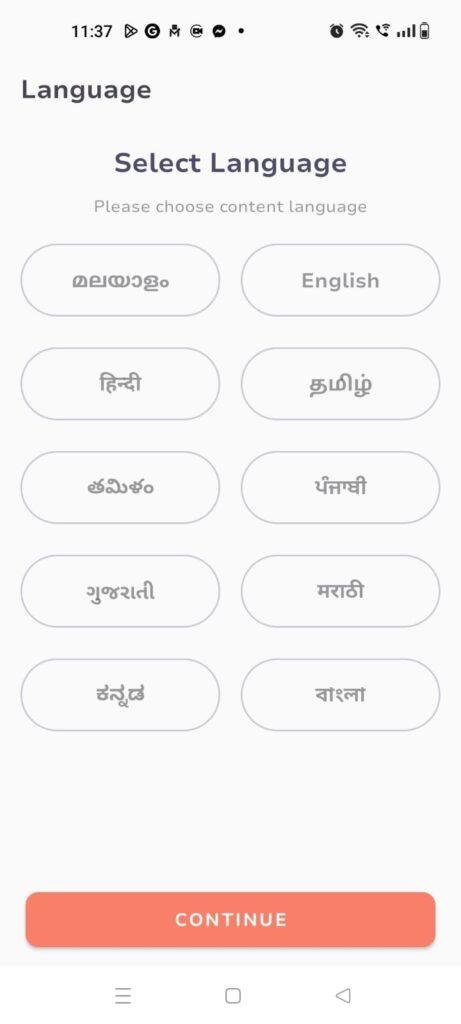
- Setup Speed: Moving past the welcome screen and entering the main interface takes around 1 minute, moving you straight to the trending book grids without forcing you through confusing setup menus.
- Menu Smoothness: Switching between the home feed, the audiobook tab, and the top writer leaderboards feels lightweight and responsive. You will rarely encounter jarring visual stutters when scrolling through long text passages.
- Memory Load: The app leaves a very modest footprint in your phone’s active RAM, allowing you to minimize it to check an urgent text message and return right back to your exact reading spot without triggering a cold reload.
- Active Battery Drain: Power consumption is exceptionally low when you are simply reading text on the screen, though running the AI narration audio player over long intervals draws a tiny bit more power.
- Device Warmth: The phone remains completely cool to the touch during long reading marathons, showing no signs of processor strain or temperature spikes.
- Background Behavior: Upon exiting the application via the home button, it enters a deep sleep mode immediately, ensuring it doesn’t drain your device resources when you aren’t reading.
- System Stability: The interface proved highly stable during my evaluation, showing no abrupt closures or broken layout screens while flipping through multi-chapter novels.
Storage Space & Cache Build-Up
When you first pull Aksharathalukal down from the Google Play Store, the initial download package is incredibly compact, coming in at an agile size of under 10 MB. This makes it highly accessible for people using older phones or those managing restricted data caps. Once the application unpacks and finishes its local installation on your device, the base size stays well under 50 MB, which is impressively light for a platform packed with so much text content.
However, as you browse deeper into the library, viewing high-resolution book covers, loading complex author profiles, and streaming AI audio files, the application begins creating temporary cache files in your phone settings. Over my 2 days of testing, my device storage menu showed a gradual increase in cache build-up as more chapters were cached for offline reading. My direct advice is to leave the cache alone if you read daily since it helps the pages load instantly, but if you run tight on space, a manual clear every few months inside your phone settings will easily reclaim that room without wiping out your saved book progress.
Battery Life & Daily Warmth
Spending a quiet afternoon reading on a phone shouldn’t require you to sit right next to a wall charger. During my continuous test sessions—where I spent over an hour straight reading through various book reviews and indie fiction stories—the battery level on my phone dropped by only a few percentage points. Because the screen layer doesn’t need to constantly refresh heavy video players or fast 3D graphics, the energy draw remains closely tied to your screen’s base brightness setting rather than the application itself.
The upper back area of the phone chassis stayed completely comfortable and cool, indicating that the text engine doesn’t put any unnecessary stress on the internal processor. Even when leaving the app idling in the background for a couple of hours, it didn’t trigger any unexpected battery drain warnings or high resource alerts in the One UI device care menu.
offzack.in Quick Tip: If you prefer reading late at night, switch your device to its system-wide Dark Mode. This drastically reduces the display power draw on modern screens while protecting your eyes from harsh white light during long reading marathons.
Network Needs & Data Usage
For readers who keep a close eye on their monthly data packages, Aksharathalukal is highly considerate. Here is how the data footprints look based on my active observations:
- Initial Setup Access Cost: Very low, requiring minimal mobile data to download the core base package from the official storefront.
- Daily Usage Data Footprint: Extremely small for text browsing, as loading simple Malayalam characters consumes mere kilobytes per page.
- Additional Asset Downloads: Streaming or downloading the AI audiobook feature consumes a bit more data since it converts text to streaming audio, though it still remains less demanding than playing a standard online video file.
- Offline Support: The application allows you to save your favorite running series straight to a personal in-app library, letting you pull up those pre-loaded text files completely offline when you are traveling through areas with zero cellular reception.
Monetization & User Security Review
Aksharathalukal approaches data privacy with a very welcoming guest access policy. If you just want to read free public stories, poems, or book reviews, you do not need to link your private social profiles or type in your phone number. You can navigate the public library anonymously. However, if you plan to write your own books, comment on chapters, or engage with the monetization engine, creating a verified profile account is required. According to the developer’s Play Store Data Safety disclosure, data is transferred securely using industry-standard encryption protocols, and users can request data deletion directly from their profile menus.
The monetization model is unique compared to most web-novel apps. The developers offer a completely ad-free reading layout by default, meaning you will not get interrupted by unexpected visual ads while reading a story chapter. Instead, the app utilizes an optional ad system paired with an in-app coin currency. Readers can choose to watch brief promotional videos to earn virtual coins, which are then used to unlock premium content from verified “Super Writers”. Alternatively, you can purchase coin packages directly using standard online payment methods. This creates a fair environment where authors get paid for their hard work without ruining the reading flow for everyone else.
Mistakes I Noticed During Testing
While the overall concept is excellent, my 2 days of hands-on usage revealed a few bugs and design flaws that need attention:
- AI Audio Pronunciation Errors: While the AI voice narrator is incredibly convenient for multi-tasking, it occasionally trips over complex or older Malayalam compound characters, pronouncing them with a slightly robotic accent or pausing awkwardly mid-phrase.
- Draft Auto-Save Stutter: While testing the content creator text tool, the editor pane froze for under a few seconds when I tried pasting a large block of text from an external notes app, requiring me to wait for the interface to process the layout before I could continue typing.
- Missing Global Text Search Filters: The search bar works fine if you know the exact name of a novel or writer, but it currently lacks deep sub-genre filters, making it tedious to discover specific types of stories, like historical thrillers, without scrolling manually through the generic feeds.
Main Features Explained
- 100% Ad-Free Text Layout: The reading screen is completely stripped of commercial interruptions, letting you enjoy your favorite poetry or long-form travelogues without annoying visual banners popping up at the bottom of the page.
- AI Voice Audio Narration: A modern accessibility tool that instantly converts written Malayalam text into clear spoken audio, making it the perfect companion for listening to books while driving or working.
- Super Writer Monetization Engine: A built-in financial gateway that allows popular, verified local creators to lock exclusive chapters behind coin entry barriers, helping them build a sustainable writing career.
- Personal Digital Library: A convenient saving vault where you can bookmark active stories or upcoming book reviews, ensuring you can return to your reading progress in a single tap.
- Community Interaction Hub: A built-in comment, rating, and status system that lets readers communicate directly with authors, providing feedback and sharing writing tips within a safe community ecosystem.
Pros & Cons
What I Liked
- The reading experience is genuinely peaceful and completely free from forced commercial pop-ups.
- The application setup file is incredibly lightweight, leaving plenty of space for other media on budget mobile phones.
- The optional ad-watching model allows casual readers to unlock premium stories for free without opening their wallets.
What Could Be Better
- The search engine needs better discovery tags to help users find hidden indie gems without manual scrolling.
- The AI audio voice can sound a bit mechanical when processing long, traditional literary terms.
- The writing panel lacks advanced formatting options like italicized text or custom indentation layouts for poets.
Industry Comparison
To understand how Aksharathalukal holds up against other options in the digital reading marketplace, it helps to compare it directly against its closest alternatives:
Pratilipi is the largest giant in the regional self-publishing space, offering a massive volume of content across multiple Indian languages. However, its interface is heavily commercialized, frequently showing intrusive ads and forcing readers into highly aggressive premium paywall systems to finish popular stories. While it has a much larger overall community size, it completely lacks the clean, focused tranquility that defines the Aksharathalukal reading environment.
Wattpad represents the global standard for indie authors, featuring an polished interface and a massive suite of creative writing tools. The downside is that its core library is heavily geared toward global English fiction, making it incredibly difficult to find a dedicated, active community focused purely on high-quality Malayalam literature. Aksharathalukal easily wins out here by catering directly to Kerala’s local cultural context and literary traditions.
Storytel provides a premium audiobook experience with professional voice actors and immaculate production values. However, it operates on a strict, expensive monthly subscription model that completely bars free users from entering the app. Aksharathalukal bridges this gap beautifully by offering its AI narration feature entirely for free, alongside a community space where readers can textually interact directly with the authors they support.
Audience Recommendations
Who Should Install It?
- Avid Malayalam Readers: If you want an authentic space to read local novels and poems without getting harassed by commercial pop-ups.
- Aspiring Local Writers: If you want to share your creative stories with an engaged, language-specific audience and monetize your content early.
- Commuters and Multi-taskers: If you love literature but only have time to consume books hands-free via audio features while working or traveling.
Who Should Skip It?
- Global Fiction Seekers: If you are primarily looking for English novels, global translation series, or mainstream Western comic books.
- Professional Audio Purists: If you cannot tolerate occasional minor AI pronunciation hiccups and prefer professional human studio voice acting.
Common FAQs
- Do I have to pay real money to unlock premium stories in the app?No, you don’t have to spend cash. While you can buy coin packages directly, the app lets you earn coins completely for free simply by choosing to watch brief promotional video ads in your spare time.
- Can I download stories to read when I have no internet connection?Yes. You can easily add active stories and book entries directly to your personal in-app Library tab, which preserves the text files so you can open and read them later when you are completely offline.
- How can I earn money as a writer on the Aksharathalukal platform?Once you build up a consistent publishing history, you can apply for verification to receive a blue checkmark badge. Verified creators can then lock premium chapters or set up custom community joining tiers that require readers to spend coins to gain access.
Official Store Access
Independent Disclaimer: The link provided below points directly to the official digital marketplace hosted by the platform provider. offzack.in is not associated with the external developer team and recommends reviewing application data safety summaries before initiating any device installations.
The offzack.in Final Verdict
Aksharathalukal is a fantastic, highly refreshing addition to the regional mobile application space. By replacing annoying forced commercial pop-ups with a peaceful, optional ad-supported coin system, it creates a genuinely comfortable haven for Malayalam book lovers. While the search parameters could use better filtering options and the AI narration engine still requires minor refinement, its lightweight design, strong privacy respect, and excellent community focus make it a must-download for anyone passionate about Kerala’s independent literary world.
Final Scorecard
- Ease of Use [4.2/5]: The text menus are completely clean and highly accessible, though discovering obscure books would be much simpler with a better categorization filter.
- Speed & Performance [4.5/5]: Chapters load under a few seconds, text scaling is instant, and the app never stutters or drops frames during long reading blocks.
- Features [4.0/5]: The addition of an AI audiobook player is an excellent modern utility, even if it occasionally trips over complex traditional words.
- Privacy & Safety [4.3/5]: The ability to access the entire public library as a guest without registering a profile is a phenomenal win for basic user data safety.
- Value for Money [4.6/5]: Giving users a completely ad-free text interface for free while providing optional monetization channels for indie writers is an incredible value.
- Overall offzack.in Score: 4.3 / 5