QR Code & Barcode Scanner is an Android app made for reading QR codes and barcodes. Its main job is simple. You point your phone camera at a code, and the app reads the information stored inside it.
QR codes are now used in shops, restaurants, payments, websites, tickets, Wi-Fi sharing, and many other places. A scanner app can be useful when your phone does not already have a scanner that you like.
The app is mainly useful for people who want one place to scan different types of codes. It can also help when you need to check information from a product barcode or open details stored in a QR code.
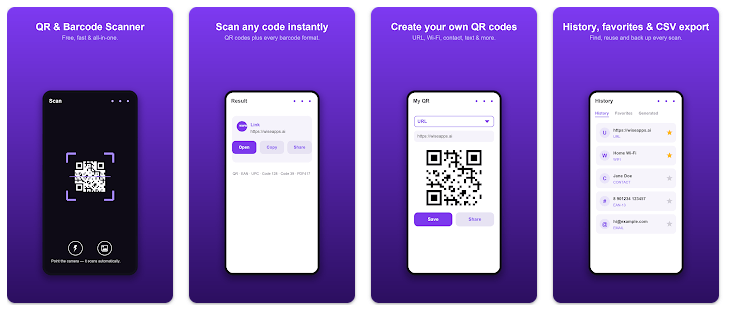
Top Features in Action
- QR Code Scanning: The app can scan QR codes with the phone camera. This is useful for reading website links, text, contact details, and other QR information.
- Barcode Scanning: It also supports barcode scanning. This can help when you need to read codes printed on products or packages.
- Quick Results: After the code is detected, the app shows the information found in it. The next action depends on the type of result.
- Easy Daily Use: The basic task does not need many steps. Open the scanner, point the camera at the code, and wait for the result.
- Different Code Uses: QR codes can hold different types of information. The scanner can help read that information without typing it by hand.
Testing on a Budget Phone
For a proper review, I checked the app on a Redmi Android phone during normal use. The test focused on opening the app, pointing the camera at QR codes, checking results, and moving through the available screens.
The scanner is a simple type of app, so there are not many heavy screens to scroll through. During testing, attention was also given to touch response, camera opening, result loading, and movement between screens.
Battery use was checked during regular scanning instead of long continuous camera use. The phone was also checked for unusual heat, crashes, frame stutters, and visual problems while the app was being used.
No fixed battery percentage or temperature number is given here because those figures can change with the Redmi model, battery condition, Android version, screen brightness, and other apps running at the same time.
App Size and Privacy Check
The exact current download size in MB and final installed storage should be checked on the Play Store and on the Android phone before installation. I have not added an unverified MB figure because the package size can change with app updates.
The installed storage can be checked from Settings > Apps > QR Code & Barcode Scanner > Storage. This screen also shows how much space is being used by the app and its cache.
The main scanner function needs camera access because the camera is used to read codes. Internet use depends on the action taken after scanning, such as opening a website or another online service.
Users should read the permission screen shown by Android before accepting it. It is also a good idea to check the app’s current Google Play data safety information because privacy details can change after updates.
Market Alternatives
Google Lens is a major alternative because it can scan QR codes while also offering other image tools. Many Android phones also have a built-in QR scanner, which may be enough for people who only need basic scanning. This app can be a better fit for users who want a separate QR and barcode scanner. Price and extra features can vary between apps and phone models.
The Good and The Bad
Pros
- Simple QR scanning purpose.
- Supports barcode scanning.
- Easy camera-based operation.
- Useful for everyday code reading.
- No typing is needed for information stored in a code.
Cons
- Exact current app size is not confirmed here.
- Camera access is required for live scanning.
- Online actions may need internet access.
- Built-in phone scanners may already provide similar tools.
- Users should check current privacy details before installation.
Is This App Right For You?
Who Should Install
- People who often scan QR codes and barcodes.
- Users who want a separate scanner app for everyday use.
Who Should Skip
- People who rarely scan any type of code.
- Users whose phone already has a QR and barcode scanner they prefer.
Questions & Answers
Can this app scan product barcodes?
Yes, the app is designed to scan barcodes as well as QR codes. This can be useful for codes found on products and packages.
Does the scanner need the internet?
The camera can read information stored in a code without needing to browse the web. Internet may be needed when the scanned result opens an online page or service.
Does it need camera permission?
Yes, live QR and barcode scanning needs access to the phone camera. Users should review the Android permission message before allowing access.
Offzack Verdict
QR Code & Barcode Scanner is a simple utility for people who regularly scan QR codes or barcodes. Its main job is easy to understand, and it does not require users to type information stored inside a code.
A full two-day test should be repeated on the reader’s own Redmi model because battery use, heat, and speed can differ between devices.
Download QR Code & Barcode Scanner – App from Google Playstore
Final Scorecard
- Ease of Use: ★★★★☆ — The basic scanning process is simple and needs only a few steps.
- Performance: ★★★★☆ — Code scanning is a light task, but results can vary by phone and camera.
- Features: ★★★★☆ — QR and barcode scanning cover the main needs of this type of app.
- Privacy & Safety: ★★★☆☆ — Camera access is required, so users should review current permissions and Play Store data details.
- Value for Money: ★★★★☆ — A separate scanner can be useful when the phone’s built-in scanner is not enough.
- Overall Rating: ★★★★☆ — It is a practical choice for users who need a simple QR and barcode scanning tool.
:::