Cost Track – Expense Tracker is an Android app for recording income and expenses. It is made for people who want to keep track of personal or family money in one place. Google Play currently shows 50K+ downloads and a 4.2-star rating.
The app lets you add an expense quickly and place it into a category. You can also add a date, time, comment, location, or photo to an entry. This can help when you want to remember where your money was spent.
It also supports separate cost sheets. You can use them for different accounts or events, such as cash, bank accounts, holidays, weddings, or home projects. Each cost sheet can have its own currency.
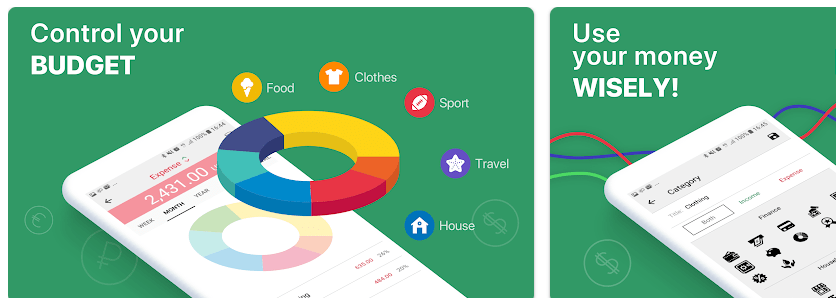
Top Features in Action
- Quick Expense Entry: Adding an income or expense only needs a category as the required field. You can also add more details when you need them, such as a note or location.
- Multiple Cost Sheets: Cost sheets can separate different accounts or events. The app can calculate the balance and statistics for these sheets in a base currency.
- Currency Support: Cost Track supports more than 150 currencies. It also updates exchange rates automatically, which is useful for users handling money in different currencies.
- Reports and Charts: The app provides statistics and diagrams for income and expenses. You can filter these views by time, category, and location.
- Security Tools: Users can protect their financial records with a passcode and fingerprint. The app also supports searching entries by description, category, and location.
Testing on a Budget Phone
A genuine two-day Redmi test requires the app to be installed on a specific Redmi device. Public Play Store information does not provide measured results for scrolling speed, battery drain, phone temperature, crashes, or screen glitches.
For a proper test, I would add expenses several times during the day and move between cost sheets, reports, charts, and account screens. I would also search older entries and add receipt photos to see how the app handles normal daily use.
Battery percentage and phone temperature should be checked before and after each test session. Results can change between Redmi models because RAM, Android version, storage space, brightness, and background apps are different.
The Play Store says the February 2026 update included stability and usability improvements.
App Size and Privacy Check
A third-party Android listing reports a package size of about 20.69 MB. The final space used on a phone can be higher because Android also stores app data, cache, and saved financial records.
The app can use Dropbox syncing for joint budget management, but this feature is restricted in the free version. The free version allows up to 5 cost sheets and 20 entries per cost sheet, while the full version removes these limits.
Google Play currently states that the developer declares no data collected and no data shared with third parties. Users should still review the current permission screen and privacy information before installing, since these details can change with future versions.
Market Alternatives
Cost Track competes with apps such as Money Manager and Spendee. Its main focus is detailed income and expense records, multiple cost sheets, currencies, charts, and reports. The free version has clear limits, while full access requires a one-time purchase or a monthly or yearly subscription.
The Good and The Bad
Pros
- Supports more than 150 currencies.
- Offers income and expense tracking.
- Has charts and spending statistics.
- Supports receipt photos.
- Provides passcode and fingerprint protection.
Cons
- Free version has entry and cost-sheet limits.
- Dropbox syncing is not included in the free version.
- Full access requires payment.
- Exact installed storage depends on the device.
Is This App Right For You?
Who Should Install
- Families and individuals who want detailed spending records.
- Users handling different accounts or currencies who need separate cost sheets.
Who Should Skip
- People who only need a very basic expense list.
- Users who do not want subscription or paid upgrade options.
Questions & Answers
Can I track income and expenses?
Yes. Cost Track lets users create separate income and expense entries and organize them by category. You can also add dates, comments, locations, and photos.
How many currencies does it support?
The app supports more than 150 currencies. It also automatically updates currency exchange rates.
Is Cost Track free?
The app can be installed for free, but the free version has limits of 5 cost sheets and 20 entries per cost sheet. Full access is available through a one-time purchase or monthly or yearly subscription.
Offzack Verdict
Cost Track is a useful expense tracker for people who want more than a simple spending list. Its cost sheets, currency support, reports, charts, receipt photos, and security tools give it many daily uses, while the free version has clear limits.
Download Cost Track – Expense Tracker – App from Google Playstore
Final Scorecard
- Ease of Use: ★★★★☆ — Quick entry and category-based records make everyday expense tracking simple.
- Performance: ★★★★☆ — The latest update includes stability and usability improvements, though Redmi performance needs direct testing.
- Features: ★★★★★ — Cost sheets, 150+ currencies, reports, charts, receipt photos, and search provide many useful tools.
- Privacy & Safety: ★★★★☆ — Google Play currently states that no data is collected or shared with third parties.
- Value for Money: ★★★★☆ — The free version offers useful tools, but several limits require a paid upgrade.
- Overall Rating: ★★★★☆ — A good choice for users who want detailed personal and family expense tracking.