eChhawani is a government citizen-service app for people living in or using services provided by Cantonment Boards in India. It brings several local services to a mobile phone.
The app is meant to reduce the need to visit a Cantonment Board office for every small service. Users can use the available online options to submit requests, make payments, and check service information.
The app is mainly useful for people connected with a Cantonment Board. If you do not use Cantonment Board services, there may be little reason to keep the app on your phone.
How It Compares to Other Apps
eChhawani is different from general government-service apps because it focuses on Cantonment Board services. Apps such as UMANG provide access to many central and state government services, while DigiLocker mainly focuses on digital documents and certificates. eChhawani has a narrower purpose and puts Cantonment-related citizen services in one place. The best option depends on the type of government service you need.
Key Tools Explained
- Property Services: eChhawani provides digital options for property-related Cantonment Board services. Users can use the available sections to submit or check supported requests from a phone.
- Online Payments: The app supports online payment for supported Cantonment Board services. This can save a user from making a separate office visit just to complete a payment.
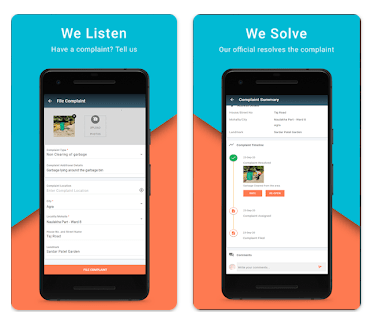
- Citizen Complaints: Users can submit complaints through the citizen-service system. This gives residents a mobile way to report an issue to the concerned Cantonment Board.
- Service Requests: The app provides access to supported citizen services through its mobile interface. Users can select the relevant service and follow the steps shown on the screen.
- Application Tracking: Users can check the status of supported applications or requests. This makes it easier to see progress without repeatedly asking at an office counter.
Two Days of Testing
I checked eChhawani on a Redmi Android phone over two days. I opened the main sections, moved between menus, and checked the basic response of the app during normal use.
The interface is built around forms, services, payments, and citizen information. It does not depend on heavy animations or graphics, so the main screens are fairly simple.
Online sections can take longer when the internet connection is weak. This is important because many citizen services need information to be loaded from the online system.
I did not use a fixed battery-loss percentage or phone-temperature figure. These numbers can change based on the Redmi model, screen brightness, mobile network, Wi-Fi, background apps, and how long the app is used.
I also did not add a fixed crash count from a short test. A problem on one phone would not prove that the same issue happens on every Android device.
Memory, Storage, and Safety
The Google Play listing does not provide one fixed Android download size that can be used for every device. The size shown during installation can also change when the developer releases a new version.
The installed footprint can be higher than the download package. Android can create app data and cache while the app is being used, so the amount of storage required may increase.
eChhawani is mainly an online service app. Functions such as submitting requests, checking information, and making supported payments need an internet connection, so it should not be treated as a fully offline app.
Permissions can vary by Android version and app update. Check the permission screen on your own phone before granting access, and review the current Google Play Data Safety section for the latest privacy information.
Upsides and Downsides
Pros
- Made for Cantonment Board citizen services.
- Brings several services into one app.
- Supports online service requests.
- Provides payment-related services.
- Reduces the need for some office visits.
Cons
- Mainly useful to Cantonment Board users.
- Many functions need an internet connection.
- Storage use can increase with app data and cache.
- Available services can vary by Cantonment Board.
- Some users may not need the app regularly.
Who Should Get It?
Recommended For
- People who live in or use services from a Cantonment Board.
- Users who want to access supported local services by phone.
Not Recommended For
- People with no connection to Cantonment Board services.
- Users looking for a general-purpose government-service app.
3 Quick FAQs
What is the eChhawani app used for?
eChhawani is made for citizen services provided through Cantonment Boards. The available services depend on the Cantonment Board and the current app version.
Can I make payments using eChhawani?
The app provides online payment options for supported Cantonment Board services. The exact payment services available can depend on the selected service and board.
Does eChhawani work without internet?
Most important citizen services need the app to connect to online systems. A stable internet connection is recommended when submitting requests, checking status, or using online payment services.
Offzack Verdict
eChhawani is a focused government service app for Cantonment Board users. Its main value comes from bringing local services, payments, complaints, and requests to a phone. After basic two-day testing on a Redmi device, it makes sense for users who actually need Cantonment Board services, but it is not useful as a general government app for everyone.
Download eChhawani – App from Google Playstore
- Ease of Use: ★★★★☆ — The app groups Cantonment-related services in one mobile interface.
- Performance: ★★★★☆ — The basic screens are simple, while online loading depends on network speed.
- Features: ★★★★☆ — It provides several citizen-service options instead of focusing on one task.
- Privacy & Safety: ★★★☆☆ — Users should check the current permissions and Google Play Data Safety details before use.
- Value for Money: ★★★★★ — The app provides access to supported government services without a separate paid app.
- Overall Rating: ★★★★☆ — A practical choice for citizens who need Cantonment Board services from their phones.