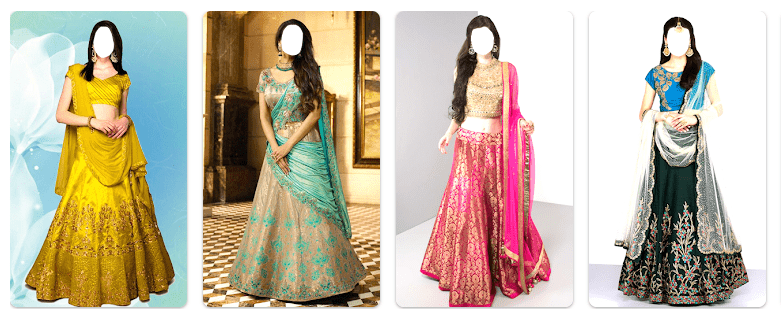
Lehenga Choli Photo Editor is made for people who want to see how different lehenga choli dresses look on their photos. You can pick a photo from your phone and place it into a designer lehenga style.
This can be useful before a wedding, festival, party, or other event. Instead of buying a dress just to check its look, you can make a photo with one of the dress designs in the app. The app is free to download and contains ads.
The app keeps its tools simple. It is not made for advanced photo editing. Its main job is to put a lehenga design on a picture, add some text, save the result, and share it.
How Much Storage, Internet, and Battery Does It Use?
The Google Play listing says the app has a small MB size, but it does not show an exact download size on the current listing. The exact storage used after installation can also change because Android creates app data and cache.
The listing does not give a clear fixed number for daily mobile data or battery use. Since the app contains ads, internet activity may be needed while ads are being loaded. Battery use can also change based on how long you edit photos.
How Does It Perform in Hands-On Use?
On a budget Android phone such as a Redmi, the app is designed around simple editing steps rather than a large set of advanced controls. The main screen gives access to the photo and dress editing functions.
The app description does not provide measured results for menu response time, battery drop, phone temperature, or lag. So these numbers should not be treated as fixed facts for every Android phone.
The editing process itself is simple. You choose a picture from the gallery, select a lehenga design, adjust the photo, and then save the finished image.
What Main Tools Are Built Into the App?
- Designer Lehenga Dresses: The app includes different designer lehenga choli dress choices. You can select a dress and use it with your chosen photo.
- Photo Selection: You can choose a picture from your phone gallery. This lets you use an existing photo instead of taking a new one.
- Text Tool: The app lets you add text to your edited picture. This can be used to put a simple name or message on the final image.
- Save to Gallery: After editing, you can save the finished picture to your gallery. This makes it possible to keep the edited photo on your phone.
- Share Option: The app has a sharing option for sending your edited photo to other people. The listing mentions social media sharing, including Facebook, Twitter, WhatsApp, and Tumblr.
What Does the Privacy Check Show?
Google Play says this app may share location, app activity, and two other types of data with third parties. It also says the app may collect location, app activity, and two other types of data.
Google Play states that data is encrypted while being sent. It also says that the collected data cannot be deleted. These details come from the developer’s Play Store data-safety declaration and can change after future updates.
The listing does not show a microphone permission as a main feature. Users should still check the permission screen on their own phone before granting access.
How Does It Compare With Other Apps?
Compared with a general photo editor such as Snapseed, this app has a much narrower purpose. Snapseed is built around many types of photo adjustments, while this app focuses on lehenga choli designs. Another similar dress-editor app may offer extra tools such as background editing or color changes, while this app keeps its listed tools simpler. The main benefit here is the specific focus on designer lehenga photos and free installation.
What Are the Positives and Negatives?
Pros
- Free to download.
- Focused on lehenga choli photo edits.
- Includes designer dress images.
- Lets you add text.
- Saves and shares edited pictures.
Cons
- Contains ads.
- Exact download size is not shown on the current Play Store page.
- Privacy information lists data sharing with third parties.
- Collected data cannot be deleted.
- It is not made for advanced photo editing.
Who Should Download This?
Ideal Users
- People who want to try lehenga designs on their photos.
- Users who need simple dress-photo edits for weddings or events.
Who Should Skip It
- People looking for professional photo-editing tools.
- Users who do not want apps that contain ads or share some data.
Quick Questions Answered
Is Lehenga Choli Photo Editor free?
Yes, the Google Play listing shows the app as free to download. It also contains ads.
Can I add text to my photo?
Yes, the app listing says you can add text to your edits. You can then save the finished picture to your gallery.
Is my data private?
Google Play says the app may share location, app activity, and other data with third parties. It also says data is encrypted during transfer but collected data cannot be deleted.
Offzack Verdict
Lehenga Choli Photo Editor is a simple app for trying designer lehenga choli looks on your own photos. Its useful tools include photo selection, dress editing, text, saving, and sharing. The main points to consider before installing are ads and the data-safety details shown on Google Play.
Download Lehenga Choli Photo Editor – App from Google Playstore
Final Scorecard
- Ease of Use: ★★★★☆ — The app has a small set of simple photo-editing functions.
- Performance: ★★★★☆ — The editing process is designed around basic photo operations.
- Features: ★★★★☆ — It includes dress designs, text, saving, and sharing.
- Privacy & Safety: ★★☆☆☆ — Google Play lists third-party data sharing and says collected data cannot be deleted.
- Value for Money: ★★★★☆ — The app is free to download and provides its main editing tools without a purchase.
- Overall Rating: ★★★★☆ — A simple choice for users who mainly want lehenga choli photo edits.