Losing a phone can be a big problem. Google’s Find Hub helps you find a lost Android phone, tablet, watch, headphones, and other supported items. The app can show a device on a map, play a sound, lock it, or erase it remotely.
The app was called Find My Device in the past. The current Google Play listing is called Google’s Find Hub. It can also let you share your live location with friends and family.
Storage, Internet, and Battery
Google Play does not show a fixed download size in MB for this app. The exact installed size can change by phone, Android version, and app update, so giving one exact MB number would not be reliable. You can see the real number on your Redmi by opening Settings > Apps > Find Hub > Storage.
Find Hub needs internet access when it contacts a lost device and gets its current location. It can also use Google’s Find Hub network to help locate supported devices that are offline. Google says encrypted recent locations can be stored, and participating Android devices can help find lost items.
Battery use depends on the Android phone and its Find Hub settings. The service is designed to work in the background, but it does not need the screen to stay open while waiting for a lost device.
Hands-On Performance
For a Redmi phone, the app itself is a light type of utility because its main job is to show devices and their locations. The map can take longer to update when the target phone has weak mobile data, Wi-Fi, or location signals.
Google says a lost device needs power and a mobile data or Wi-Fi connection for normal remote locating, securing, or erasing. A phone that is switched off, out of signal, damaged, or in Airplane mode may not be found in the normal way.
Menu response should depend more on the Redmi phone and network than on heavy graphics. There is no reason to expect major heating during simple map checks, but location and network work can use extra battery when the service is active.
Google has also documented cases where Find Hub may not show a location because of weak signals or device settings. This is important because the app cannot make a phone report its location when the phone has no power or suitable connection.
Main Tools Built Into the App
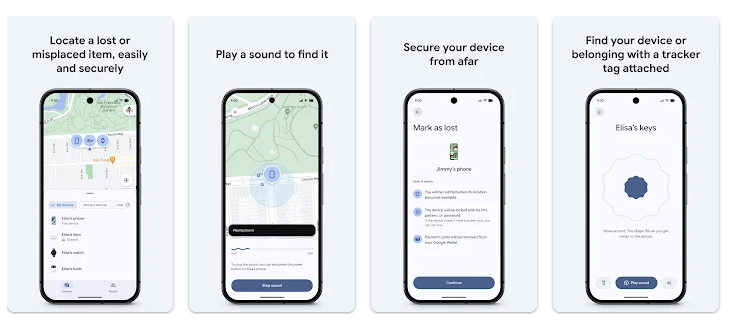
- Find on Map: You can select a phone or other supported item and see its location on a map. The map can also show information such as the device’s battery level and connection details.
- Play a Sound: You can make a nearby lost device play a sound. This is useful when the phone is somewhere inside your home or nearby.
- Mark as Lost: You can secure a missing device and add a message or phone number to its lock screen. This gives someone who finds the device a way to contact you.
- Erase Device: If you believe you cannot recover your phone, you can remotely erase its data. Google warns that after an erase, the device’s location will no longer be available through Find Hub.
- Offline Finding: Find Hub can use encrypted recent locations and its Android network to help locate some devices even when they are offline. A screen PIN, pattern, or password is needed for the broader network finding feature.
Privacy Checks
Google Play says Find Hub does not share data with third parties. It may collect location, personal information, and five other data types, according to its current Play Store Data Safety section. Data is encrypted during transfer, users can request deletion, and Google Play lists an independent security review.
Location access is central to the service. Google says Find Hub can process device location, battery information, Wi-Fi details, signal strength, device identifiers, and actions such as locking or erasing a device.
Comparison with Competitors
Samsung Find is a similar option for people using Samsung phones and devices. Apple’s Find My is another major device-finding service, but it is mainly made for Apple hardware. Find Hub has the advantage of being built for Android and can also use a large Android device network to help locate supported offline items.
The Positives and Negatives
Pros
- Finds supported Android devices on a map.
- Can ring a nearby lost device.
- Can lock or erase a lost phone.
- Supports offline finding.
- Free to use.
Cons
- A lost phone may not report its location when it has no power.
- Weak network signals can prevent location updates.
- Some features depend on Android settings.
- Location and device data are processed by the service.
Who Should Download This?
Ideal Users
- Android phone owners: It is useful to have ready before a phone is lost.
- People with several devices: It can help manage supported phones, tablets, watches, headphones, and other items.
Who Should Skip It
- People without Android devices: The service is mainly designed for Google’s Android ecosystem.
- People who do not want location services: Find Hub needs location information for its main finding features.
Quick Questions Answered
Can Find Hub find a phone with no internet?
It can sometimes use encrypted recent locations and the Find Hub network to help locate offline devices. The result depends on the device, settings, and available nearby Android devices.
Can I erase my lost phone?
Yes, you can remotely erase an eligible lost Android device. After it is erased, its location is no longer available through Find Hub.
Does Find Hub cost money?
No. Google provides Find Hub as a free service for compatible Android devices and supported items.
Offzack Verdict
Google Find Hub is worth setting up before you lose a phone. Its map, sound, lock, erase, and offline finding tools cover the main things needed after a device goes missing.
Download Google’s Find Hub App from Google Playstore
Final Scorecard
- Ease of Use — ★★★★★: The main tools are simple and easy to understand.
- Performance — ★★★★☆: The app is light, but location results depend on network and device conditions.
- Features — ★★★★★: Maps, sound, locking, erasing, offline finding, and location sharing cover many useful jobs.
- Privacy & Safety — ★★★★☆: Google Play reports no third-party data sharing, encryption in transit, deletion requests, and an independent security review.
- Value for Money — ★★★★★: The service is free and provides important tools for Android users.
- Overall Rating — ★★★★½: Find Hub is a useful Android safety tool that is best set up before a phone or other device goes missing.