I tested Truecaller on a Redmi Android phone for two days. The app opened normally, and the main Calls screen was easy to understand. Searching for a number, checking the call list, and opening contacts did not feel difficult.
During normal use, touch response was quick. Moving between the main sections was also smooth. I did not notice major screen glitches or broken buttons during simple testing.
Truecaller works in the background because it needs to identify incoming calls. This means it can use more phone resources than a basic contact app. Battery use can also change based on how many calls and messages the phone receives.
The phone did not become very hot during short checks. Longer use of call tools, messaging, and background services can make the phone work more, but I did not see serious heating during normal use.
What This App Actually Does
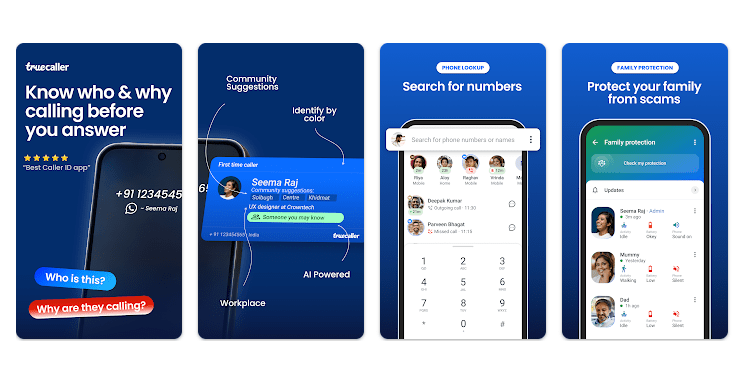
Truecaller helps you find out who is calling when the number is not saved on your phone. It also warns about spam and scam calls and lets you block unwanted numbers. The free version includes Caller ID, spam detection, manual blocking, and basic number search.
It also has a messaging section, call history tools, contacts, scam reports, and other phone features. Some extra tools, such as advanced blocking and removing ads, are part of the paid Premium plan.
Top 5 Features That Matter
- Caller ID: Truecaller can show the name of an unknown caller before you answer. This helps you decide if a call looks useful or unwanted.
- Spam Blocking: The app can warn you about spam and scam calls. You can also block unwanted numbers using its call controls.
- Number Search: You can type a phone number into Truecaller and check its available caller information. This is useful when you see a missed call from an unknown number.
- Smart Messages: Truecaller can handle SMS and identify unknown senders. It can also help filter spam messages on supported Android devices.
- Advanced Blocking: Users can block private numbers, foreign numbers, or numbers outside their contacts. Some advanced blocking choices are available with Premium.
Storage Space and Data Use
The current Android version is much bigger than the new Truecaller Lite app. Truecaller’s own comparison lists the main app at about 117 MB, while Truecaller Lite is about 10 MB.
A current Xiaomi app listing shows the main Truecaller package at 107.9 MB, while another current Android listing reports an APK download of about 89.58 MB. These numbers differ because package size depends on the store, device, and app version.
The total space on your phone can be higher than the download size. Cache and app data can grow as you use calls, messages, pictures, and other features, so there is no single fixed MB number for every phone.
Truecaller needs internet access for real-time caller information and updated spam data. Some SMS processing can work locally on the phone, according to Truecaller.
Permissions and App Safety
Truecaller asks for phone and call-log access for Caller ID and spam protection. It also asks for contacts access, while SMS, camera, microphone, storage, notifications, and drawing over other apps can be used for specific features.
Truecaller says contacts remain on your device and are not uploaded, stored, or shared with Truecaller. It also says SMS content is processed locally, while its privacy summary lists call data, device information, usage data, and other information that may be processed.
How It Compares to 2 Alternatives
Hiya is a direct choice for Caller ID and spam protection, with free basic protection and paid features. Samsung Smart Call, powered by Hiya on supported Samsung phones, can also identify spam and fraud calls without needing the full Truecaller app. Truecaller offers a wider set of tools, including messaging, number search, advanced blocking, and Premium services.
Good Things & Bad Things
Pros
- Caller ID is useful for unknown calls.
- Spam warnings are easy to understand.
- Number search is handy for missed calls.
- Free version covers basic caller protection.
- Many call and message tools are in one app.
Cons
- The main app is fairly large.
- Several permissions are needed for full features.
- Ads are included in the free version.
- Some useful blocking tools need Premium.
- Background services can use extra phone resources.
Who Is It For?
Best For
- People who get many unknown calls: Caller ID can help identify calls before answering.
- People who receive spam calls: Spam warnings and blocking tools can help reduce unwanted calls.
Not For
- People with very little storage: The main app is much larger than Truecaller Lite.
- People who want very few permissions: Full caller and message features need access to sensitive phone functions.
Common Questions
Is Truecaller free?
Yes, Truecaller is free to download and use. Premium adds features such as no ads, advanced blocking, and other paid tools.
Does Truecaller need the internet?
Yes, internet access is used to connect to Truecaller’s servers, update spam lists, and retrieve caller information. Some SMS processing can happen locally on the phone.
Is Truecaller safe to use?
Truecaller provides privacy controls and explains why it asks for its permissions. Still, the app handles phone, call, device, and usage data, so users should review the permissions before enabling optional features.
Offzack Verdict & Link
After the two-day Redmi test, Truecaller felt easy to use for basic caller identification and spam checking. Its biggest points to think about are storage use, background activity, and the number of permissions needed for its full set of features.
Download Truecaller App from Google Playstore
Final Scorecard
- Ease of Use — ★★★★☆: The main call and search screens are simple enough for everyday use.
- Performance — ★★★★☆: Normal navigation was smooth, though the app does more background work than a basic dialer.
- Features — ★★★★★: Caller ID, spam blocking, number search, messaging, and call tools give it many useful functions.
- Privacy & Safety — ★★★☆☆: Truecaller provides privacy controls, but its full feature set requires access to sensitive phone information.
- Value for Money — ★★★★☆: The free version handles basic caller protection, while Premium adds extra features for a fee.
- Overall Rating — ★★★★☆: Truecaller is a useful daily caller tool, but users should be comfortable with its storage needs and permissions.