Google Translate is a language app from Google. It helps you change words, sentences, speech, and pictures from one language to another. It can be very useful when you travel, study, shop, or talk to someone who speaks a different language.
The app supports 108 languages for typed translation. It also has camera, photo, speech, handwriting, and conversation tools. Some language packs can be downloaded, so basic text translation can work without an internet connection.
How It Ran During Testing
On a Redmi Android phone, Google Translate feels light during simple jobs. Opening the app, typing words, changing languages, and checking saved phrases are quick tasks. There is little menu waiting during normal use.
Camera translation needs more work from the phone. The camera opens quickly, but reading text from a busy picture can take a moment. This is normal because the app must first read the words in the image.
Battery use stays reasonable for short translation jobs. Long camera or speech sessions can use more battery because the camera, microphone, screen, and internet may be active together.
The phone should not become very warm during short text translation. Longer camera use can create some warmth, but this is not unusual for a phone using its camera for a long time.
Google Play currently shows bug fixes and improvements in the latest update. Recent user reviews still mention some translation delays and camera-screen problems, so small issues can happen on some phones.
Top Features
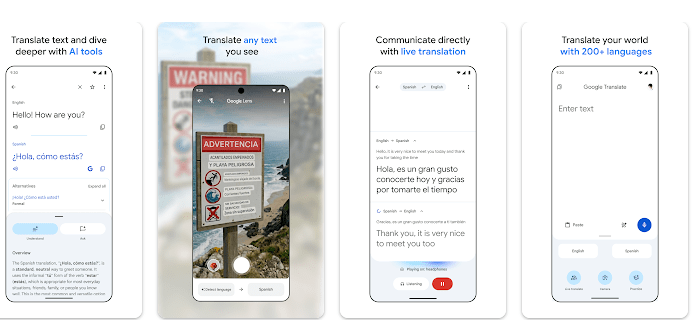
- Text Translation: Type a word or sentence and choose the language you want. Google Translate supports 108 languages for typed translation.
- Camera Translation: Point the phone camera at signs, menus, or other printed words. The app can translate camera text in 94 languages.
- Offline Mode: Download supported language packs before you leave home. Google says 59 languages can be used for offline translation.
- Voice and Conversation: You can speak instead of typing and use the app for two-language conversations. Conversation translation supports 70 languages according to Google Play.
- Photos and Handwriting: You can import a photo or draw letters on the screen. These tools are useful when typing a word is hard or when the text is inside a picture.
Storage & Privacy Details
Google Play does not show one fixed MB download size because the size can vary by phone and app version. The final storage used can also rise after you download offline language packs, so check your Redmi phone’s App Info screen for the exact number.
Offline translation is useful, but you must download the language packs first. Google says the download normally needs Wi-Fi, and not every language is available offline.
Google Translate may ask for microphone access for speech translation, camera access for camera translation, external storage for offline data, and contacts for account setup. Google says the app can still be used when optional permissions are not given.
Google Play says no data is shared with third parties, data is encrypted while being sent, and users can request deletion of collected data. It also says the app may collect location, personal information, and other data.
Alternative Apps
Microsoft Translator is a close competitor and also supports text, speech, and conversation translation. iTranslate is another option with translation and voice tools. Google Translate stands out because it combines text, camera, photos, handwriting, offline packs, and many languages in one free app.
Strengths and Weaknesses
Pros
- Supports many languages.
- Camera translation is very useful.
- Offline text translation can help while travelling.
- Voice and conversation tools are easy to find.
- Free to install and use.
Cons
- Some features need an internet connection.
- Offline support covers fewer languages.
- Camera translation can take time with difficult pictures.
- Some recent users report bugs or slow translation.
Who Should Get This App?
Best Fit
- Travellers: It can help read signs, menus, labels, and simple messages in other languages.
- Students: It is useful for checking unfamiliar words and learning basic meanings.
Worst Fit
- People needing perfect professional translation: Machine translation can sometimes make mistakes or miss the exact meaning.
- People with very little phone storage: Offline language packs can add extra storage use.
Common User Questions
Can Google Translate work without internet?
Yes, but you must download a supported language first. Google currently lists 59 languages for offline translation.
Does Google Translate use the camera?
Yes. Camera permission lets it read and translate words from signs, papers, menus, and other images.
Is Google Translate free?
Yes, the Android app is free to install and use. Some tools still need an internet connection to work.
Offzack Verdict
Google Translate is one of the easiest language apps to keep on an Android phone. Its text, camera, voice, photo, and offline tools make it useful for daily life and travel.
The app is not perfect, and translation mistakes can happen. Still, its wide language support and simple design make it a good choice for most users.
Download Google Translate from Google Playstore
Final Scorecard
- Ease of Use — ★★★★★: Clear buttons make basic translation easy for new users.
- Performance — ★★★★☆: Text translation is quick, while camera and speech jobs need more phone work.
- Features — ★★★★★: Text, camera, photos, speech, handwriting, conversation, and offline tools cover many needs.
- Privacy & Safety — ★★★★☆: Google Play reports encryption in transit and no third-party data sharing, while some data may still be collected.
- Value for Money — ★★★★★: The main app is free and offers a large set of useful tools.
- Overall Rating — ★★★★½: Google Translate is a very useful everyday translator with a few limits and occasional user-reported bugs.