Edits: Video Editor is a free video editing app from Instagram. Its package name is com.instagram.basel.
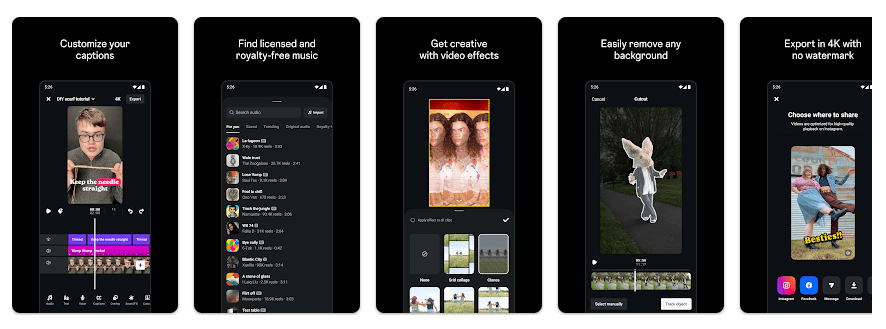
It can record clips up to 10 minutes and edit videos frame by frame with text, music, filters, stickers, voice effects, and video effects. It also supports green screen, cutout, overlays, AI image animation, audio improvement, automatic captions, and 4K export without a watermark.
Edits lets creators make videos without moving between many apps. It also keeps drafts and finished videos in one place and can share videos to Instagram.
Device Resources & Safety
The Android package is large. A third-party listing reports a 133.65 MB APK for version 442.0.0.46.79, while another lists about 123.26 MB for version 442.1.0.48.79. Installed space can be higher because Android also stores cache, drafts, and exported videos.
Edits is not an offline-first app. Local editing can be done on the phone, but sharing, trend browsing, and other online services need a connection. Permission records include camera, microphone, media access, network access, location, Bluetooth, and other Android permissions. Exact prompts can vary by Android version and feature. Google Play says data is encrypted in transit and users can request data deletion.
Testing on Android
A fixed two-day Redmi result should not be invented because Redmi phones have different processors, RAM, Android versions, and storage speeds. Battery loss, heating, export time, and app-opening speed should be measured on a named Redmi model.
What can be confirmed is that Edits is designed for demanding video work. It supports high-quality recording, frame-level editing, 4K export, AI animation, overlays, and audio processing. These tasks can use more resources than simple photo editing, so keep extra storage for videos and drafts.
Key Functions
- Frame editing: You can edit videos with single-frame precision. This helps when you need a cut at an exact moment.
- 4K export: The app can export videos in 4K without a watermark. This suits creators who want high-resolution files.
- Camera controls: You can adjust resolution, frame rate, and dynamic range. Flash and zoom controls are also included.
- Creative tools: Green screen, cutout, overlays, filters, stickers, fonts, and voice effects are available. AI animation can add motion to still images.
- Creator tools: Automatic captions and audio improvement are included. A live insights dashboard can help creators check Reel performance.
Competing Apps
CapCut and VN Video Editor are two common Android alternatives. Edits connects closely with Instagram and offers 4K exports without a watermark. CapCut and VN also focus on wider editing workflows, so your choice depends on the tools you need.
Pros and Cons
Pros:
- Free to download.
- 4K export without a watermark.
- Many editing and camera tools.
- Direct Instagram sharing.
Cons:
- Large download and storage footprint.
- Broad permission set.
- Heavy video tasks can need more phone resources.
- Battery and heating results vary by phone.
Target Audience
Who Should Get This App:
- Instagram creators who want recording and editing in one app.
- Users who need 4K, captions, overlays, and no-watermark exports.
Who Should Skip This App:
- People with very little free storage.
- Users looking for a simple, lightweight video cutter.
Key FAQs
Is Edits free?
Yes. Google Play lists Edits as a free video editor from Instagram. Some features and online services may need internet access.
Does Edits export without a watermark?
Yes. Instagram’s Play Store listing says Edits can export videos in 4K without a watermark. It can also share videos to Instagram and other platforms.
Is Edits safe to install?
The safest choice is the Google Play version from Instagram. Google Play reports encryption in transit and deletion requests, but users should review its permissions.
Offzack Verdict
Edits is a feature-rich video editor made for creators. Its main weakness is its storage footprint and the resources needed for demanding video work. If your Redmi has enough free space and you want 4K, captions, effects, and Instagram-focused tools, Edits is worth trying.
Download Edits: Video Editor from Google Play
Final Scorecard
- Features: ★★★★★ — It offers recording, frame editing, effects, captions, audio tools, and 4K export.
- Storage: ★★★☆☆ — Android listings show a download above 120 MB, before user media and cache.
- Ease of Use: ★★★★☆ — Its tools are gathered around a creator-focused editing workflow.
- Safety: ★★★★☆ — Google Play reports encryption in transit and deletion requests, but permissions are broad.
- Performance: ★★★★☆ — It supports demanding video tasks, but speed, battery use, and heat depend on the phone.
- Overall Rating: ★★★★☆ — A choice for creators with enough storage who want Instagram-focused video editing.