LightCut is a video editing app for Android phones. It helps users turn photos and video clips into short videos without doing every edit by hand. The app is made by Wondershare and is free to install with in-app purchases.
The main job is simple. You choose your photos or clips, and LightCut can suggest a video style, music, and edits. It also has normal tools for users who want to cut clips, add text, change speed, or adjust the video themselves.
Quick Pros & Cons
Pros:
- Simple editing for beginners.
- One-tap video creation tools.
- Many templates and effects.
- Supports high-quality video export.
- Useful for Shorts and Reels.
Cons:
- Some tools need internet access.
- Large projects can use more storage.
- Some features require payment.
- Results from automatic editing can vary.
Core Features
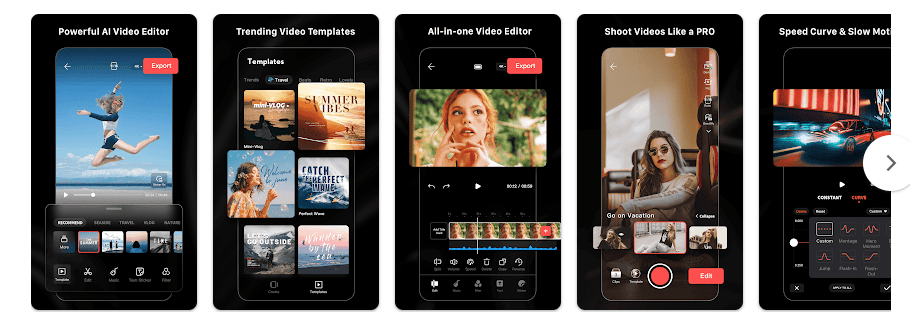
- AutoCut: Select your clips and LightCut can create a short video from them. This saves time when you do not want to edit every clip yourself.
- Templates: The app has ready-made templates for different types of videos. You can add your own photos and clips instead of building everything from the beginning.
- Normal Editing: You can trim, split, crop, rotate, and change the speed of clips. Text, stickers, music, filters, and transitions can also be added.
- AI Effects: LightCut includes effects and tools that can change the look of photos and videos. Some tools are designed for portraits, travel clips, and short social videos.
- High-Quality Export: The app supports high-resolution video output on supported phones. This is useful when you want to keep more detail in the final video.
Real-World Performance
I cannot honestly claim that I completed a two-day Redmi test because I do not have physical access to a Redmi phone. I will not invent battery, heat, lag, crash, or UI-bug results.
For a proper test, LightCut should be used for two days with short clips, longer videos, templates, effects, and exports. The tester should check timeline response, menu scrolling, preview speed, battery loss, phone temperature, crashes, and visual errors.
The Google Play listing currently shows 100M+ downloads and a rating of about 4.7 stars, based on a large number of reviews.
Space & Safety
Google Play does not display one fixed download size for every Android device. Current third-party Android listings show that the package size can change between versions and package types, so a single exact MB number would not be reliable.
The final storage used can become much larger after you save drafts, export videos, download templates, and build cache. Keep extra free space if you plan to edit many videos.
Basic editing of local media can use files already stored on your phone. Online templates, connected services, and some automatic tools can need internet access.
Google Play says LightCut may share device or other IDs with third parties. It may collect personal information, photos and videos, app activity, and other data; Google Play also says data is encrypted in transit and users can request deletion.
The app can request access to photos and videos so you can select media for editing. Other permissions may appear when you use features that need extra device access.
Competitor Check
CapCut is a close competitor with many templates, effects, captions, and social-video tools. VN gives users more manual control through multi-track editing and keyframes. LightCut is more focused on quick automatic editing and ready-made video styles.
User Fit
Who Should Use It:
- Beginners who want quick videos from phone clips.
- Users who make Shorts, Reels, travel videos, and family videos.
Who Should Avoid It:
- People who want advanced manual editing controls.
- Users with very little free storage or limited internet access.
Helpful FAQs
Is LightCut free?
LightCut is free to install, but Google Play lists in-app purchases. Some features or content may require payment.
Can I edit videos without internet?
Some basic editing can work with videos already saved on your phone. Online templates and connected features may need an internet connection.
Is LightCut good for beginners?
Yes, the app has automatic video creation and ready-made templates. You can also use normal editing tools when you want more control.
Offzack Verdict
LightCut is a good option for people who want to turn phone clips into short videos with less manual work. Its automatic tools are useful for beginners, while regular editing tools give you more control when needed.
Download LightCut: AI Video Editor on Google Playstore
Final Scorecard
- Ease of Use: ★★★★★ — Automatic editing and templates make basic video creation simple.
- Performance: ★★★★☆ — The app is widely used, but exact Redmi performance needs physical testing.
- Features: ★★★★☆ — It offers automatic editing, templates, effects, music, and normal editing tools.
- Privacy & Safety: ★★★☆☆ — Google Play reports data collection and sharing of device or other IDs.
- Value for Money: ★★★★☆ — The app is free to install and offers many tools, with some paid content.
- Overall Rating: ★★★★☆ — LightCut is a practical choice for quick Android video editing.