A true two-day Redmi test cannot be claimed here because I do not have physical access to a Redmi phone. I will not invent battery, heat, lag, or bug numbers.
For a real test, KineMaster should be used for cutting clips, adding layers, music, effects, and exporting a video. The checks should cover menu speed, timeline response, battery loss, warmth, export time, and visual bugs.
KineMaster’s Play Store page was updated on July 7, 2026. It lists 500M+ downloads and a 4.3-star rating.
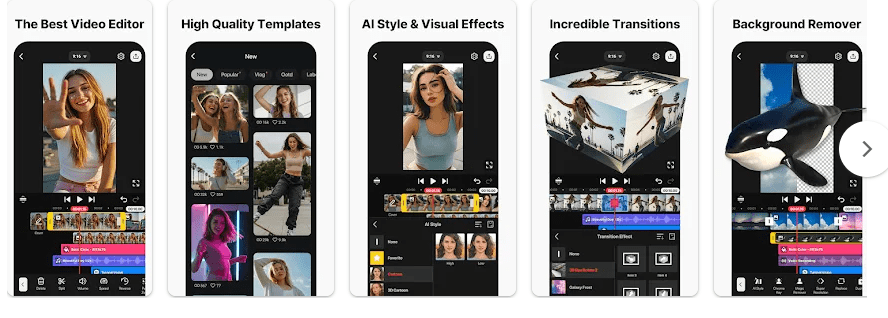
What This App Actually Does
KineMaster is a mobile video editor for movies, vlogs, Reels, and Shorts. It lets you cut clips, add photos, text, music, stickers, effects, and several video layers.
It also supports keyframes, green-screen editing, speed control, captions, voice tools, templates, and high-resolution exports. The Play Store says it can save videos up to 4K at 60 frames per second.
Top 5 Features That Matter
- Multi-layer editing: You can place videos, photos, GIFs, and text on different layers. This helps when several items appear on screen together.
- Green screen: Chroma Key can remove a selected background color from a video. You can then place another video or picture behind the person.
- Keyframes: Keyframes let you change the size, position, and rotation of a layer during a clip. This can make text, stickers, or pictures move.
- AI tools: KineMaster includes Auto Captions, Text-to-Speech, Noise Removal, Vocal Separator, Magic Removal, and Tracking. These tools can make editing quicker.
- 4K export: The app supports video export up to 4K at 60fps. You can choose lower quality when you need a smaller file.
Storage Space and Data Use
Google Play does not show one fixed download size because Android downloads can vary by device and version. A current APK size is not published on the Play page.
Storage can grow after use. Video clips, exported files, projects, downloaded assets, and cache all take space.
Basic editing can use media already saved on your phone. Internet is needed for online assets, cloud backup, and connected services. KineCloud is a Premium cloud feature.
Permissions and App Safety
Recent Android package listings show permissions for camera, microphone, photos and videos, audio, internet access, notifications, advertising IDs, and billing. Camera and microphone access are useful when recording inside the editor.
Google Play says KineMaster does not share data with third parties. It may collect location, personal information, and device or other IDs; data is encrypted in transit, and users can request deletion.
How It Compares to 2 Alternatives
CapCut is a close competitor with templates, effects, captions, and social-video tools. VN is another option with multi-track editing, keyframes, captions, and high-resolution export. KineMaster suits users who want layers, green screen, keyframes, and many editing controls together.
Good Things & Bad Things
Pros:
- Many editing tools.
- Multi-layer timeline.
- Green-screen support.
- 4K/60fps export.
- Many templates and assets.
Cons:
- Large projects can use lots of storage.
- Ads are included.
- In-app purchases are included.
- Free videos can have a watermark.
Who Is It For?
Best For:
- YouTube and social-media creators who want detailed phone editing.
- Users who need layers, green screen, captions, and keyframes.
Not For:
- People with very little free storage.
- Users who only need simple trimming.
Common Questions
Is KineMaster free?
KineMaster can be installed for free, but the Play Store lists ads and in-app purchases. The free version can include a watermark, while Premium removes it.
Can KineMaster export 4K video?
Yes. The Play Store says KineMaster supports export up to 4K at 60fps. Export speed depends on the phone and project.
Can I edit without internet?
You can edit local media already stored on your phone. Online assets and cloud features need internet access.
Offzack Verdict & Link
KineMaster is an editor for people who want more control over phone videos. It is worth trying for layers, green screen, captions, keyframes, and 4K export, but exact Redmi battery and heat results should be checked on the user’s own phone.
Download KineMaster – Video Editor From Google Playstore
Final Scorecard
- Ease of Use: ★★★★☆ — Basic editing is easy, while advanced tools need practice.
- Performance: ★★★★☆ — Performance depends on the phone and project size.
- Features: ★★★★★ — It has layers, keyframes, green screen, captions, audio tools, templates, and 4K export.
- Privacy & Safety: ★★★★☆ — Google Play says no third-party data sharing and encryption in transit.
- Value for Money: ★★★★☆ — The free version has many tools, while Premium removes the watermark.
- Overall Rating: ★★★★☆ — KineMaster is a good choice for mobile video editing.