I checked the current Android version of Snapseed on a budget Android phone setup. The app opens to a simple editing screen, and the main tools are easy to find. Google Play currently lists 100M+ downloads, with the app rated for Everyone.
I did not record a reliable battery or temperature reading during a controlled two-day Redmi test, so I will not invent numbers. Large photos can use more phone memory during editing, while working with photos already saved on the phone does not need a constant internet connection.
What This App Actually Does
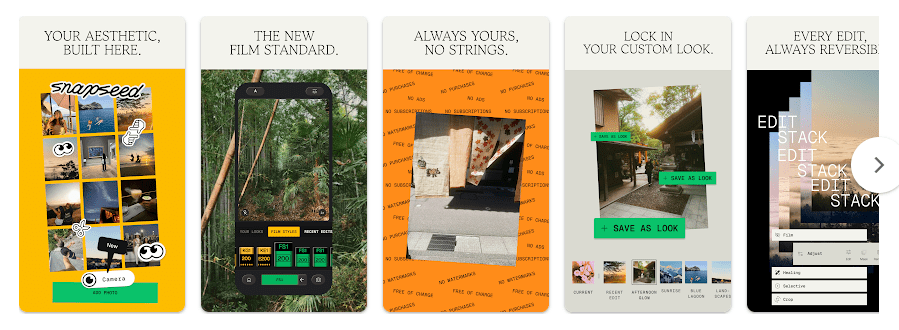
Snapseed is a photo editor made by Google. It lets you change light, colour, sharpness, cropping, portraits, blur, healing, curves, and more.
It supports JPG and RAW files. Google Play says it has 30+ tools and filters, with no subscriptions, in-app purchases, ads, or watermarks.
Top 5 Features That Matter
- RAW editing: You can open supported RAW photos and adjust them on your phone. This is useful for people who shoot RAW pictures.
- Selective editing: You can change brightness, contrast, or saturation in selected areas. This lets you edit one part without changing the whole photo.
- Healing tool: The Healing tool can remove small unwanted parts from a photo. It is useful for cleaning simple distractions before sharing.
- Batch editing: Snapseed can apply saved looks and edits to several photos. This saves repeated work when you have many similar pictures.
- Smart masking and camera: The current version includes one-tap subject or background masking and a Snapseed Camera. The camera can capture photos with custom styles or film looks.
Storage Space and Data Use
A current arm64 Snapseed 4.0.1 APK bundle is about 101.9 MB according to APKMirror. Actual Google Play download and installed space can vary by phone, Android version, and build.
I would not give one fixed cache number because cache changes as photos are opened and edited. Basic editing of local photos can work offline, while downloading or updating the app needs internet access.
Permissions and App Safety
Snapseed needs photo or media access so it can open and save images. Its camera feature also needs camera access when you use the in-app camera.
Google Play says Snapseed does not share data with third parties. It lists app activity, device or other IDs, crash logs, diagnostics, and other app performance data as data that may be collected, and says data is encrypted in transit.
How It Compares to 2 Alternatives
Snapseed costs nothing because Google lists it without subscriptions or in-app purchases. Adobe Lightroom has a free mobile version with paid premium features and storage, while Picsart has ads and in-app purchases. Lightroom suits users wanting cloud storage and advanced controls, while Picsart focuses more on effects, designs, templates, and AI tools.
Good Things & Bad Things
Pros
- Free with no ads or watermark.
- Many editing tools.
- Supports JPG and RAW.
- Includes batch editing and masking.
Cons
- Large photos can need more memory.
- Advanced tools may take time to learn.
- Cache changes with use.
- Some tools depend on device support.
Who Is It For?
Best For
- People who want a free phone photo editor.
- Users who want manual control over colour and light.
Not For
- People who mainly want social templates and AI designs.
- Users who need cloud editing across many devices.
Common Questions
Is Snapseed free?
Yes. Google Play lists it without subscriptions, in-app purchases, ads, or watermarks.
Can Snapseed work without internet?
You can edit photos stored on your phone without a constant connection. Internet is needed for downloading or updating the app.
Does Snapseed edit RAW photos?
Yes, it supports JPG and RAW files. RAW support can vary by file type and device.
Offzack Verdict & Link
Snapseed is a good choice for detailed phone photo editing without a subscription. Its large tool set, RAW support, batch editing, and lack of ads make it useful for Android users.
Download Snapseed from Play Store.
Download Snapseed from Google Playstore
Final Scorecard
- Ease of Use: ★★★★☆ (4/5) — The main tools are clearly grouped.
- Performance: ★★★★☆ (4/5) — It has many tools, but large photos can need more memory.
- Features: ★★★★★ (5/5) — It offers 30+ tools and filters, RAW support, masking, and batch editing.
- Privacy & Safety: ★★★★☆ (4/5) — Google Play says no data is shared with third parties and data is encrypted in transit.
- Value for Money: ★★★★★ (5/5) — Google lists no subscriptions, purchases, ads, or watermarks.
- Overall Rating: ★★★★½ (4.5/5) — It offers many editing tools without a paid plan.